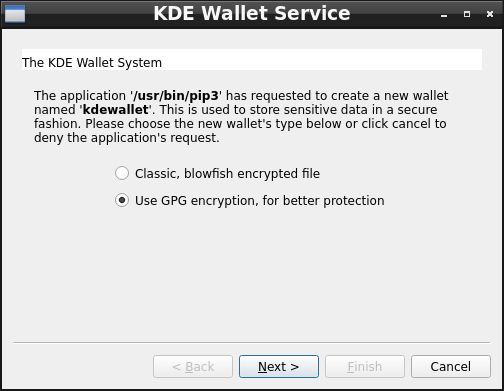
Success, but also confusion. Here are the results I got: ll@leno:~/A-Video-260/eMata$ sudo apt remove yt-dlp [sudo] password for ll: Reading package lists... Done Building dependency tree... Done Reading state information... Done The following packages were automatically installed and are no longer required: libopengl0 linux-image-5.10.0-10-amd64 linux-image-5.10.0-11-amd64 linux-image-5.10.0-12-amd64 linux-image-5.10.0-13-amd64 linux-image-5.10.0-14-amd64 linux-image-5.10.0-15-amd64 linux-image-5.10.0-16-amd64 linux-image-5.10.0-17-amd64 linux-image-5.10.0-18-amd64 linux-image-5.10.0-19-amd64 linux-image-5.10.0-20-amd64 linux-image-5.10.0-21-amd64 linux-image-5.10.0-22-amd64 linux-image-5.10.0-23-amd64 python3-brotli python3-pycryptodome python3-pyxattr python3-websockets rtmpdump sse3-support Use 'sudo apt autoremove' to remove them. The following packages will be REMOVED: yt-dlp 0 upgraded, 0 newly installed, 1 to remove and 1 not upgraded. After this operation, 9,864 kB disk space will be freed. Do you want to continue? [Y/n] y (Reading database ... 313936 files and directories currently installed.) Removing yt-dlp (2023.03.04-1~bpo11+1) ... Processing triggers for man-db (2.9.4-2) ... ll@leno:~/A-Video-260/eMata$ pip3 install yt-dlp WARNING: Keyring is skipped due to an exception: Failed to open keyring: org.freedesktop.DBus.Error.NoReply: Did not receive a reply. Possible causes include: the remote application did not send a reply, the message bus security policy blocked the reply, the reply timeout expired, or the network connection was broken.. Collecting yt-dlp Downloading yt_dlp-2023.7.6-py2.py3-none-any.whl (3.0 MB) |████████████████████████████████| 3.0 MB 3.0 MB/s Requirement already satisfied: mutagen in /usr/lib/python3/dist- packages (from yt-dlp) (1.45.1) Requirement already satisfied: pycryptodomex in /usr/lib/python3/dist- packages (from yt-dlp) (3.9.7) Requirement already satisfied: brotli in /usr/lib/python3/dist-packages (from yt-dlp) (1.0.9) Requirement already satisfied: certifi in /usr/lib/python3/dist- packages (from yt-dlp) (2020.6.20) Requirement already satisfied: websockets in /usr/lib/python3/dist- packages (from yt-dlp) (8.1) Installing collected packages: yt-dlp WARNING: The script yt-dlp is installed in '/home/ll/.local/bin' which is not on PATH. Consider adding this directory to PATH or, if you prefer to suppress this warning, use --no-warn-script-location. Successfully installed yt-dlp-2023.7.6 ll@leno:~/A-Video-260/eMata$ yt-dlp https://www.youtube.com/watch?v=O8NqgtL5a4I bash: /usr/bin/yt-dlp: No such file or directory ll@leno:~/A-Video-260/eMata$ ~/.local/bin/yt-dlp https://www.youtube.com/watch?v=O8NqgtL5a4I [youtube] Extracting URL: https://www.youtube.com/watch?v=O8NqgtL5a4I ... [download] 100% of 131.42MiB in 00:01:50 at 1.19MiB/s ... ll@leno:~/A-Video-260/eMata$ Notes - about me: Prior to asking how to install with pip, I searched on my own for how to do that. I got results like https://pip.pypa.io/en/stable/cli/pip_install/ which were confusing to me. It did not make sense to me to begin an install command with "python." So, I asked the generic question. I appreciate the help and guidance from Mark and from everyone in GLUG. It's not clear to me what bits of knowledge I'm lacking. Perhaps I don't really grasp how to install programs, which I think are referred to as packages. I think that it has something to do with apt. Perhaps I don't really grasp what apt is and how apt functions. Perhaps I don't grasp what pip is and how pip functions. In the past, I felt somewhat overwhelmed with new Linux info. I'm feeling ready now to take in more info. I appreciate guidance in what sources to pursue. Notes - about this task: 1 I removed the apt yt-dlp 2 I tried pip3 install yt-dlp 3 A window popped up. Not knowing what to do, I did nothing. What should I know about the window for KDE Wallet Service? 4 A warning showed keyring is skipped. What should I know about the keyring being skipped? 5 A warning showed installed in '/home/ll/.local/bin' which is not on PATH I'm familiar with the concept of path from my experience with DOS years ago. I have not done anything yet with path in Linux. Are there any recommendations for me for path? Is not good to get started? Any approach best? 6 I tried to run yt-dlp from the directory where I want to download a video into. That failed. 7 I tried ~/.local/bin/yt-dlp and had success 8 Now, I'd like to address the points in 3, 4 and 5 above. In gratitude, LeRoy -- There is something glorious birthing within all of us. I am the Love of God, no matter what.BSA LeRoy Diener 213-LEROYIZ 213-537-6949 https://leroydiener.com On Sun, 2023-09-03 at 19:31 -0600, Mark Galassi wrote:
So, how do I install with pip?
You probably would have found that one quite quickly with a web search. You run:
pip3 install packagename
you might want to add the --user flag:
pip3 install --user packagename