
Hi NMGLUG folks, Here's an interesting error that I'm trying to resolve. On one computer, len4, with Debian 11, I updated yt-dlp successfully, as shown here ll@len4:~$ sudo yt-dlp -U [sudo] password for ll: Available version: stable@2023.07.06, Current version: stable@2023.03.04 Current Build Hash: 91cad9f121c1f6f0a81b747415c46ecba0ff331ed38cc6433040b4ac7b6e15ca Updating to stable@2023.07.06 ... Updated yt-dlp to stable@2023.07.06 ll@len4:~$ On another computer, leno, also with Debian 11, I get an error trying to update yt-dlp, as below ll@leno:~$ sudo yt-dlp -U [sudo] password for ll: Available version: stable@2023.07.06, Current version: stable@2023.03.04 ERROR: As yt-dlp has been installed via apt, you should use that to update. If you're on a stable release, also check backports. ll@leno:~$ lsb_release -a No LSB modules are available. Distributor ID: Debian Description: Debian GNU/Linux 11 (bullseye) Release: 11 Codename: bullseye ll@leno:~$ Any ideas? Thanks, LeRoy -- There is something glorious birthing within all of us. I am the Love of God, no matter what.BSA LeRoy Diener 213-LEROYIZ 213-537-6949 https://leroydiener.com

On Tue, Aug 29, 2023 at 12:26:33PM -0500, LeRoy Diener wrote: [...]
On another computer, leno, also with Debian 11, I get an error trying to update yt-dlp, as below ll@leno:~$ sudo yt-dlp -U [sudo] password for ll: Available version: stable@2023.07.06, Current version: stable@2023.03.04 ERROR: As yt-dlp has been installed via apt, you should use that to update. If you're on a stable release, also check backports.
I don't know anything about yt-dlp But it looks like the second machine used 'apt' to install the package, while the first one was installed by another means?

I'd do what the message says, and use apt to update it. You should already be running sudo apt update && sudo apt upgrade (or full-upgrade), which will pull in new versions of yt-dlp, but if you want to do just that package, you can sudo apt install yt-dlp Or if the apt package isn't new enough, you can sudo apt remove yt-dlp and then install the other version. ...Akkana LeRoy Diener writes:
Hi NMGLUG folks,
Here's an interesting error that I'm trying to resolve.
On one computer, len4, with Debian 11, I updated yt-dlp successfully, as shown here ll@len4:~$ sudo yt-dlp -U [sudo] password for ll: Available version: stable@2023.07.06, Current version: stable@2023.03.04 Current Build Hash: 91cad9f121c1f6f0a81b747415c46ecba0ff331ed38cc6433040b4ac7b6e15ca Updating to stable@2023.07.06 ... Updated yt-dlp to stable@2023.07.06 ll@len4:~$
On another computer, leno, also with Debian 11, I get an error trying to update yt-dlp, as below ll@leno:~$ sudo yt-dlp -U [sudo] password for ll: Available version: stable@2023.07.06, Current version: stable@2023.03.04 ERROR: As yt-dlp has been installed via apt, you should use that to update. If you're on a stable release, also check backports. ll@leno:~$ lsb_release -a No LSB modules are available. Distributor ID: Debian Description: Debian GNU/Linux 11 (bullseye) Release: 11 Codename: bullseye ll@leno:~$
Any ideas?
Thanks, LeRoy
-- There is something glorious birthing within all of us. I am the Love of God, no matter what.BSA LeRoy Diener 213-LEROYIZ 213-537-6949 https://leroydiener.com
_______________________________________________ nmglug mailing list nmglug@lists.nmglug.org http://lists.nmglug.org/listinfo.cgi/nmglug-nmglug.org
It's not working yet, but your suggestions were somewhat helpful, Akkana. I got this result: ll@leno:~$ sudo apt install yt-dlp ... yt-dlp is already the newest version (2023.03.04-1~bpo11+1). That seems to contradict the other output:
Available version: stable@2023.07.06, Current version: stable@2023.03.04
Even though it didn't solve this issue, it's helpful to know this basic approach. I played with it a bit. I removed yt-dlp and installed it again. Being the older version, it didn't update, but it got me a new bit of basic knowledge. So, thanks to Akkana for that, even though the initial issue remains. I'm guessing that there is a newer version, which is necessary to have, but that the newest version is not available in the apt repository. This refers to John's postulate: "But it looks like the second machine used 'apt' to install the package, while the first one was installed by another means?" I don't recall how yt-dlp was installed on the len4 machine, where the update was successful, but I have a vague memory that youtube-dl (and now yt-dlp) was known to have older versions in apt, which made it advantageous to install it from a different source. I don't recall what that source is or how to do that. Anyone know that? In gratitude, LeRoy -- There is something glorious birthing within all of us. I am the Love of God, no matter what.BSA LeRoy Diener 213-LEROYIZ 213-537-6949 https://leroydiener.com On Tue, 2023-08-29 at 14:28 -0600, Akkana Peck wrote:
I'd do what the message says, and use apt to update it.
You should already be running sudo apt update && sudo apt upgrade (or full-upgrade), which will pull in new versions of yt-dlp, but if you want to do just that package, you can sudo apt install yt-dlp
Or if the apt package isn't new enough, you can sudo apt remove yt-dlp and then install the other version.
...Akkana
LeRoy Diener writes:
Hi NMGLUG folks,
Here's an interesting error that I'm trying to resolve.
On one computer, len4, with Debian 11, I updated yt-dlp successfully, as shown here ll@len4:~$ sudo yt-dlp -U [sudo] password for ll: Available version: stable@2023.07.06, Current version: stable@2023.03.04 Current Build Hash: 91cad9f121c1f6f0a81b747415c46ecba0ff331ed38cc6433040b4ac7b6e15ca Updating to stable@2023.07.06 ... Updated yt-dlp to stable@2023.07.06 ll@len4:~$
On another computer, leno, also with Debian 11, I get an error trying to update yt-dlp, as below ll@leno:~$ sudo yt-dlp -U [sudo] password for ll: Available version: stable@2023.07.06, Current version: stable@2023.03.04 ERROR: As yt-dlp has been installed via apt, you should use that to update. If you're on a stable release, also check backports. ll@leno:~$ lsb_release -a No LSB modules are available. Distributor ID: Debian Description: Debian GNU/Linux 11 (bullseye) Release: 11 Codename: bullseye ll@leno:~$
Any ideas?
Thanks, LeRoy
-- There is something glorious birthing within all of us. I am the Love of God, no matter what.BSA LeRoy Diener 213-LEROYIZ 213-537-6949 https://leroydiener.com
_______________________________________________ nmglug mailing list nmglug@lists.nmglug.org http://lists.nmglug.org/listinfo.cgi/nmglug-nmglug.org
_______________________________________________ nmglug mailing list nmglug@lists.nmglug.org http://lists.nmglug.org/listinfo.cgi/nmglug-nmglug.org

I'm guessing that there is a newer version, which is necessary to have, but that the newest version is not available in the apt repository.
You can find out more about what's happening by figuring out the paths things are running from. In bash you can try: type -a yt-dlp which might give you something like: yt-dlp is /home/YOURLOGINNAME/.local/bin/yt-dlp yt-dlp is /usr/bin/yt-dlp indicating that you have it installed from two different sources: pip and apt. Then you can run ~/.local/bin/yt-dlp --version and /usr/bin/yt-dlp --version I get the same from both: 2023-07-06: ~ $ ~/.local/bin/yt-dlp --version 2023.07.06 ~ $ /usr/bin/yt-dlp --version 2023.07.06
Not yet resolved, but your ideas were somewhat helpful, Mark. Here are the results on len4, where the yt-dlp update was successful: ll@len4:~$ type -a yt-dlp yt-dlp is /usr/local/bin/yt-dlp ll@len4:~$ /usr/local/bin/yt-dlp --version 2023.07.06 ll@len4:~$ Here are the results on leno, not yet working: ll@leno:~$ type -a yt-dlp yt-dlp is /usr/bin/yt-dlp yt-dlp is /bin/yt-dlp ll@leno:~$ /usr/bin/yt-dlp --version 2023.03.04 ll@leno:~$ /bin/yt-dlp --version 2023.03.04 ll@leno:~$ Additionally, it was nice to dive in and learn more about the CLI type command, info at https://www.howtogeek.com/426014/how-to-use-the-linux-type-command/ I enjoyed learning this. On the topic of why yt-dlp is not working and not updating, it looks like I got a bit more info, but I don't know how this info can be helpful. Any ideas for where to go from here? In gratitude, LeRoy -- There is something glorious birthing within all of us. I am the Love of God, no matter what.BSA LeRoy Diener 213-LEROYIZ 213-537-6949 https://leroydiener.com On Wed, 2023-08-30 at 06:57 -0600, Mark Galassi wrote:
I'm guessing that there is a newer version, which is necessary to have, but that the newest version is not available in the apt repository.
You can find out more about what's happening by figuring out the paths things are running from. In bash you can try:
type -a yt-dlp
which might give you something like:
yt-dlp is /home/YOURLOGINNAME/.local/bin/yt-dlp yt-dlp is /usr/bin/yt-dlp
indicating that you have it installed from two different sources: pip and apt.
Then you can run
~/.local/bin/yt-dlp --version
and
/usr/bin/yt-dlp --version
I get the same from both: 2023-07-06:
~ $ ~/.local/bin/yt-dlp --version 2023.07.06 ~ $ /usr/bin/yt-dlp --version 2023.07.06
Here are the results on [...]
In that first vignette you have stuff likely installed with pip, but it looks like someone unwisely ran pip as root instead of using the --user option. So that's where pip will give you the latest. Note that you should make sure that you have $HOME/.local/bin in your path when you install stuff with pip, and that you use the --user option. In the second vignette you have it as a system package, which might update more slowly. You can remove that and then install your own. Removing system packages is done with "sudo apt remove pkgname" on debian and "sudo dnf remove pkgname" on rpm-based systems. To confirm even more that it's from a system package you can do: dpkg -l | grep -i yt-dlp # (debian-based) rpm -qa | grep -i yt-dlp # (redhat-based)
Not resolved yet, but a bit more info. Here are the results on len4, where the yt-dlp update was successful: ll@len4:~$ dpkg -l yt-dlp dpkg query: no packages found matching yt-dlp ll@len4:~$ Here are the results on leno, not yet working: ll@leno:~$ dpkg -l | grep -i yt-dlp ii yt-dlp 2023.03.04-1~bpo11+1 all downloader of videos from YouTube and other sites ll@leno:~$ Additionally, I got more familiar with dpkg and grep from https://www.debian.org/doc/manuals/debian-faq/pkgtools.en.html and https://www.howtogeek.com/496056/how-to-use-the-grep-command-on-linux/ Here's the situation: The most recent version, 2023.07.06, is working on len4. However, the old verion, 2023.03.04, on leno, results in the http 403 forbidden error and fails to download any videos. Until recently, yt- dlp was working on both. How can I get yt-dlp to work again on leno? In gratitude, LeRoy -- There is something glorious birthing within all of us. I am the Love of God, no matter what.BSA LeRoy Diener 213-LEROYIZ 213-537-6949 https://leroydiener.com On Thu, 2023-08-31 at 19:26 -0600, Mark Galassi wrote:
Here are the results on [...]
In that first vignette you have stuff likely installed with pip, but it looks like someone unwisely ran pip as root instead of using the - -user option.
So that's where pip will give you the latest.
Note that you should make sure that you have $HOME/.local/bin in your path when you install stuff with pip, and that you use the --user option.
In the second vignette you have it as a system package, which might update more slowly. You can remove that and then install your own. Removing system packages is done with "sudo apt remove pkgname" on debian and "sudo dnf remove pkgname" on rpm-based systems.
To confirm even more that it's from a system package you can do:
dpkg -l | grep -i yt-dlp # (debian-based)
rpm -qa | grep -i yt-dlp # (redhat-based)
In my email I gave you the instruction to uninstall the system-installed yt-dlp. If you do that, then you can install with pip, which gives you the newer version. LeRoy Diener <leroy@choosetherightside.com> writes:
Not resolved yet, but a bit more info.
Here are the results on len4, where the yt-dlp update was successful: ll@len4:~$ dpkg -l yt-dlp dpkg query: no packages found matching yt-dlp ll@len4:~$
Here are the results on leno, not yet working: ll@leno:~$ dpkg -l | grep -i yt-dlp ii yt-dlp 2023.03.04-1~bpo11+1 all downloader of videos from YouTube and other sites ll@leno:~$
Additionally, I got more familiar with dpkg and grep from https:// www.debian.org/doc/manuals/debian-faq/pkgtools.en.html and https:// www.howtogeek.com/496056/how-to-use-the-grep-command-on-linux/
Here's the situation: The most recent version, 2023.07.06, is working on len4. However, the old verion, 2023.03.04, on leno, results in the http 403 forbidden error and fails to download any videos. Until recently, yt-dlp was working on both.
How can I get yt-dlp to work again on leno?
In gratitude, LeRoy
--
There is something glorious birthing within all of us. I am the Love of God, no matter what. BSA LeRoy Diener 213-LEROYIZ 213-537-6949 https://leroydiener.com
On Thu, 2023-08-31 at 19:26 -0600, Mark Galassi wrote:
Here are the results on [...]
In that first vignette you have stuff likely installed with pip, but it looks like someone unwisely ran pip as root instead of using the --user option.
So that's where pip will give you the latest.
Note that you should make sure that you have $HOME/.local/bin in your path when you install stuff with pip, and that you use the --user option.
In the second vignette you have it as a system package, which might update more slowly. You can remove that and then install your own. Removing system packages is done with "sudo apt remove pkgname" on debian and "sudo dnf remove pkgname" on rpm-based systems.
To confirm even more that it's from a system package you can do:
dpkg -l | grep -i yt-dlp # (debian-based)
rpm -qa | grep -i yt-dlp # (redhat-based)
_______________________________________________ nmglug mailing list nmglug@lists.nmglug.org http://lists.nmglug.org/listinfo.cgi/nmglug-nmglug.org
Mark, thanks for the added clarity. I now get that the solution will be to install yt-dlp with pip. I know how to install with apt, i.e. sudo apt remove yt-dlp and sudo apt install yt-dlp The part that I am missing is how to install with pip. So, how do I install with pip? In gratitude, LeRoy -- There is something glorious birthing within all of us. I am the Love of God, no matter what.BSA LeRoy Diener 213-LEROYIZ 213-537-6949 https://leroydiener.com On Fri, 2023-09-01 at 23:37 -0600, Mark Galassi wrote:
In my email I gave you the instruction to uninstall the system- installed yt-dlp. If you do that, then you can install with pip, which gives you the newer version.
LeRoy Diener <leroy@choosetherightside.com> writes:
Not resolved yet, but a bit more info.
Here are the results on len4, where the yt-dlp update was successful: ll@len4:~$ dpkg -l yt-dlp dpkg query: no packages found matching yt-dlp ll@len4:~$
Here are the results on leno, not yet working: ll@leno:~$ dpkg -l | grep -i yt-dlp ii yt-dlp 2023.03.04-1~bpo11+1 all downloader of videos from YouTube and other sites ll@leno:~$
Additionally, I got more familiar with dpkg and grep from https:// www.debian.org/doc/manuals/debian-faq/pkgtools.en.html and https:// www.howtogeek.com/496056/how-to-use-the-grep-command-on-linux/
Here's the situation: The most recent version, 2023.07.06, is working on len4. However, the old verion, 2023.03.04, on leno, results in the http 403 forbidden error and fails to download any videos. Until recently, yt-dlp was working on both.
How can I get yt-dlp to work again on leno?
In gratitude, LeRoy
--
There is something glorious birthing within all of us. I am the Love of God, no matter what. BSA LeRoy Diener 213-LEROYIZ 213-537-6949 https://leroydiener.com
On Thu, 2023-08-31 at 19:26 -0600, Mark Galassi wrote:
Here are the results on [...]
In that first vignette you have stuff likely installed with pip, but it looks like someone unwisely ran pip as root instead of using the --user option.
So that's where pip will give you the latest.
Note that you should make sure that you have $HOME/.local/bin in your path when you install stuff with pip, and that you use the --user option.
In the second vignette you have it as a system package, which might update more slowly. You can remove that and then install your own. Removing system packages is done with "sudo apt remove pkgname" on debian and "sudo dnf remove pkgname" on rpm-based systems.
To confirm even more that it's from a system package you can do:
dpkg -l | grep -i yt-dlp # (debian-based)
rpm -qa | grep -i yt-dlp # (redhat-based)
_______________________________________________ nmglug mailing list nmglug@lists.nmglug.org http://lists.nmglug.org/listinfo.cgi/nmglug-nmglug.org
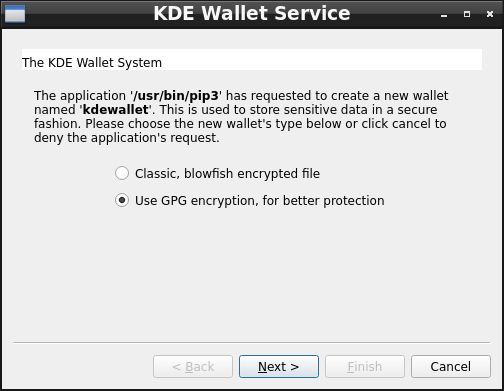
Success, but also confusion. Here are the results I got: ll@leno:~/A-Video-260/eMata$ sudo apt remove yt-dlp [sudo] password for ll: Reading package lists... Done Building dependency tree... Done Reading state information... Done The following packages were automatically installed and are no longer required: libopengl0 linux-image-5.10.0-10-amd64 linux-image-5.10.0-11-amd64 linux-image-5.10.0-12-amd64 linux-image-5.10.0-13-amd64 linux-image-5.10.0-14-amd64 linux-image-5.10.0-15-amd64 linux-image-5.10.0-16-amd64 linux-image-5.10.0-17-amd64 linux-image-5.10.0-18-amd64 linux-image-5.10.0-19-amd64 linux-image-5.10.0-20-amd64 linux-image-5.10.0-21-amd64 linux-image-5.10.0-22-amd64 linux-image-5.10.0-23-amd64 python3-brotli python3-pycryptodome python3-pyxattr python3-websockets rtmpdump sse3-support Use 'sudo apt autoremove' to remove them. The following packages will be REMOVED: yt-dlp 0 upgraded, 0 newly installed, 1 to remove and 1 not upgraded. After this operation, 9,864 kB disk space will be freed. Do you want to continue? [Y/n] y (Reading database ... 313936 files and directories currently installed.) Removing yt-dlp (2023.03.04-1~bpo11+1) ... Processing triggers for man-db (2.9.4-2) ... ll@leno:~/A-Video-260/eMata$ pip3 install yt-dlp WARNING: Keyring is skipped due to an exception: Failed to open keyring: org.freedesktop.DBus.Error.NoReply: Did not receive a reply. Possible causes include: the remote application did not send a reply, the message bus security policy blocked the reply, the reply timeout expired, or the network connection was broken.. Collecting yt-dlp Downloading yt_dlp-2023.7.6-py2.py3-none-any.whl (3.0 MB) |████████████████████████████████| 3.0 MB 3.0 MB/s Requirement already satisfied: mutagen in /usr/lib/python3/dist- packages (from yt-dlp) (1.45.1) Requirement already satisfied: pycryptodomex in /usr/lib/python3/dist- packages (from yt-dlp) (3.9.7) Requirement already satisfied: brotli in /usr/lib/python3/dist-packages (from yt-dlp) (1.0.9) Requirement already satisfied: certifi in /usr/lib/python3/dist- packages (from yt-dlp) (2020.6.20) Requirement already satisfied: websockets in /usr/lib/python3/dist- packages (from yt-dlp) (8.1) Installing collected packages: yt-dlp WARNING: The script yt-dlp is installed in '/home/ll/.local/bin' which is not on PATH. Consider adding this directory to PATH or, if you prefer to suppress this warning, use --no-warn-script-location. Successfully installed yt-dlp-2023.7.6 ll@leno:~/A-Video-260/eMata$ yt-dlp https://www.youtube.com/watch?v=O8NqgtL5a4I bash: /usr/bin/yt-dlp: No such file or directory ll@leno:~/A-Video-260/eMata$ ~/.local/bin/yt-dlp https://www.youtube.com/watch?v=O8NqgtL5a4I [youtube] Extracting URL: https://www.youtube.com/watch?v=O8NqgtL5a4I ... [download] 100% of 131.42MiB in 00:01:50 at 1.19MiB/s ... ll@leno:~/A-Video-260/eMata$ Notes - about me: Prior to asking how to install with pip, I searched on my own for how to do that. I got results like https://pip.pypa.io/en/stable/cli/pip_install/ which were confusing to me. It did not make sense to me to begin an install command with "python." So, I asked the generic question. I appreciate the help and guidance from Mark and from everyone in GLUG. It's not clear to me what bits of knowledge I'm lacking. Perhaps I don't really grasp how to install programs, which I think are referred to as packages. I think that it has something to do with apt. Perhaps I don't really grasp what apt is and how apt functions. Perhaps I don't grasp what pip is and how pip functions. In the past, I felt somewhat overwhelmed with new Linux info. I'm feeling ready now to take in more info. I appreciate guidance in what sources to pursue. Notes - about this task: 1 I removed the apt yt-dlp 2 I tried pip3 install yt-dlp 3 A window popped up. Not knowing what to do, I did nothing. What should I know about the window for KDE Wallet Service? 4 A warning showed keyring is skipped. What should I know about the keyring being skipped? 5 A warning showed installed in '/home/ll/.local/bin' which is not on PATH I'm familiar with the concept of path from my experience with DOS years ago. I have not done anything yet with path in Linux. Are there any recommendations for me for path? Is not good to get started? Any approach best? 6 I tried to run yt-dlp from the directory where I want to download a video into. That failed. 7 I tried ~/.local/bin/yt-dlp and had success 8 Now, I'd like to address the points in 3, 4 and 5 above. In gratitude, LeRoy -- There is something glorious birthing within all of us. I am the Love of God, no matter what.BSA LeRoy Diener 213-LEROYIZ 213-537-6949 https://leroydiener.com On Sun, 2023-09-03 at 19:31 -0600, Mark Galassi wrote:
So, how do I install with pip?
You probably would have found that one quite quickly with a web search. You run:
pip3 install packagename
you might want to add the --user flag:
pip3 install --user packagename
Success, but also confusion.
Nothing too confusing. The output told you that you need to put $HOME/.local/bin in your PATH environment variable if you're going to run programs installed with pip. You presumably already did that on your other host. The other message is that the old program has disappeared from /usr/bin. You can get around that with a new terminal or (if your shell is "bash") by typing "hash" with no arguments.
LeRoy Diener writes:
Success, but also confusion. [ ... Prior to asking how to install with pip, I searched on my own for how to do that. I got results like https://pip.pypa.io/en/stable/cli/pip_install/ which were confusing to me. It did not make sense to me to begin an install command with "python." So, I asked the generic question.
pip is Python's installation program, but it is itself written in Python. Some Pythonistas think all Python programs should be run with python -m programname, so in this case, python -m pip. I'm not sure why they advocate all that extra typing; maybe on some platforms (Windows?), installing pip doesn't include an executable called pip so people have to type the extra python -m. At any rate, on Linux there's no need (as you discovered). Searching for pip advice, you'll also find other complications, like the debate about running in a virtualenv vs. running with --user vs. running under sudo. For a long time pip didn't have the mode where you can just run it as a regular user (like you ultimately did), so anybody installing with pip had to choose between these three imperfect options. So don't feel bad about being confused by pip installs. It's better now, but used to be super confusing.
What should I know about the window for KDE Wallet Service? 4 A warning showed keyring is skipped. What should I know about the keyring being skipped?
I see this sometimes with gtk/gnome programs. Some programs assume you're running a full gnome environment, and if you're missing parts of it (like not running whatever keyring service gnome expects) you'll get warnings spewed to standard output.
5 A warning showed installed in '/home/ll/.local/bin' which is not on PATH I'm familiar with the concept of path from my experience with DOS years ago. I have not done anything yet with path in Linux. Are there any recommendations for me for path? Is not good to get started? Any approach best?
That's something you do need to know. PATH is the environment variable that tells the system where to look when you type a command. For instance, if you type "cat /etc/password", the system has to figure out what you mean by "cat" -- what program to run. So it looks in your $PATH environment variable, and then looks for a file named "cat" in each of the directories specified there, in order (so the first one wins). You can see your PATH by typing: echo $PATH It might look something like: /usr/local/bin:/usr/bin:/bin Colon : is the path separator, so with this path, if you type yt-dlp, it will look first for a file called /usr/local/bin/yt-dlp. Not finding that, it will look for a file /usr/bin/yt-dlp. And so on. It will run the first one it finds, and won't look any farther. Since you now know that pip installs things to /home/ ll/.local/bin, you want to have that in your PATH, so you'll be able to type yt-dlp rather than /home/ ll/.local/bin/yt-dlp. The most common way to do this is to edit your shell initialization file. If you're using bash, you could put it in one of the files bash runs once, at login time: export PATH=$HOME/.local/bin:$PATH That tells bash to take whatever its default PATH is, stick $HOME/.local/bin at the beginning, and export it so it wil be visible to other programs your login shell might run. Putting it at the beginning means when you run yt-dlp, it will find the one in .local/bin first, before something that's in /usr/bin or wherever. Or you could set it explicitly in .bashrc, e.g. export PATH=$HOME/.local/bin:/usr/local/bin:/usr/bin:/bin but then you have to make sure the path includes everything you'll ever want to run.
6 I tried to run yt-dlp from the directory where I want to download a video into. That failed.
That's why you need it in your PATH. ...Akkana
Thanks, Akkana. There are many things that you wrote which are helpful. I like the intro for pip and what pip is and other bits about pip. It's good to know that I can safely ignore the warning about the KDE wallet and the keyring and also about what that is. I appreciate most the description about PATH and how to get started with it. I found more info at https://www.howtogeek.com/658904/how-to-add-a-directory-to-your-path-in-linu... which gives an intro in a bit more depth. Here are my results: This is from len4, where yt-dlp was already working ll@len4:~$ echo $PATH /usr/local/bin:/usr/bin:/bin:/usr/local/games:/usr/games ll@len4:~$ ll@len4:~$ type -a yt-dlp yt-dlp is /usr/local/bin/yt-dlp This is from leno ll@leno:~$ echo $PATH /home/ll/bin:/usr/local/bin:/usr/bin:/bin:/usr/local/games:/usr/games ll@leno:~$ ll@leno:~$ type -a yt-dlp yt-dlp is /home/ll/.local/bin/yt-dlp ... ll@leno:~/A-Video-260/eMata$ yt-dlp https://www.youtube.com/watch?v=O8NqgtL5a4I bash: /usr/bin/yt-dlp: No such file or directory ll@leno:~/A-Video-260/eMata$ ~/.local/bin/yt-dlp https://www.youtube.com/watch?v=O8NqgtL5a4I [youtube] Extracting URL: https://www.youtube.com/watch?v=O8NqgtL5a4I ... has already been downloaded ll@leno:~/A-Video-260/eMata$ echo $PATH /home/ll/bin:/usr/local/bin:/usr/bin:/bin:/usr/local/games:/usr/games ll@leno:~/A-Video-260/eMata$ echo $HOME /home/ll ll@leno:~/A-Video-260/eMata$ export PATH=$HOME/.local/bin:$PATH ll@leno:~/A-Video-260/eMata$ echo $PATH /home/ll/.local/bin:/home/ll/bin:/usr/local/bin:/usr/bin:/bin:/usr/loca l/games:/usr/games ll@leno:~/A-Video-260/eMata$ yt-dlp https://www.youtube.com/watch?v=O8NqgtL5a4I ... has already been downloaded ll@leno:~/A-Video-260/eMata$ Notes: 1 The $PATH on len4 and the $PATH on leno were the same, except leno had an extra in front, i.e. /home/ll/bin Now, leno has two extras in front. 2 yt-dlp is in usr/local/bin/ on len4 whereas yt-dlp is in /home/ll/.local/bin/ on leno I'm guessing that yt-dlp on len4 was not installed using pip?? 3 In the last several lines, I tested trying to run yt-dlp, then added to the path, confirmed the path change, then confirmed that yt-dlp is working with the new path. I'm feeling grateful. LeRoy -- There is something glorious birthing within all of us. I am the Love of God, no matter what.BSA LeRoy Diener 213-LEROYIZ 213-537-6949 https://leroydiener.com On Tue, 2023-09-05 at 09:34 -0600, Akkana Peck wrote:
LeRoy Diener writes:
Success, but also confusion. [ ... Prior to asking how to install with pip, I searched on my own for how to do that. I got results like https://pip.pypa.io/en/stable/cli/pip_install/ which were confusing to me. It did not make sense to me to begin an install command with "python." So, I asked the generic question.
pip is Python's installation program, but it is itself written in Python. Some Pythonistas think all Python programs should be run with python -m programname, so in this case, python -m pip. I'm not sure why they advocate all that extra typing; maybe on some platforms (Windows?), installing pip doesn't include an executable called pip so people have to type the extra python -m. At any rate, on Linux there's no need (as you discovered).
Searching for pip advice, you'll also find other complications, like the debate about running in a virtualenv vs. running with --user vs. running under sudo. For a long time pip didn't have the mode where you can just run it as a regular user (like you ultimately did), so anybody installing with pip had to choose between these three imperfect options.
So don't feel bad about being confused by pip installs. It's better now, but used to be super confusing.
What should I know about the window for KDE Wallet Service? 4 A warning showed keyring is skipped. What should I know about the keyring being skipped?
I see this sometimes with gtk/gnome programs. Some programs assume you're running a full gnome environment, and if you're missing parts of it (like not running whatever keyring service gnome expects) you'll get warnings spewed to standard output.
5 A warning showed installed in '/home/ll/.local/bin' which is not on PATH I'm familiar with the concept of path from my experience with DOS years ago. I have not done anything yet with path in Linux. Are there any recommendations for me for path? Is not good to get started? Any approach best?
That's something you do need to know.
PATH is the environment variable that tells the system where to look when you type a command. For instance, if you type "cat /etc/password", the system has to figure out what you mean by "cat" - - what program to run. So it looks in your $PATH environment variable, and then looks for a file named "cat" in each of the directories specified there, in order (so the first one wins).
You can see your PATH by typing: echo $PATH It might look something like: /usr/local/bin:/usr/bin:/bin
Colon : is the path separator, so with this path, if you type yt-dlp, it will look first for a file called /usr/local/bin/yt-dlp. Not finding that, it will look for a file /usr/bin/yt-dlp. And so on. It will run the first one it finds, and won't look any farther.
Since you now know that pip installs things to /home/ ll/.local/bin, you want to have that in your PATH, so you'll be able to type yt-dlp rather than /home/ ll/.local/bin/yt-dlp. The most common way to do this is to edit your shell initialization file. If you're using bash, you could put it in one of the files bash runs once, at login time: export PATH=$HOME/.local/bin:$PATH That tells bash to take whatever its default PATH is, stick $HOME/.local/bin at the beginning, and export it so it wil be visible to other programs your login shell might run. Putting it at the beginning means when you run yt-dlp, it will find the one in .local/bin first, before something that's in /usr/bin or wherever.
Or you could set it explicitly in .bashrc, e.g. export PATH=$HOME/.local/bin:/usr/local/bin:/usr/bin:/bin but then you have to make sure the path includes everything you'll ever want to run.
6 I tried to run yt-dlp from the directory where I want to download a video into. That failed.
That's why you need it in your PATH.
...Akkana _______________________________________________ nmglug mailing list nmglug@lists.nmglug.org http://lists.nmglug.org/listinfo.cgi/nmglug-nmglug.org
participants (4)
-
 Akkana Peck
 -
 John Osmon
 -
 LeRoy Diener
 -
 Mark Galassi