
Hi Intermittent problem received Dvd today has been finicky VLC error message say check log where is that log be located? Have played the DVD in part three tries out of perhaps ten tries no go at times seem to override error message? Have been using open disc ,open files and open DVD alternately the later where the error message manafests, I then somehow have stumbled upon the three file .avi choices. choose one click on to play, Where I found the files is a bit hazy? Any thoughts on an unraveling strategy? Thanks, Anthony

Hi Anthony , You will want to make sure logging is actually enabled. Tools -> Preferences -> Show Settings, flip this to /All/. Then under Advanced, select Logger. (You could also search for logger) Checkmark log to file. From there I would set the path to somewhere you will be able to access it. I would probably stick with text formatting and default verbosity. Feel free to upload the log to here: https://paste.opensuse.org/ if you would like to me to see what is wrong. Are you playing .avi files off the DVD? Or are you playing the .vob/.ifo files from the VIDEO_TS folder? If you don't need disc decryption then I would probably look at mpv (console) or GNOME mpv (GUI). When I used to do fan-subbing; during quality checking, I found that VLC had terrible playback. I mean VLC wurks, but I'm not really sure why it's so popular. Regards, Jared On 4/8/19 10:19 PM, a wrote:
Hi
Intermittent problem received Dvd today has been finicky VLC error message say check log where is that log be located?
Have played the DVD in part three tries out of perhaps ten tries no go at times seem to override error message?
Have been using open disc ,open files and open DVD alternately the later where the error message manafests, I then somehow have stumbled upon the three file .avi choices. choose one click on to play, Where I found the files is a bit hazy?
Any thoughts on an unraveling strategy? Thanks, Anthony
_______________________________________________ nmglug mailing list nmglug@lists.nmglug.org http://lists.nmglug.org/listinfo.cgi/nmglug-nmglug.org

A., why not "play disk" from vlc menu? I'll try a screenshot later. Also, is the disk commercial or user made? Was it made free and cross platform or designed to only run with certain software? Just some thoughts. Ted P. On Mon, Apr 8, 2019, 10:20 PM a <a@kaluta.us> wrote:
Hi
Intermittent problem received Dvd today has been finicky VLC error message say check log where is that log be located?
Have played the DVD in part three tries out of perhaps ten tries no go at times seem to override error message?
Have been using open disc ,open files and open DVD alternately the later where the error message manafests, I then somehow have stumbled upon the three file .avi choices. choose one click on to play, Where I found the files is a bit hazy?
Any thoughts on an unraveling strategy? Thanks, Anthony
_______________________________________________ nmglug mailing list nmglug@lists.nmglug.org http://lists.nmglug.org/listinfo.cgi/nmglug-nmglug.org
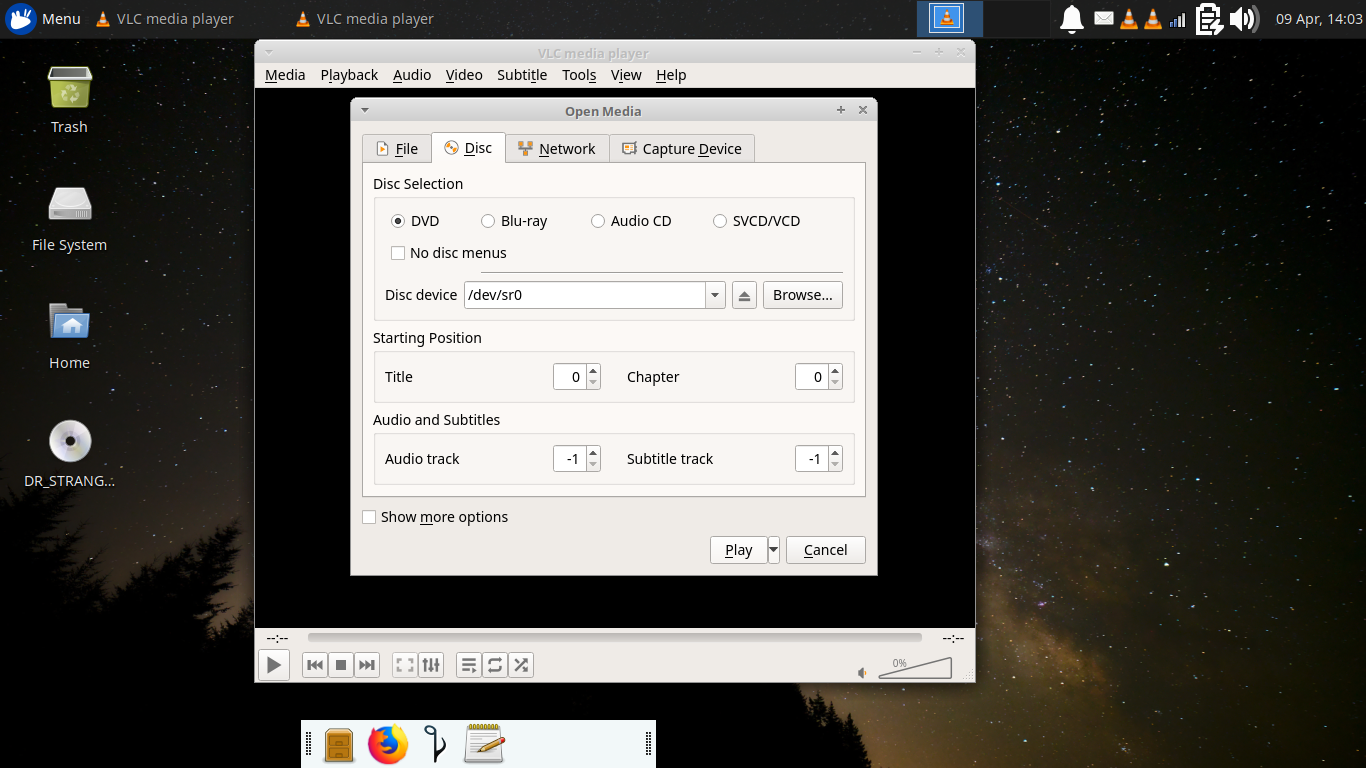
A., When I play a disk I insert it and make sure it is mounted. Then open vlc and use the menu option "media" to bring up the vlc sub menu, then check that it shows sr0 or some reasonable address for the disk drive and at the bottom select "Play." This lets the player deal with the files and the whole interlacing concept. It will depend on who made the disk and how good a copy it is. Good luck ,Ted P. On Tue, Apr 9, 2019 at 1:18 PM Ted Pomeroy <ted.pome@gmail.com> wrote:
A., why not "play disk" from vlc menu? I'll try a screenshot later. Also, is the disk commercial or user made? Was it made free and cross platform or designed to only run with certain software? Just some thoughts. Ted P.
On Mon, Apr 8, 2019, 10:20 PM a <a@kaluta.us> wrote:
Hi
Intermittent problem received Dvd today has been finicky VLC error message say check log where is that log be located?
Have played the DVD in part three tries out of perhaps ten tries no go at times seem to override error message?
Have been using open disc ,open files and open DVD alternately the later where the error message manafests, I then somehow have stumbled upon the three file .avi choices. choose one click on to play, Where I found the files is a bit hazy?
Any thoughts on an unraveling strategy? Thanks, Anthony
_______________________________________________ nmglug mailing list nmglug@lists.nmglug.org http://lists.nmglug.org/listinfo.cgi/nmglug-nmglug.org

Interesting issue. First, is there a mtg. Thursday and where? OK, a little strange since a DVD is not an .avi. It would be an mp4 or just the image on your desktop of the DVD. I can't imagine where 3 .avi's came from if they didn't exist before. You would generally need to reformat a DVD to create an .avi which is generally a much smaller file size. I would consider running VLC or mplayer in a terminal to open the DVD. Try: $ cd /media run ls as below and your username should be shown: /media$ ls "myusername" then: $ cd "myusername" then to see what's in /media/yourusername run ls command again: /media/"myusername"$ ls FIRE_GIRL then: $ vlc FIRE_GIRL and the DVD should play. If not you'll be able to see the errors in the terminal which will give you info that will help. Good luck! On 4/9/19 1:18 PM, Ted Pomeroy wrote:
A., why not "play disk" from vlc menu? I'll try a screenshot later. Also, is the disk commercial or user made? Was it made free and cross platform or designed to only run with certain software? Just some thoughts. Ted P.
On Mon, Apr 8, 2019, 10:20 PM a <a@kaluta.us <mailto:a@kaluta.us>> wrote:
Hi
Intermittent problem received Dvd today has been finicky VLC error message say check log where is that log be located?
Have played the DVD in part three tries out of perhaps ten tries no go at times seem to override error message?
Have been using open disc ,open files and open DVD alternately the later where the error message manafests, I then somehow have stumbled upon the three file .avi choices. choose one click on to play, Where I found the files is a bit hazy?
Any thoughts on an unraveling strategy? Thanks, Anthony
_______________________________________________ nmglug mailing list nmglug@lists.nmglug.org <mailto:nmglug@lists.nmglug.org> http://lists.nmglug.org/listinfo.cgi/nmglug-nmglug.org
_______________________________________________ nmglug mailing list nmglug@lists.nmglug.org http://lists.nmglug.org/listinfo.cgi/nmglug-nmglug.org --

participants (5)
-
 a
a -
 Alucard
 -
 Brian O'Keefe
 -
 Harold Furbiter
 -
 Ted Pomeroy