Yet another example of Comcast/Xfinity spying and sleeze

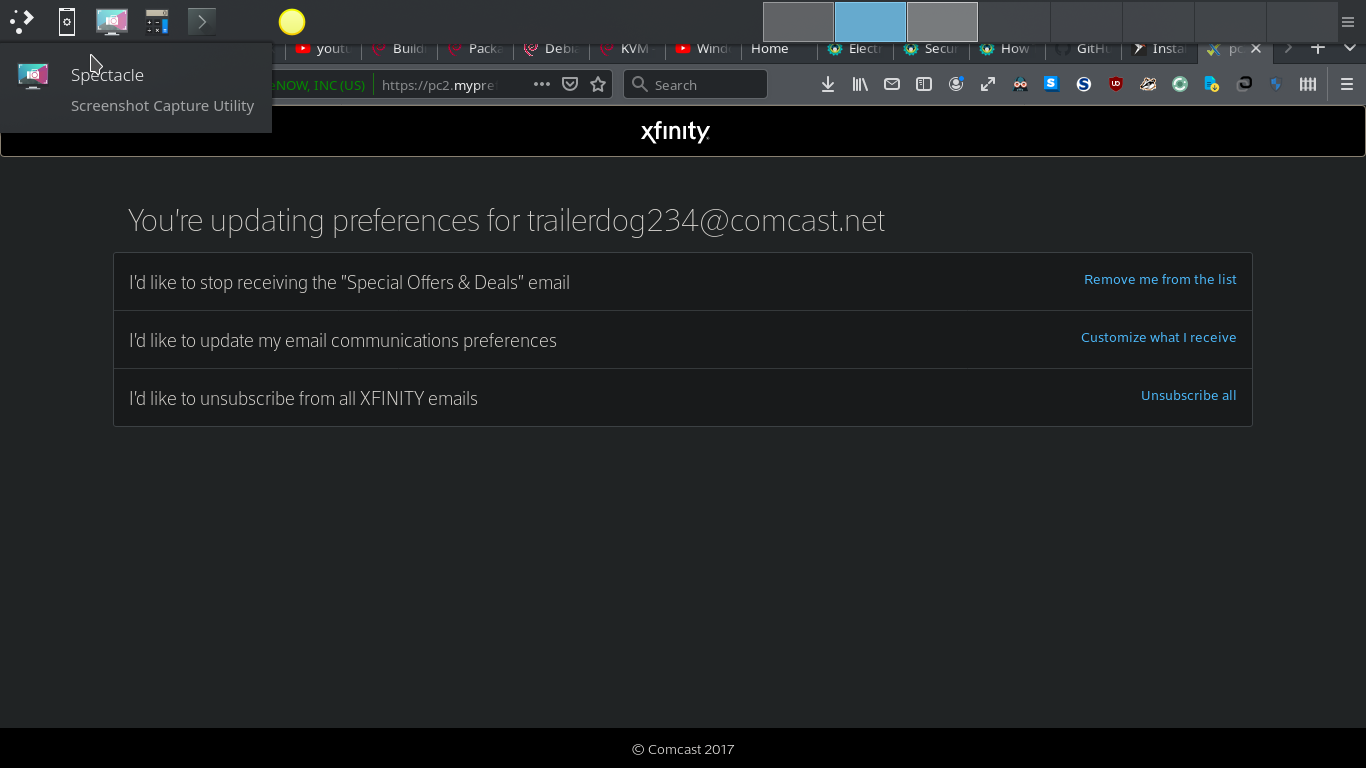
Seems the marketing department pounces (and cheats) at every opportunity. Yes, I've said it before. No, I'm not in a position to dump them and won't be for a while; also, I have other email accounts with different providers. It's just that I'm highly sensitized right now and think that knowledgeable computer users ought to occasionally be reminded of how prevalent this stuff is getting. And perhaps share my ire and sign up with some other outfit if the opportunity arises. Yesterday evening I did a nuke-n-pave switch from Kubuntu 18.04 LTS to Debian 10 KDE on the that laptop I'm writing from (interesting cautionary tale of woe behind that, and partially self-inflicted, but I'll save it for another occasion). Had to install a new instance of Thunderbird in a new system identity--the type of event that Comcast/Xfinity always seems to notice or want to get involved in in one way or another. Usually another. In this case: "Take your in-home WiFi to the next level" Email from Xfinity, 8:25 am. "...Introducing Xfi Complete. Get the complete peace of mind ... blah, blah, blah ...for only $25 more a month. ... If you do not wish to receive emails like this in the future, please click _here_" I did. See attached screenshot. Notice white NoScript icon (0 of 3 items blocked). All three links on the page dysfunctional. Dead. No way to actually communicate that I do not wish to receive such communications. Not that I should have to because, as I've previously written, I've already done it before. Tom Here's the code from the page in case someone who understands such things better than I is willing and able to provide some perspective or objective analysis: <!DOCTYPE html><html ng-app="comcastPC"><head><meta charset="utf-8" /><title></title><meta name="viewport" content="width=device-width, initial-scale=1" /><link rel="stylesheet" href="https://maxcdn.bootstrapcdn.com/bootstrap/3.3.7/css/bootstrap.min.css"><link rel="stylesheet" href="styles/main.css" /></head><body><header><nav class="navbar navbar-inverse"><div class="container center-content"><div class="navbar-header"><a href="//www.xfinity.com" target="_self" class="navbar-brand"><span><img src="img/xfinity-logo.svg" style="margin-top:15px"/></span></a></div></div></nav></header><!-- Google Tag Manager --><noscript><iframe src="https://www.googletagmanager.com/ns.html?id=GTM-P53ZR3" height="0" width="0" style="display:none;visibility:hidden"></iframe> </noscript><script>(function (w, d, s, l, i) { w[l] = w[l] || []; w[l].push({ 'gtm.start': new Date().getTime(), event: 'gtm.js' }); var f = d.getElementsByTagName(s)[0], j = d.createElement(s), dl = l != 'dataLayer' ? '&l=' + l : ''; j.async = true; j.src = 'https://www.googletagmanager.com/gtm.js?id=' + i + dl; f.parentNode.insertBefore(j, f); })(window, document, 'script', 'dataLayer', 'GTM-P53ZR3'); </script><!-- End Google Tag Manager --><ng-view></ng-view><br /><br /><br /><footer><div >© Comcast 2017 </div></footer><script src="https://cdnjs.cloudflare.com/ajax/libs/angular.js/1.6.5/angular.min.js"></script><script src="https://cdnjs.cloudflare.com/ajax/libs/angular.js/1.6.5/angular-route.min.js"></script><script type="text/javascript" src="https://cdnjs.cloudflare.com/ajax/libs/angular.js/1.6.5/angular-cookies.min.js"></script><script src="scripts/libs/ui-bootstrap-tpls-2.5.0.min.js"></script><script src="scripts/libs/angular-base64.min.js"></script><script src="scripts/app.js"></script><script src="scripts/services/addPreferenceService.js"></script><script src="scripts/services/filterHeaderService.js"></script><script src="scripts/controllers/mainController.js"></script><script src="scripts/controllers/managePreferenceController.js"></script></body></html><script id="f5_cspm">(function(){var f5_cspm={f5_p:'AOHAGAJCNBLDEPHFBKFBFJIDAENNBKNHEIEFNOJFILJIKLNIECMMANHJBENONDKENFABFDBGAAJHIAMBPANAJOFEAABPOPGEAIGHKCPJGNBAIPHFKKJKIPKKNEJLIDBH',setCharAt:function(str,index,chr){if(index>str.length-1)return str;return str.substr(0,index)+chr+str.substr(index+1);},get_byte:function(str,i){var s=(i/16)|0;i=(i&15);s=s*32;return((str.charCodeAt(i+16+s)-65)<<4)|(str.charCodeAt(i+s)-65);},set_byte:function(str,i,b){var s=(i/16)|0;i=(i&15);s=s*32;str=f5_cspm.setCharAt(str,(i+16+s),String.fromCharCode((b>>4)+65));str=f5_cspm.setCharAt(str,(i+s),String.fromCharCode((b&15)+65));return str;},set_latency:function(str,latency){latency=latency&0xffff;str=f5_cspm.set_byte(str,40,(latency>>8));str=f5_cspm.set_byte(str,41,(latency&0xff));str=f5_cspm.set_byte(str,35,2);return str;},wait_perf_data:function(){try{var wp=window.performance.timing;if(wp.loadEventEnd>0){var res=wp.loadEventEnd-wp.navigationStart;if(res<60001){var cookie_val=f5_cspm.set_latency(f5_cspm.f5_p,res);window.document.cookie='f5avr1103044515aaaaaaaaaaaaaaaa_cspm_='+encodeURIComponent(cookie_val)+';path=/';} return;}} catch(err){return;} setTimeout(f5_cspm.wait_perf_data,100);return;},go:function(){var chunk=window.document.cookie.split(/\s*;\s*/);for(var i=0;i<chunk.length;++i){var pair=chunk[i].split(/\s*=\s*/);if(pair[0]=='f5_cspm'&&pair[1]=='1234') {var d=new Date();d.setTime(d.getTime()-1000);window.document.cookie='f5_cspm=;expires='+d.toUTCString()+';path=/;';setTimeout(f5_cspm.wait_perf_data,100);}}}} f5_cspm.go();}());</script>

Tom Ashcraft writes:
All three links on the page dysfunctional. Dead. No way to actually communicate that I do not wish to receive such communications. Not that I should have to because, as I've previously written, I've already done it before.
Tom
Here's the code from the page in case someone who understands such things better than I is willing and able to provide some perspective or objective analysis:
Unfortunately the actual buttons aren't in there. They're probably coming from one of the many scripts the page loads, e.g. <script src="https://cdnjs.cloudflare.com/ajax/libs/angular.js/1.6.5/angular.min.js"></ script><script src="https://cdnjs.cloudflare.com/ajax/libs/angular.js/1.6.5/angular-route.min. js"></script><script type="text/javascript" src="https://cdnjs.cloudflare.com/ajax/libs/angular.js/1.6.5/angular-cookies.mi n.js"></script><script src="scripts/libs/ui-bootstrap-tpls-2.5.0.min.js"></script><script src="scripts/libs/angular-base64.min.js"></script><script src="scripts/app.js"></script><script src="scripts/services/addPreferenceService.js"></script><script src="scripts/services/filterHeaderService.js"></script><script src="scripts/controllers/mainController.js"></script><script src="scripts/controllers/managePreferenceController.js"></script> All those scripts/* URLs are relative to whatever page you were on, which isn't shown in the screenshot. Sometimes you can tell something with the DOM inspector. Right-click on one of the non-functioning buttons and choose "Inspect" or "Inspect element" (both Firefox and Chrome have an inspector, with different strengths). Then you can poke around in the inspector window to see if it's a link with an href, if it has an onClick function, etc. This isn't guaranteed to tell you what's going on, but at least there's a chance. I'd been idly considering the idea of switching to Comcast despite terrible past experiences, because CenturyLink DSL has been so slow and unreliable lately. You're reminding me why I shouldn't. Anyone have experience with fixed wireless providers, like LANet or NMSurf? I have a good sightlight to Pajarito Mountain, but I hear weather can be a big problem with fixed wireless, and I'm guessing installation costs would make it an expensive experiment. ...Akkana
participants (2)
-
 Akkana Peck
 -
 Tom Ashcraft