
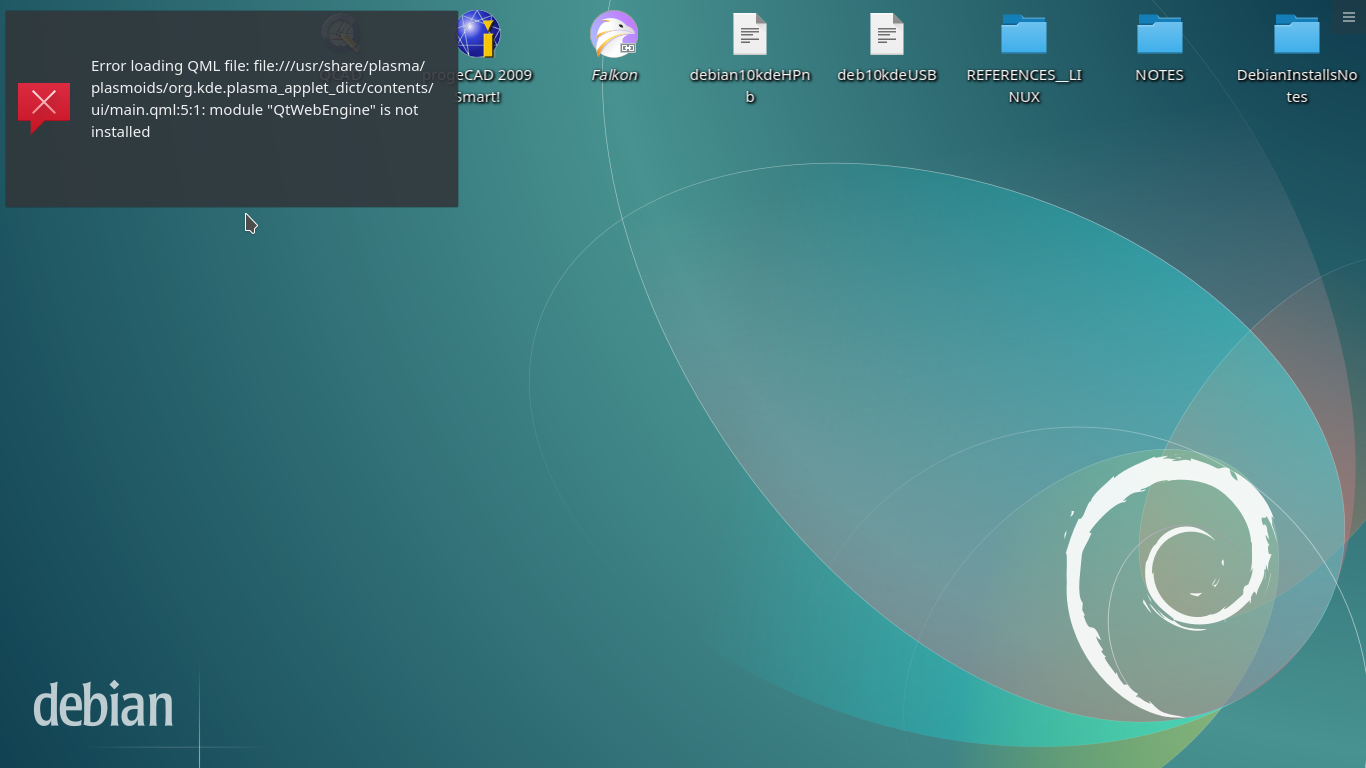
Hello NMGLUG, I've got a two-day old install of Debian 10 with KDE Plasma desktop on a brand-new 1TB SSD in a two or three year old 15" HP-Notebook with an AMD CPU. This installed via Calamares running from a live, non-free firmware iso, checksum and signature file verified. Mostly so far everything seems robust and beautiful, but there's been considerable pathology with setting up the panels the way I like. Right-clicking on an application in either of the main application menus (I have a cascading menu in the upper panel, and the default menu in the lower panel) *should* show and permit the option of installing a one-click launch icon on the associated panel--but sometimes it does, and other times it doesn't. Also, I had a dictionary widget in the upper panel that was apparently missing one of the supporting files for some reason. In association with a desktop crash, hard powerdown* and/or my eventual removal of the widget, the error message somehow became permanent. See attached screenshot. Any suggestions for how I might best attempt to repair this? Thanks, Tom *'ctrl-alt-esc' will kill Plasma (but leave application windows running, presumably because they run in different threads) but I don't yet know how to restart Plasma from the terminal, and for some reason there is no 'shutdown', 'reboot' or 'halt' command installed.
OK guys, I lucked out and stumbled on the fix for my artifact. Turns out the message on the screen can be removed with the same key combinations as used to remove widgets *from the panel*, i.e. 'Alt-D, R'. I think. Now I can't find where I saw that out of context. Anyway, having done that fixes the problem installing one-click launchers to the panels too. I can go to bed happy tonight because *everything* I've set up is now working correctly. Definitely KDE Plasma and definitely not Kubuntu. But I still need to figure out how to get terminal shutdown/reboot/halt installed. Back to all that excellent documentation in the wikis and the desktop. Must be in there somewhere. Tom On 8/14/19 7:46 PM, Tom Ashcraft wrote:
Hello NMGLUG,
I've got a two-day old install of Debian 10 with KDE Plasma desktop on a brand-new 1TB SSD in a two or three year old 15" HP-Notebook with an AMD CPU. This installed via Calamares running from a live, non-free firmware iso, checksum and signature file verified.
Mostly so far everything seems robust and beautiful, but there's been considerable pathology with setting up the panels the way I like.
Right-clicking on an application in either of the main application menus (I have a cascading menu in the upper panel, and the default menu in the lower panel) *should* show and permit the option of installing a one-click launch icon on the associated panel--but sometimes it does, and other times it doesn't.
Also, I had a dictionary widget in the upper panel that was apparently missing one of the supporting files for some reason. In association with a desktop crash, hard powerdown* and/or my eventual removal of the widget, the error message somehow became permanent. See attached screenshot.
Any suggestions for how I might best attempt to repair this?
Thanks,
Tom
*'ctrl-alt-esc' will kill Plasma (but leave application windows running, presumably because they run in different threads) but I don't yet know how to restart Plasma from the terminal, and for some reason there is no 'shutdown', 'reboot' or 'halt' command installed.
_______________________________________________ nmglug mailing list nmglug@lists.nmglug.org http://lists.nmglug.org/listinfo.cgi/nmglug-nmglug.org
Yep, systemd. This explains it: https://www.faqforge.com/linux/distributions/debian/how-to-shutdown-or-reboo... sudo systemctl poweroff sudo systemctl reboot On 8/14/19 9:30 PM, Tom Ashcraft wrote:
OK guys,
I lucked out and stumbled on the fix for my artifact. Turns out the message on the screen can be removed with the same key combinations as used to remove widgets *from the panel*, i.e. 'Alt-D, R'. I think. Now I can't find where I saw that out of context. Anyway, having done that fixes the problem installing one-click launchers to the panels too.
I can go to bed happy tonight because *everything* I've set up is now working correctly. Definitely KDE Plasma and definitely not Kubuntu.
But I still need to figure out how to get terminal shutdown/reboot/halt installed. Back to all that excellent documentation in the wikis and the desktop. Must be in there somewhere.
Tom
On 8/14/19 7:46 PM, Tom Ashcraft wrote:
Hello NMGLUG,
I've got a two-day old install of Debian 10 with KDE Plasma desktop on a brand-new 1TB SSD in a two or three year old 15" HP-Notebook with an AMD CPU. This installed via Calamares running from a live, non-free firmware iso, checksum and signature file verified.
Mostly so far everything seems robust and beautiful, but there's been considerable pathology with setting up the panels the way I like.
Right-clicking on an application in either of the main application menus (I have a cascading menu in the upper panel, and the default menu in the lower panel) *should* show and permit the option of installing a one-click launch icon on the associated panel--but sometimes it does, and other times it doesn't.
Also, I had a dictionary widget in the upper panel that was apparently missing one of the supporting files for some reason. In association with a desktop crash, hard powerdown* and/or my eventual removal of the widget, the error message somehow became permanent. See attached screenshot.
Any suggestions for how I might best attempt to repair this?
Thanks,
Tom
*'ctrl-alt-esc' will kill Plasma (but leave application windows running, presumably because they run in different threads) but I don't yet know how to restart Plasma from the terminal, and for some reason there is no 'shutdown', 'reboot' or 'halt' command installed.
_______________________________________________ nmglug mailing list nmglug@lists.nmglug.org http://lists.nmglug.org/listinfo.cgi/nmglug-nmglug.org
_______________________________________________ nmglug mailing list nmglug@lists.nmglug.org http://lists.nmglug.org/listinfo.cgi/nmglug-nmglug.org

You may want to consider the shutdown command, it can be configured with much more than the legacy reboot and poweroff commands: https://debian-administration.org/article/89/Shutting_down_your_Debian_machi... Jonathan On 8/14/19 10:05 PM, Tom Ashcraft wrote:
Yep, systemd. This explains it:
https://www.faqforge.com/linux/distributions/debian/how-to-shutdown-or-reboo...
sudo systemctl poweroff
sudo systemctl reboot
On 8/14/19 9:30 PM, Tom Ashcraft wrote:
OK guys,
I lucked out and stumbled on the fix for my artifact. Turns out the message on the screen can be removed with the same key combinations as used to remove widgets *from the panel*, i.e. 'Alt-D, R'. I think. Now I can't find where I saw that out of context. Anyway, having done that fixes the problem installing one-click launchers to the panels too.
I can go to bed happy tonight because *everything* I've set up is now working correctly. Definitely KDE Plasma and definitely not Kubuntu.
But I still need to figure out how to get terminal shutdown/reboot/halt installed. Back to all that excellent documentation in the wikis and the desktop. Must be in there somewhere.
Tom
On 8/14/19 7:46 PM, Tom Ashcraft wrote:
Hello NMGLUG,
I've got a two-day old install of Debian 10 with KDE Plasma desktop on a brand-new 1TB SSD in a two or three year old 15" HP-Notebook with an AMD CPU. This installed via Calamares running from a live, non-free firmware iso, checksum and signature file verified.
Mostly so far everything seems robust and beautiful, but there's been considerable pathology with setting up the panels the way I like.
Right-clicking on an application in either of the main application menus (I have a cascading menu in the upper panel, and the default menu in the lower panel) *should* show and permit the option of installing a one-click launch icon on the associated panel--but sometimes it does, and other times it doesn't.
Also, I had a dictionary widget in the upper panel that was apparently missing one of the supporting files for some reason. In association with a desktop crash, hard powerdown* and/or my eventual removal of the widget, the error message somehow became permanent. See attached screenshot.
Any suggestions for how I might best attempt to repair this?
Thanks,
Tom
*'ctrl-alt-esc' will kill Plasma (but leave application windows running, presumably because they run in different threads) but I don't yet know how to restart Plasma from the terminal, and for some reason there is no 'shutdown', 'reboot' or 'halt' command installed.
_______________________________________________ nmglug mailing list nmglug@lists.nmglug.org http://lists.nmglug.org/listinfo.cgi/nmglug-nmglug.org
_______________________________________________ nmglug mailing list nmglug@lists.nmglug.org http://lists.nmglug.org/listinfo.cgi/nmglug-nmglug.org
_______________________________________________ nmglug mailing list nmglug@lists.nmglug.org http://lists.nmglug.org/listinfo.cgi/nmglug-nmglug.org
participants (2)
-
 Jonathan Haack
 -
 Tom Ashcraft