
Hi All, My Asus laptop has been freezing up for no reason that I could think of. I found out my swap partition is 2GB and this person solved it by increasing the swap partition to 16GB. I'm reluctant to start messing with partitions, though I have at times, w/o one of you brainiacs look at the procedure. If anyone can look this over I'd appreciate it but no obligations. Stay safe! Brian 0 <https://askubuntu.com/posts/1242975/timeline> yes Ubuntu 20.04 hangs freeze although I have 8 GB of Ram and i7 I could temporary fix this issue in my side, by expanding swap partition from 2 GB to 16 GB I am not sure but I think there is problem in Ubuntu 20.04 memory management, here in my side it keep consuming memory, then when both memory and swap are full, the computer start to freeze and hang the solution steps are: 1- check the amount of swap you have |grep SwapTotal /proc/meminfo | 2-turn off the swap process |sudo swapoff -a | 3-resize the swap(in my case i expand it to 16 gb) |sudo dd if=/dev/zero of=/swapfile bs=1G count=16 | 4- attach the swap to partition |sudo mkswap /swapfile | 5- activate swap(enable it) |sudo swapon /swapfile | 6- see the new swap size |grep SwapTotal /proc/meminfo | done --


Brian, A quick look at it seems that it is correct. Swap is a partition, it has to be unmounted to be re-sized, hence the 'swapoff' command. The 'dd' to resize it is an interesting approach, rather than using parted or gparted. If you have used all of the physical drive to install, it might feel clearer to use gparted to enlarge /swap and see which other partition is giving up some room. Check to see if the sample directions were installed to hardware like yours or was it a virtual install? I will have to take a look at the discussion on the Internet. Thank you, Ted P. On Sat, Jun 6, 2020 at 2:21 PM Brian O'Keefe <okeefe@cybermesa.com> wrote:
Hi All,
My Asus laptop has been freezing up for no reason that I could think of. I found out my swap partition is 2GB and this person solved it by increasing the swap partition to 16GB. I'm reluctant to start messing with partitions, though I have at times, w/o one of you brainiacs look at the procedure. If anyone can look this over I'd appreciate it but no obligations.
Stay safe!
Brian 0 <https://askubuntu.com/posts/1242975/timeline>
yes Ubuntu 20.04 hangs freeze although I have 8 GB of Ram and i7
I could temporary fix this issue in my side, by expanding swap partition from 2 GB to 16 GB
I am not sure but I think there is problem in Ubuntu 20.04 memory management, here in my side it keep consuming memory, then when both memory and swap are full, the computer start to freeze and hang
the solution steps are:
1- check the amount of swap you have
grep SwapTotal /proc/meminfo
2-turn off the swap process
sudo swapoff -a
3-resize the swap(in my case i expand it to 16 gb)
sudo dd if=/dev/zero of=/swapfile bs=1G count=16
4- attach the swap to partition
sudo mkswap /swapfile
5- activate swap(enable it)
sudo swapon /swapfile
6- see the new swap size
grep SwapTotal /proc/meminfo
done -- _______________________________________________ nmglug mailing list nmglug@lists.nmglug.org http://lists.nmglug.org/listinfo.cgi/nmglug-nmglug.org

Brian, Very interesting. Is your swap a file or a partition? I just read an article https://bogdancornianu.com/change-swap-size-in-ubuntu/ which sounds like what you describe for making swap bigger. It notes that Ubuntu changed the protocol of swap from a partition to a file. I am using Xubuntu 18.04 and the install here is a swap partition. As shown here from my lsblk: sda 8:0 0 298.1G 0 disk ├─sda1 8:1 0 199M 0 part ├─sda2 8:2 0 165.4G 0 part ├─sda3 8:3 0 1K 0 part ├─sda4 8:4 0 103.3M 0 part ├─sda5 8:5 0 125G 0 part / └─sda6 8:6 0 7.5G 0 part [SWAP] sr0 11:0 1 1024M 0 rom So, be careful and check first. I might suggest you ascertain the nature of your system before trying to use the directions you quoted. Thank you, Ted P. On Sat, Jun 6, 2020 at 3:35 PM Ted Pomeroy <ted.pome@gmail.com> wrote:
Brian, A quick look at it seems that it is correct. Swap is a partition, it has to be unmounted to be re-sized, hence the 'swapoff' command. The 'dd' to resize it is an interesting approach, rather than using parted or gparted. If you have used all of the physical drive to install, it might feel clearer to use gparted to enlarge /swap and see which other partition is giving up some room. Check to see if the sample directions were installed to hardware like yours or was it a virtual install? I will have to take a look at the discussion on the Internet. Thank you, Ted P.
On Sat, Jun 6, 2020 at 2:21 PM Brian O'Keefe <okeefe@cybermesa.com> wrote:
Hi All,
My Asus laptop has been freezing up for no reason that I could think of. I found out my swap partition is 2GB and this person solved it by increasing the swap partition to 16GB. I'm reluctant to start messing with partitions, though I have at times, w/o one of you brainiacs look at the procedure. If anyone can look this over I'd appreciate it but no obligations.
Stay safe!
Brian 0 <https://askubuntu.com/posts/1242975/timeline>
yes Ubuntu 20.04 hangs freeze although I have 8 GB of Ram and i7
I could temporary fix this issue in my side, by expanding swap partition from 2 GB to 16 GB
I am not sure but I think there is problem in Ubuntu 20.04 memory management, here in my side it keep consuming memory, then when both memory and swap are full, the computer start to freeze and hang
the solution steps are:
1- check the amount of swap you have
grep SwapTotal /proc/meminfo
2-turn off the swap process
sudo swapoff -a
3-resize the swap(in my case i expand it to 16 gb)
sudo dd if=/dev/zero of=/swapfile bs=1G count=16
4- attach the swap to partition
sudo mkswap /swapfile
5- activate swap(enable it)
sudo swapon /swapfile
6- see the new swap size
grep SwapTotal /proc/meminfo
done -- _______________________________________________ nmglug mailing list nmglug@lists.nmglug.org http://lists.nmglug.org/listinfo.cgi/nmglug-nmglug.org

I ran gparted and the Ubuntu disk utility as well as fdisk, sfdisk, cfdisk and there is no swap partition that I can find. There are tens if not more files listed w/ fdisk and the following is running lsblk There are obviously significant changes in 20.04 that are pretty much incomprehensible to me! $ lsblk NAME MAJ:MIN RM SIZE RO TYPE MOUNTPOINT loop0 7:0 0 161.4M 1 loop /snap/gnome-3-28-1804/128 loop1 7:1 0 105.2M 1 loop /snap/audacity/648 loop2 7:2 0 154.3M 1 loop /snap/chromium/1143 loop3 7:3 0 156.2M 1 loop /snap/chromium/1165 loop4 7:4 0 97M 1 loop /snap/core/9289 loop5 7:5 0 93.9M 1 loop /snap/core/9066 loop6 7:6 0 55M 1 loop /snap/core18/1705 loop7 7:7 0 289.8M 1 loop /snap/kde-frameworks-5-qt-5-14-core18/3 loop8 7:8 0 55M 1 loop /snap/core18/1754 loop9 7:9 0 140.7M 1 loop /snap/gnome-3-26-1604/100 loop11 7:11 0 49.8M 1 loop /snap/snap-store/454 loop12 7:12 0 255.6M 1 loop /snap/gnome-3-34-1804/33 loop13 7:13 0 107M 1 loop /snap/gnucash-jz/43 loop14 7:14 0 255.6M 1 loop /snap/gnome-3-34-1804/36 loop15 7:15 0 54.8M 1 loop /snap/gtk-common-themes/1502 loop16 7:16 0 181.1M 1 loop /snap/spotify/36 loop17 7:17 0 141.8M 1 loop /snap/inkscape/7601 loop18 7:18 0 62.1M 1 loop /snap/gtk-common-themes/1506 loop19 7:19 0 140.7M 1 loop /snap/gnome-3-26-1604/98 loop20 7:20 0 260.7M 1 loop /snap/kde-frameworks-5-core18/32 loop21 7:21 0 160.2M 1 loop /snap/gnome-3-28-1804/116 loop22 7:22 0 87.8M 1 loop /snap/kdenlive/23 loop23 7:23 0 132K 1 loop /snap/gtk2-common-themes/9 loop24 7:24 0 141.8M 1 loop /snap/inkscape/7627 loop25 7:25 0 132K 1 loop /snap/gtk2-common-themes/5 loop26 7:26 0 291M 1 loop /snap/vlc/1620 loop27 7:27 0 163.7M 1 loop /snap/spotify/41 loop28 7:28 0 2.2M 1 loop /snap/gnome-system-monitor/148 loop29 7:29 0 290.6M 1 loop /snap/kde-frameworks-5-qt-5-14-core18/4 loop30 7:30 0 2.2M 1 loop /snap/gnome-system-monitor/145 loop31 7:31 0 202.9M 1 loop /snap/vlc/1397 loop32 7:32 0 87.8M 1 loop /snap/kdenlive/24 loop33 7:33 0 113.4M 1 loop /snap/audacity/666 sda 8:0 0 238.5G 0 disk ├─sda1 8:1 0 512M 0 part /boot/efi └─sda2 8:2 0 238G 0 part / However I get this when I run the following so Swap is not a partition, right? What is it now? A file as you noted? $ grep SwapTotal /proc/meminfo SwapTotal: 2097148 kB Thanks so much Ted and I hope that you are doing as well as you can be. Brian On 6/6/20 4:19 PM, Ted Pomeroy wrote:
Brian, Very interesting. Is your swap a file or a partition? I just read an article https://bogdancornianu.com/change-swap-size-in-ubuntu/ which sounds like what you describe for making swap bigger. It notes that Ubuntu changed the protocol of swap from a partition to a file. I am using Xubuntu 18.04 and the install here is a swap partition. As shown here from my lsblk: sda 8:0 0 298.1G 0 disk ├─sda1 8:1 0 199M 0 part ├─sda2 8:2 0 165.4G 0 part ├─sda3 8:3 0 1K 0 part ├─sda4 8:4 0 103.3M 0 part ├─sda5 8:5 0 125G 0 part / └─sda6 8:6 0 7.5G 0 part [SWAP] sr0 11:0 1 1024M 0 rom So, be careful and check first. I might suggest you ascertain the nature of your system before trying to use the directions you quoted. Thank you, Ted P.
On Sat, Jun 6, 2020 at 3:35 PM Ted Pomeroy <ted.pome@gmail.com <mailto:ted.pome@gmail.com>> wrote:
Brian, A quick look at it seems that it is correct. Swap is a partition, it has to be unmounted to be re-sized, hence the 'swapoff' command. The 'dd' to resize it is an interesting approach, rather than using parted or gparted. If you have used all of the physical drive to install, it might feel clearer to use gparted to enlarge /swap and see which other partition is giving up some room. Check to see if the sample directions were installed to hardware like yours or was it a virtual install? I will have to take a look at the discussion on the Internet. Thank you, Ted P.
On Sat, Jun 6, 2020 at 2:21 PM Brian O'Keefe <okeefe@cybermesa.com <mailto:okeefe@cybermesa.com>> wrote:
Hi All,
My Asus laptop has been freezing up for no reason that I could think of. I found out my swap partition is 2GB and this person solved it by increasing the swap partition to 16GB. I'm reluctant to start messing with partitions, though I have at times, w/o one of you brainiacs look at the procedure. If anyone can look this over I'd appreciate it but no obligations.
Stay safe!
Brian
0
yes Ubuntu 20.04 hangs freeze although I have 8 GB of Ram and i7
I could temporary fix this issue in my side, by expanding swap partition from 2 GB to 16 GB
I am not sure but I think there is problem in Ubuntu 20.04 memory management, here in my side it keep consuming memory, then when both memory and swap are full, the computer start to freeze and hang
the solution steps are:
1- check the amount of swap you have
|grep SwapTotal /proc/meminfo |
2-turn off the swap process
|sudo swapoff -a |
3-resize the swap(in my case i expand it to 16 gb)
|sudo dd if=/dev/zero of=/swapfile bs=1G count=16 |
4- attach the swap to partition
|sudo mkswap /swapfile |
5- activate swap(enable it)
|sudo swapon /swapfile |
6- see the new swap size
|grep SwapTotal /proc/meminfo |
done
-- _______________________________________________ nmglug mailing list nmglug@lists.nmglug.org <mailto:nmglug@lists.nmglug.org> http://lists.nmglug.org/listinfo.cgi/nmglug-nmglug.org
_______________________________________________ nmglug mailing list nmglug@lists.nmglug.org http://lists.nmglug.org/listinfo.cgi/nmglug-nmglug.org --

One observation that just came to me is the issue again copied below is relating to increasing swap is as a partition in 20.04 but as you can see I do not have a swap partition but I have a 2GB something...file? Also a couple of screenshots from system monitor. It seems that swap has plenty of memory, at least as I run four applications open and hidden process. Maybe they are of some help? Thanks Brian
0
yes Ubuntu 20.04 hangs freeze although I have 8 GB of Ram and i7
I could temporary fix this issue in my side, by expanding swap partition from 2 GB to 16 GB
I am not sure but I think there is problem in Ubuntu 20.04 memory management, here in my side it keep consuming memory, then when both memory and swap are full, the computer start to freeze and hang
the solution steps are:
1- check the amount of swap you have
|grep SwapTotal /proc/meminfo |
2-turn off the swap process
|sudo swapoff -a |
3-resize the swap(in my case i expand it to 16 gb)
|sudo dd if=/dev/zero of=/swapfile bs=1G count=16 |
4- attach the swap to partition
|sudo mkswap /swapfile |
5- activate swap(enable it)
|sudo swapon /swapfile |
6- see the new swap size
|grep SwapTotal /proc/meminfo |
done
-- _______________________________________________ nmglug mailing list nmglug@lists.nmglug.org <mailto:nmglug@lists.nmglug.org> http://lists.nmglug.org/listinfo.cgi/nmglug-nmglug.org
_______________________________________________ nmglug mailing list nmglug@lists.nmglug.org http://lists.nmglug.org/listinfo.cgi/nmglug-nmglug.org
--
_______________________________________________ nmglug mailing list nmglug@lists.nmglug.org http://lists.nmglug.org/listinfo.cgi/nmglug-nmglug.org --
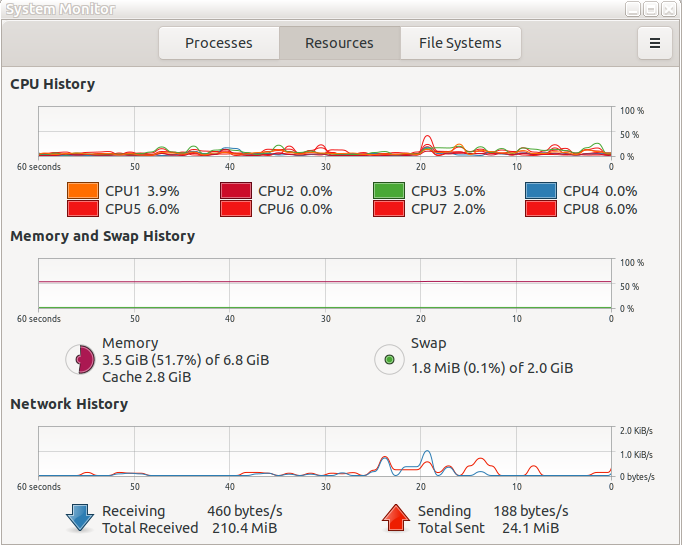
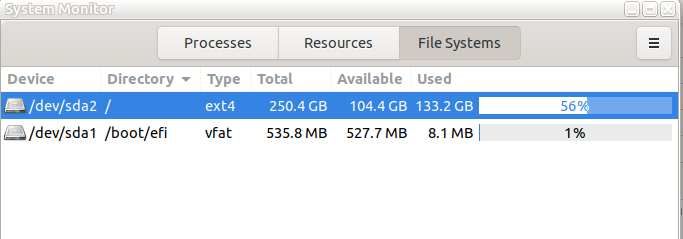

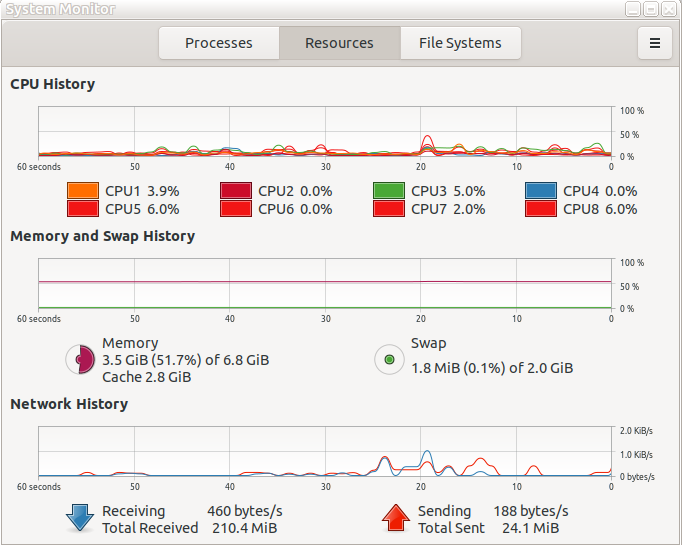
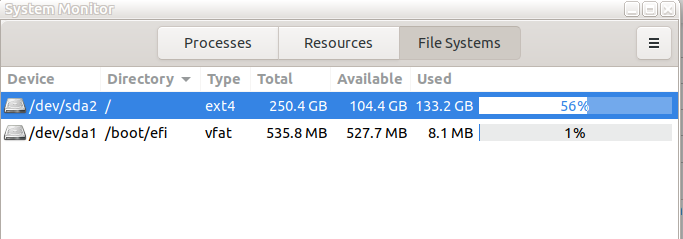
One observation that just came to me is the issue again copied below is relating to increasing swap is as a partition in 20.04 but as you can see I do not have a swap partition but I have a 2GB something...file? Also a couple of screenshots from system monitor. It seems that swap has plenty of memory, at least as I run four applications open and hidden process. Maybe they are of some help? Thanks Brian
0
yes Ubuntu 20.04 hangs freeze although I have 8 GB of Ram and i7
I could temporary fix this issue in my side, by expanding swap partition from 2 GB to 16 GB
I am not sure but I think there is problem in Ubuntu 20.04 memory management, here in my side it keep consuming memory, then when both memory and swap are full, the computer start to freeze and hang
the solution steps are:
1- check the amount of swap you have
|grep SwapTotal /proc/meminfo |
2-turn off the swap process
|sudo swapoff -a |
3-resize the swap(in my case i expand it to 16 gb)
|sudo dd if=/dev/zero of=/swapfile bs=1G count=16 |
4- attach the swap to partition
|sudo mkswap /swapfile |
5- activate swap(enable it)
|sudo swapon /swapfile |
6- see the new swap size
|grep SwapTotal /proc/meminfo |
done
-- _______________________________________________ nmglug mailing list nmglug@lists.nmglug.org <mailto:nmglug@lists.nmglug.org> http://lists.nmglug.org/listinfo.cgi/nmglug-nmglug.org
_______________________________________________ nmglug mailing list nmglug@lists.nmglug.org http://lists.nmglug.org/listinfo.cgi/nmglug-nmglug.org
--
_______________________________________________ nmglug mailing list nmglug@lists.nmglug.org http://lists.nmglug.org/listinfo.cgi/nmglug-nmglug.org --

participants (2)
-
 Brian O'Keefe
 -
 Ted Pomeroy