
OS DEBIAN 10, FIREFOX, CIMMANON. Q. RECONSTITUTE aBACKUP a@alap:~$ ./home/a/bin/rsnapshotBackup.sh bash: ./home/a/bin/rsnapshotBackup.sh: No such file or directory a@alap:~$ chmod +x /home/a/bin/rsnapshotBackup.sh chmod: cannot access '/home/a/bin/rsnapshotBackup.sh': No such file or directory a@alap:~$ sudo a@alap:~$ su Password: root@alap:/home/a# ./home/a/bin/rsnapshotBackup.sh bash: ./home/a/bin/rsnapshotBackup.sh: No such file or directory root@alap:/home/a# SEE ATTACHMENT EXECUTABLE. WHEN USING EITHER "RUN" OR "RUN IN TERMINAL" CANNOT LOCATE THE RESULTS. OBJECTIVE IS TO UPDATE BACKUP FILES, WHAT THE HAY, YOUR WEEKEND LINUX CORRESPONDENT. BEST, a

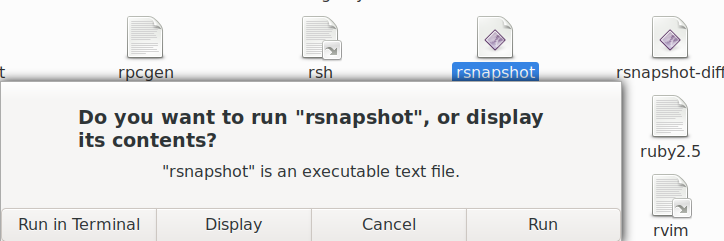
If there's no file named ./home/a/bin/rsnapshotBackup.sh (it says No such file or directory), chmod and su won't change that; the file just isn't there. In the commands you pasted, you're trying to access two different files: /home/a/bin/rsnapshotBackup.sh and ./home/a/bin/rsnapshotBackup.sh. For the second one, the dot at the beginning means: start from the current directory (.) and look inside it for a directory named home, then look inside home for a, then inside a for bin, then look there for rsnapshotBackup.sh. But it looks like neither of those files exists, so you won't be able to run the file unless you figure out where it is. Try: locate rsnapshotBackup.sh or if you don't have locate (Command not found), try the much slower: sudo find / -name rsnapshotBackup.sh to search your whole disk for any file by that name. The screenshot shows a file named rsnapshot, which doesn't tell you anything about where rsnapshotBackup.sh might be. ...Akkana a writes:
OS DEBIAN 10, FIREFOX, CIMMANON.
Q. RECONSTITUTE aBACKUP
a@alap:~$ ./home/a/bin/rsnapshotBackup.sh bash: ./home/a/bin/rsnapshotBackup.sh: No such file or directory a@alap:~$ chmod +x /home/a/bin/rsnapshotBackup.sh chmod: cannot access '/home/a/bin/rsnapshotBackup.sh': No such file or directory a@alap:~$ sudo
a@alap:~$ su Password: root@alap:/home/a# ./home/a/bin/rsnapshotBackup.sh bash: ./home/a/bin/rsnapshotBackup.sh: No such file or directory root@alap:/home/a#
SEE ATTACHMENT EXECUTABLE. WHEN USING EITHER "RUN" OR "RUN IN TERMINAL" CANNOT LOCATE THE RESULTS. OBJECTIVE IS TO UPDATE BACKUP FILES, WHAT THE HAY, YOUR WEEKEND LINUX CORRESPONDENT. BEST, a
I had previous copied immediately below early on, before I proceed with "Fix" attempt, using that information in attempted restore. /home/a/Desktop/emblem-symbolic-link.png /media/a/aBackup : opened with notepad,results: [Desktop Entry][Desktop Entry] Name=aBackup Exec=/home/a/bin/rsnapshotBackup.sh Comment= Terminal=true Type=Application Icon=/usr/share/icons/mate/256x256/emblems/emblem-symbolic-link.png Name=aBackup Exec=/home/a/bin/rsnapshotBackup.sh Comment= Terminal=true Type=Application Icon=/usr/share/icons/mate/256x256/emblems/emblem-symbolic-link.png a@alap:~$ locate rsnapshotBackup.sh bash: locate: command not found a@alap:~$ sudo find / -name rsnapshotBackup.sh [sudo] password for a: /media/a/aBackup/alpha.17/alap/home/a/bin/rsnapshotBackup.sh /media/a/aBackup/alpha.16/alap/home/a/bin/rsnapshotBackup.sh /media/a/aBackup/alpha.15/alap/home/a/bin/rsnapshotBackup.sh /media/a/aBackup/alpha.14/alap/home/a/bin/rsnapshotBackup.sh /media/a/aBackup/alpha.13/alap/home/a/bin/rsnapshotBackup.sh find: ‘/media/a/aBackup/alpha.0’: No such file or directory /home/a/.local/share/Trash/files/bin/rsnapshotBackup.sh find: ‘/run/user/1000/gvfs’: Permission denied a@alap:~$ On 10/11/20 9:44 AM, Akkana Peck wrote:
sudo find / -name rsnapshotBackup.sh
I located this in the trash opening the file contents: On 10/11/20 10:39 AM, a wrote:#!/bin/bash echo "backup of a home" rsnapshot alpha echo "done" read -n there are several option for file placement i.e. send to aBackup .... If usable how to proceed it known, Thanks a
I had previous copied immediately below early on, before I proceed with "Fix" attempt, using that information in attempted restore.
/home/a/Desktop/emblem-symbolic-link.png
/media/a/aBackup : opened with notepad,results:
[Desktop Entry][Desktop Entry] Name=aBackup Exec=/home/a/bin/rsnapshotBackup.sh Comment= Terminal=true Type=Application Icon=/usr/share/icons/mate/256x256/emblems/emblem-symbolic-link.png Name=aBackup Exec=/home/a/bin/rsnapshotBackup.sh Comment= Terminal=true Type=Application Icon=/usr/share/icons/mate/256x256/emblems/emblem-symbolic-link.png
a@alap:~$ locate rsnapshotBackup.sh bash: locate: command not found a@alap:~$ sudo find / -name rsnapshotBackup.sh [sudo] password for a: /media/a/aBackup/alpha.17/alap/home/a/bin/rsnapshotBackup.sh /media/a/aBackup/alpha.16/alap/home/a/bin/rsnapshotBackup.sh /media/a/aBackup/alpha.15/alap/home/a/bin/rsnapshotBackup.sh /media/a/aBackup/alpha.14/alap/home/a/bin/rsnapshotBackup.sh /media/a/aBackup/alpha.13/alap/home/a/bin/rsnapshotBackup.sh find: ‘/media/a/aBackup/alpha.0’: No such file or directory /home/a/.local/share/Trash/files/bin/rsnapshotBackup.sh find: ‘/run/user/1000/gvfs’: Permission denied a@alap:~$
On 10/11/20 9:44 AM, Akkana Peck wrote:
sudo find / -name rsnapshotBackup.sh
nmglug mailing list nmglug@lists.nmglug.org http://lists.nmglug.org/listinfo.cgi/nmglug-nmglug.org
"/bin/rsnapshotBackup.sh" (attach) is sitting in the "trash", can I copy this part "/rsnapshotBackup.sh" and drop in in the file system and if do drop it in the files system will it auto place in correct order? Any insight? Thanks, a On 10/11/20 10:58 AM, a wrote:
I located this in the trash opening the file contents:
On 10/11/20 10:39 AM, a wrote:#!/bin/bash
echo "backup of a home" rsnapshot alpha echo "done" read -n there are several option for file placement i.e. send to aBackup .... If usable how to proceed it known, Thanks a
I had previous copied immediately below early on, before I proceed with "Fix" attempt, using that information in attempted restore.
/home/a/Desktop/emblem-symbolic-link.png
/media/a/aBackup : opened with notepad,results:
[Desktop Entry][Desktop Entry] Name=aBackup Exec=/home/a/bin/rsnapshotBackup.sh Comment= Terminal=true Type=Application Icon=/usr/share/icons/mate/256x256/emblems/emblem-symbolic-link.png Name=aBackup Exec=/home/a/bin/rsnapshotBackup.sh Comment= Terminal=true Type=Application Icon=/usr/share/icons/mate/256x256/emblems/emblem-symbolic-link.png
a@alap:~$ locate rsnapshotBackup.sh bash: locate: command not found a@alap:~$ sudo find / -name rsnapshotBackup.sh [sudo] password for a: /media/a/aBackup/alpha.17/alap/home/a/bin/rsnapshotBackup.sh /media/a/aBackup/alpha.16/alap/home/a/bin/rsnapshotBackup.sh /media/a/aBackup/alpha.15/alap/home/a/bin/rsnapshotBackup.sh /media/a/aBackup/alpha.14/alap/home/a/bin/rsnapshotBackup.sh /media/a/aBackup/alpha.13/alap/home/a/bin/rsnapshotBackup.sh find: ‘/media/a/aBackup/alpha.0’: No such file or directory /home/a/.local/share/Trash/files/bin/rsnapshotBackup.sh find: ‘/run/user/1000/gvfs’: Permission denied a@alap:~$
On 10/11/20 9:44 AM, Akkana Peck wrote:
sudo find / -name rsnapshotBackup.sh
nmglug mailing list nmglug@lists.nmglug.org http://lists.nmglug.org/listinfo.cgi/nmglug-nmglug.org
nmglug mailing list nmglug@lists.nmglug.org http://lists.nmglug.org/listinfo.cgi/nmglug-nmglug.org
a writes:
"/bin/rsnapshotBackup.sh" (attach) is sitting in the "trash", can I copy this part "/rsnapshotBackup.sh" and drop in in the file system and if do drop it in the files system will it auto place in correct order? Any insight? Thanks, a
Maybe. But it might not be the one you want. It looks like you have several files called rsnapshotBackup.sh: a writes:
a@alap:~$ sudo find / -name rsnapshotBackup.sh [sudo] password for a: /media/a/aBackup/alpha.17/alap/home/a/bin/rsnapshotBackup.sh /media/a/aBackup/alpha.16/alap/home/a/bin/rsnapshotBackup.sh /media/a/aBackup/alpha.15/alap/home/a/bin/rsnapshotBackup.sh /media/a/aBackup/alpha.14/alap/home/a/bin/rsnapshotBackup.sh /media/a/aBackup/alpha.13/alap/home/a/bin/rsnapshotBackup.sh [ ... ] /home/a/.local/share/Trash/files/bin/rsnapshotBackup.sh [ ... ]
So you have the one in the Trash, plus five more in various places under /media/a/aBackup. That one in the Trash could be a really old one. I don't know what rsnapshotBackup.sh -- does it restore from an old backup? In that case, the one in the Trash could be a super old one, or a bad one that didn't work right. I would guess that the one in /media/a/aBackup/alpha.17 is the newest, but I wouldn't assume that without looking at the dates on all six of the files. Personally, I'd be leery of using backup software that (a) doesn't have documentation that clearly tells you where to find the restore files, and (b) stores things in directories named "alpha". Alpha usually means very early software that hasn't been tested much and should only be considered experimental. But that's just me. You should definitely make an offline copy of any files on your disk that are really important to you -- e.g. copy them to an external hard drive, and then unplug the hard drive -- before running any shell script where you're not sure exactly what it does, and where you're choosing from six different versions of the script without being sure why there are six of them. ...Akkana
/bin/rsnapshotBackup.sh The referenced trash item, /bin/rsnapshotBackup.sh was last accessed july 19 (in properties) the same date of my last backup file #20 what do you think put it in the file system and let it rip? The numbered files13-17 i imagine identify the previous backup up numbered files corresponding to that on the external drive,i haven't checked if the external referenced files have content (aside: my backup up external disk was connected to the computer,relevant?). the presenting problem manifested by an intermediate "file" flashing on for a fractional second. i have restored the original icon when i initially copied the icon content it contained: /rsnapshotBackup.sh that same code content. what I find missing is the parapathetic flash then disapear page. which when pressing a small bar which then began the external save. Jason, who seems to be on hiatus, originally installed intalled aBackup, which speaks to its merit. Searching independently I could find no supporting text for aBackup. Akkana thanks for your interest. On 10/11/20 12:10 PM, Akkana Peck wrote:
a writes:
"/bin/rsnapshotBackup.sh" (attach) is sitting in the "trash", can I copy this part "/rsnapshotBackup.sh" and drop in in the file system and if do drop it in the files system will it auto place in correct order? Any insight? Thanks, a Maybe. But it might not be the one you want. It looks like you have several files called rsnapshotBackup.sh:
a writes:
a@alap:~$ sudo find / -name rsnapshotBackup.sh [sudo] password for a: /media/a/aBackup/alpha.17/alap/home/a/bin/rsnapshotBackup.sh /media/a/aBackup/alpha.16/alap/home/a/bin/rsnapshotBackup.sh /media/a/aBackup/alpha.15/alap/home/a/bin/rsnapshotBackup.sh /media/a/aBackup/alpha.14/alap/home/a/bin/rsnapshotBackup.sh /media/a/aBackup/alpha.13/alap/home/a/bin/rsnapshotBackup.sh [ ... ] /home/a/.local/share/Trash/files/bin/rsnapshotBackup.sh [ ... ]
So you have the one in the Trash, plus five more in various places under /media/a/aBackup.
That one in the Trash could be a really old one. I don't know what rsnapshotBackup.sh -- does it restore from an old backup? In that case, the one in the Trash could be a super old one, or a bad one that didn't work right.
I would guess that the one in /media/a/aBackup/alpha.17 is the newest, but I wouldn't assume that without looking at the dates on all six of the files.
Personally, I'd be leery of using backup software that (a) doesn't have documentation that clearly tells you where to find the restore files, and (b) stores things in directories named "alpha". Alpha usually means very early software that hasn't been tested much and should only be considered experimental. But that's just me.
You should definitely make an offline copy of any files on your disk that are really important to you -- e.g. copy them to an external hard drive, and then unplug the hard drive -- before running any shell script where you're not sure exactly what it does, and where you're choosing from six different versions of the script without being sure why there are six of them.
...Akkana _______________________________________________ nmglug mailing list nmglug@lists.nmglug.org http://lists.nmglug.org/listinfo.cgi/nmglug-nmglug.org

Hi Anthony, I remember when Jason wrote the script in /home/a/bin/rsnapshotBackup.sh that runs the rsnapshot backup commands. We were with you either at the second street brewery or in our office. I think you had to leave before the script could be thoroughly tested. It could possibly be improved, but it should work. The directory aBackup/ should exist on your external backup drive, so that when you plug it into the USB port, it gets mounted at /media/a/aBackup/ ... Then the backup script may be used to run the (well-documented) rsnapshot utility to back up your home directory onto your external backup drive. Obviously this works only if the external backup drive is plugged into the USB port. Thanks, Geoff Chesshire On 10/11/20 12:58 PM, a wrote:
/bin/rsnapshotBackup.sh
The referenced trash item, /bin/rsnapshotBackup.sh was last accessed july 19 (in properties) the same date of my last backup file #20 what do you think put it in the file system and let it rip? The numbered files13-17 i imagine identify the previous backup up numbered files corresponding to that on the external drive,i haven't checked if the external referenced files have content (aside: my backup up external disk was connected to the computer,relevant?). the presenting problem manifested by an intermediate "file" flashing on for a fractional second. i have restored the original icon when i initially copied the icon content it contained: /rsnapshotBackup.sh that same code content. what I find missing is the parapathetic flash then disapear page. which when pressing a small bar which then began the external save.
Jason, who seems to be on hiatus, originally installed intalled aBackup, which speaks to its merit. Searching independently I could find no supporting text for aBackup. Akkana thanks for your interest.
On 10/11/20 12:10 PM, Akkana Peck wrote:
a writes:
"/bin/rsnapshotBackup.sh" (attach) is sitting in the "trash", can I copy this part "/rsnapshotBackup.sh" and drop in in the file system and if do drop it in the files system will it auto place in correct order? Any insight? Thanks, a Maybe. But it might not be the one you want. It looks like you have several files called rsnapshotBackup.sh:
a writes:
a@alap:~$ sudo find / -name rsnapshotBackup.sh [sudo] password for a: /media/a/aBackup/alpha.17/alap/home/a/bin/rsnapshotBackup.sh /media/a/aBackup/alpha.16/alap/home/a/bin/rsnapshotBackup.sh /media/a/aBackup/alpha.15/alap/home/a/bin/rsnapshotBackup.sh /media/a/aBackup/alpha.14/alap/home/a/bin/rsnapshotBackup.sh /media/a/aBackup/alpha.13/alap/home/a/bin/rsnapshotBackup.sh [ ... ] /home/a/.local/share/Trash/files/bin/rsnapshotBackup.sh [ ... ]
So you have the one in the Trash, plus five more in various places under /media/a/aBackup.
That one in the Trash could be a really old one. I don't know what rsnapshotBackup.sh -- does it restore from an old backup? In that case, the one in the Trash could be a super old one, or a bad one that didn't work right.
I would guess that the one in /media/a/aBackup/alpha.17 is the newest, but I wouldn't assume that without looking at the dates on all six of the files.
Personally, I'd be leery of using backup software that (a) doesn't have documentation that clearly tells you where to find the restore files, and (b) stores things in directories named "alpha". Alpha usually means very early software that hasn't been tested much and should only be considered experimental. But that's just me.
You should definitely make an offline copy of any files on your disk that are really important to you -- e.g. copy them to an external hard drive, and then unplug the hard drive -- before running any shell script where you're not sure exactly what it does, and where you're choosing from six different versions of the script without being sure why there are six of them.
...Akkana _______________________________________________ nmglug mailing list nmglug@lists.nmglug.org http://lists.nmglug.org/listinfo.cgi/nmglug-nmglug.org
nmglug mailing list nmglug@lists.nmglug.org http://lists.nmglug.org/listinfo.cgi/nmglug-nmglug.org
Hi Geoff. /home/a/bin/rsnapshotBackup.sh (Does not exist). Manual: suggests the program be run from terminal. Woould the following commend correct ./home/a/bin/rsnapshotBackup.sh Any suggestions? Thanks,a a@alap:~$ sudo find / -name rsnapshotBackup.sh /home/a/.local/share/Trash/files/bin/rsnapshotBackup.sh find: ‘/run/user/1000/gvfs’: Permission denied On 10/11/20 1:20 PM, Geoff Chesshire wrote:
Hi Anthony,
I remember when Jason wrote the script in /home/a/bin/rsnapshotBackup.sh that runs the rsnapshot backup commands. We were with you either at the second street brewery or in our office. I think you had to leave before the script could be thoroughly tested. It could possibly be improved, but it should work.
The directory aBackup/ should exist on your external backup drive, so that when you plug it into the USB port, it gets mounted at /media/a/aBackup/ ... Then the backup script may be used to run the (well-documented) rsnapshot utility to back up your home directory onto your external backup drive. Obviously this works only if the external backup drive is plugged into the USB port.
Thanks, Geoff Chesshire
On 10/11/20 12:58 PM, a wrote:
/bin/rsnapshotBackup.sh
The referenced trash item, /bin/rsnapshotBackup.sh was last accessed july 19 (in properties) the same date of my last backup file #20 what do you think put it in the file system and let it rip? The numbered files13-17 i imagine identify the previous backup up numbered files corresponding to that on the external drive,i haven't checked if the external referenced files have content (aside: my backup up external disk was connected to the computer,relevant?). the presenting problem manifested by an intermediate "file" flashing on for a fractional second. i have restored the original icon when i initially copied the icon content it contained: /rsnapshotBackup.sh that same code content. what I find missing is the parapathetic flash then disapear page. which when pressing a small bar which then began the external save.
Jason, who seems to be on hiatus, originally installed intalled aBackup, which speaks to its merit. Searching independently I could find no supporting text for aBackup. Akkana thanks for your interest.
On 10/11/20 12:10 PM, Akkana Peck wrote:
a writes:
"/bin/rsnapshotBackup.sh" (attach) is sitting in the "trash", can I copy this part "/rsnapshotBackup.sh" and drop in in the file system and if do drop it in the files system will it auto place in correct order? Any insight? Thanks, a Maybe. But it might not be the one you want. It looks like you have several files called rsnapshotBackup.sh:
a writes:
a@alap:~$ sudo find / -name rsnapshotBackup.sh [sudo] password for a: /media/a/aBackup/alpha.17/alap/home/a/bin/rsnapshotBackup.sh /media/a/aBackup/alpha.16/alap/home/a/bin/rsnapshotBackup.sh /media/a/aBackup/alpha.15/alap/home/a/bin/rsnapshotBackup.sh /media/a/aBackup/alpha.14/alap/home/a/bin/rsnapshotBackup.sh /media/a/aBackup/alpha.13/alap/home/a/bin/rsnapshotBackup.sh [ ... ] /home/a/.local/share/Trash/files/bin/rsnapshotBackup.sh [ ... ]
So you have the one in the Trash, plus five more in various places under /media/a/aBackup.
That one in the Trash could be a really old one. I don't know what rsnapshotBackup.sh -- does it restore from an old backup? In that case, the one in the Trash could be a super old one, or a bad one that didn't work right.
I would guess that the one in /media/a/aBackup/alpha.17 is the newest, but I wouldn't assume that without looking at the dates on all six of the files.
Personally, I'd be leery of using backup software that (a) doesn't have documentation that clearly tells you where to find the restore files, and (b) stores things in directories named "alpha". Alpha usually means very early software that hasn't been tested much and should only be considered experimental. But that's just me.
You should definitely make an offline copy of any files on your disk that are really important to you -- e.g. copy them to an external hard drive, and then unplug the hard drive -- before running any shell script where you're not sure exactly what it does, and where you're choosing from six different versions of the script without being sure why there are six of them.
...Akkana _______________________________________________ nmglug mailing list nmglug@lists.nmglug.org http://lists.nmglug.org/listinfo.cgi/nmglug-nmglug.org
nmglug mailing list nmglug@lists.nmglug.org http://lists.nmglug.org/listinfo.cgi/nmglug-nmglug.org
_______________________________________________ nmglug mailing list nmglug@lists.nmglug.org http://lists.nmglug.org/listinfo.cgi/nmglug-nmglug.org
Hi Anthony, You can copy any one of the files like /media/a/aBackup/alpha.13/alap/home/a/bin/rsnapshotBackup.sh over into /home/a/bin/ as these are all identical backup copies of the same file. Then after plugging in your external backup drive, you can run /home/a/bin/rsnapshotBackup.sh (with no "." at the beginning) in a terminal to make a new backup. Just be patient to let it finish. Thanks, Geoff Chesshire On 10/11/20 8:27 PM, a wrote:
Hi Geoff. /home/a/bin/rsnapshotBackup.sh (Does not exist). Manual: suggests the program be run from terminal. Woould the following commend correct ./home/a/bin/rsnapshotBackup.sh Any suggestions? Thanks,a
a@alap:~$ sudo find / -name rsnapshotBackup.sh /home/a/.local/share/Trash/files/bin/rsnapshotBackup.sh find: ‘/run/user/1000/gvfs’: Permission denied
On 10/11/20 1:20 PM, Geoff Chesshire wrote:
Hi Anthony,
I remember when Jason wrote the script in /home/a/bin/rsnapshotBackup.sh that runs the rsnapshot backup commands. We were with you either at the second street brewery or in our office. I think you had to leave before the script could be thoroughly tested. It could possibly be improved, but it should work.
The directory aBackup/ should exist on your external backup drive, so that when you plug it into the USB port, it gets mounted at /media/a/aBackup/ ... Then the backup script may be used to run the (well-documented) rsnapshot utility to back up your home directory onto your external backup drive. Obviously this works only if the external backup drive is plugged into the USB port.
Thanks, Geoff Chesshire
On 10/11/20 12:58 PM, a wrote:
/bin/rsnapshotBackup.sh
The referenced trash item, /bin/rsnapshotBackup.sh was last accessed july 19 (in properties) the same date of my last backup file #20 what do you think put it in the file system and let it rip? The numbered files13-17 i imagine identify the previous backup up numbered files corresponding to that on the external drive,i haven't checked if the external referenced files have content (aside: my backup up external disk was connected to the computer,relevant?). the presenting problem manifested by an intermediate "file" flashing on for a fractional second. i have restored the original icon when i initially copied the icon content it contained: /rsnapshotBackup.sh that same code content. what I find missing is the parapathetic flash then disapear page. which when pressing a small bar which then began the external save.
Jason, who seems to be on hiatus, originally installed intalled aBackup, which speaks to its merit. Searching independently I could find no supporting text for aBackup. Akkana thanks for your interest.
On 10/11/20 12:10 PM, Akkana Peck wrote:
a writes:
"/bin/rsnapshotBackup.sh" (attach) is sitting in the "trash", can I copy this part "/rsnapshotBackup.sh" and drop in in the file system and if do drop it in the files system will it auto place in correct order? Any insight? Thanks, a Maybe. But it might not be the one you want. It looks like you have several files called rsnapshotBackup.sh:
a writes:
a@alap:~$ sudo find / -name rsnapshotBackup.sh [sudo] password for a: /media/a/aBackup/alpha.17/alap/home/a/bin/rsnapshotBackup.sh /media/a/aBackup/alpha.16/alap/home/a/bin/rsnapshotBackup.sh /media/a/aBackup/alpha.15/alap/home/a/bin/rsnapshotBackup.sh /media/a/aBackup/alpha.14/alap/home/a/bin/rsnapshotBackup.sh /media/a/aBackup/alpha.13/alap/home/a/bin/rsnapshotBackup.sh [ ... ] /home/a/.local/share/Trash/files/bin/rsnapshotBackup.sh [ ... ]
So you have the one in the Trash, plus five more in various places under /media/a/aBackup.
That one in the Trash could be a really old one. I don't know what rsnapshotBackup.sh -- does it restore from an old backup? In that case, the one in the Trash could be a super old one, or a bad one that didn't work right.
I would guess that the one in /media/a/aBackup/alpha.17 is the newest, but I wouldn't assume that without looking at the dates on all six of the files.
Personally, I'd be leery of using backup software that (a) doesn't have documentation that clearly tells you where to find the restore files, and (b) stores things in directories named "alpha". Alpha usually means very early software that hasn't been tested much and should only be considered experimental. But that's just me.
You should definitely make an offline copy of any files on your disk that are really important to you -- e.g. copy them to an external hard drive, and then unplug the hard drive -- before running any shell script where you're not sure exactly what it does, and where you're choosing from six different versions of the script without being sure why there are six of them.
...Akkana _______________________________________________ nmglug mailing list nmglug@lists.nmglug.org http://lists.nmglug.org/listinfo.cgi/nmglug-nmglug.org
nmglug mailing list nmglug@lists.nmglug.org http://lists.nmglug.org/listinfo.cgi/nmglug-nmglug.org
_______________________________________________ nmglug mailing list nmglug@lists.nmglug.org http://lists.nmglug.org/listinfo.cgi/nmglug-nmglug.org
nmglug mailing list nmglug@lists.nmglug.org http://lists.nmglug.org/listinfo.cgi/nmglug-nmglug.org
Hi Geoff Can I just open /home/a/bin/ and drop a copy of "media/a/aBackup/alpha.13/alap/home/a/bin/rsnapshotBackup.sh" into that file in alphabetical order will it sort if out of order, or will i need to brush up on copy commands. Thanks, a On 10/11/20 10:43 PM, Geoff Chesshire wrote:
Hi Anthony,
You can copy any one of the files like /media/a/aBackup/alpha.13/alap/home/a/bin/rsnapshotBackup.sh over into /home/a/bin/ as these are all identical backup copies of the same file. Then after plugging in your external backup drive, you can run /home/a/bin/rsnapshotBackup.sh (with no "." at the beginning) in a terminal to make a new backup. Just be patient to let it finish.
Thanks, Geoff Chesshire
On 10/11/20 8:27 PM, a wrote:
Hi Geoff. /home/a/bin/rsnapshotBackup.sh (Does not exist). Manual: suggests the program be run from terminal. Woould the following commend correct ./home/a/bin/rsnapshotBackup.sh Any suggestions? Thanks,a
a@alap:~$ sudo find / -name rsnapshotBackup.sh /home/a/.local/share/Trash/files/bin/rsnapshotBackup.sh find: ‘/run/user/1000/gvfs’: Permission denied
On 10/11/20 1:20 PM, Geoff Chesshire wrote:
Hi Anthony,
I remember when Jason wrote the script in /home/a/bin/rsnapshotBackup.sh that runs the rsnapshot backup commands. We were with you either at the second street brewery or in our office. I think you had to leave before the script could be thoroughly tested. It could possibly be improved, but it should work.
The directory aBackup/ should exist on your external backup drive, so that when you plug it into the USB port, it gets mounted at /media/a/aBackup/ ... Then the backup script may be used to run the (well-documented) rsnapshot utility to back up your home directory onto your external backup drive. Obviously this works only if the external backup drive is plugged into the USB port.
Thanks, Geoff Chesshire
On 10/11/20 12:58 PM, a wrote:
/bin/rsnapshotBackup.sh
The referenced trash item, /bin/rsnapshotBackup.sh was last accessed july 19 (in properties) the same date of my last backup file #20 what do you think put it in the file system and let it rip? The numbered files13-17 i imagine identify the previous backup up numbered files corresponding to that on the external drive,i haven't checked if the external referenced files have content (aside: my backup up external disk was connected to the computer,relevant?). the presenting problem manifested by an intermediate "file" flashing on for a fractional second. i have restored the original icon when i initially copied the icon content it contained: /rsnapshotBackup.sh that same code content. what I find missing is the parapathetic flash then disapear page. which when pressing a small bar which then began the external save.
Jason, who seems to be on hiatus, originally installed intalled aBackup, which speaks to its merit. Searching independently I could find no supporting text for aBackup. Akkana thanks for your interest.
On 10/11/20 12:10 PM, Akkana Peck wrote:
a writes:
"/bin/rsnapshotBackup.sh" (attach) is sitting in the "trash", can I copy this part "/rsnapshotBackup.sh" and drop in in the file system and if do drop it in the files system will it auto place in correct order? Any insight? Thanks, a Maybe. But it might not be the one you want. It looks like you have several files called rsnapshotBackup.sh:
a writes:
a@alap:~$ sudo find / -name rsnapshotBackup.sh [sudo] password for a: /media/a/aBackup/alpha.17/alap/home/a/bin/rsnapshotBackup.sh /media/a/aBackup/alpha.16/alap/home/a/bin/rsnapshotBackup.sh /media/a/aBackup/alpha.15/alap/home/a/bin/rsnapshotBackup.sh /media/a/aBackup/alpha.14/alap/home/a/bin/rsnapshotBackup.sh /media/a/aBackup/alpha.13/alap/home/a/bin/rsnapshotBackup.sh [ ... ] /home/a/.local/share/Trash/files/bin/rsnapshotBackup.sh [ ... ]
So you have the one in the Trash, plus five more in various places under /media/a/aBackup.
That one in the Trash could be a really old one. I don't know what rsnapshotBackup.sh -- does it restore from an old backup? In that case, the one in the Trash could be a super old one, or a bad one that didn't work right.
I would guess that the one in /media/a/aBackup/alpha.17 is the newest, but I wouldn't assume that without looking at the dates on all six of the files.
Personally, I'd be leery of using backup software that (a) doesn't have documentation that clearly tells you where to find the restore files, and (b) stores things in directories named "alpha". Alpha usually means very early software that hasn't been tested much and should only be considered experimental. But that's just me.
You should definitely make an offline copy of any files on your disk that are really important to you -- e.g. copy them to an external hard drive, and then unplug the hard drive -- before running any shell script where you're not sure exactly what it does, and where you're choosing from six different versions of the script without being sure why there are six of them.
...Akkana _______________________________________________ nmglug mailing list nmglug@lists.nmglug.org http://lists.nmglug.org/listinfo.cgi/nmglug-nmglug.org
nmglug mailing list nmglug@lists.nmglug.org http://lists.nmglug.org/listinfo.cgi/nmglug-nmglug.org
nmglug mailing list nmglug@lists.nmglug.org http://lists.nmglug.org/listinfo.cgi/nmglug-nmglug.org
nmglug mailing list nmglug@lists.nmglug.org http://lists.nmglug.org/listinfo.cgi/nmglug-nmglug.org
_______________________________________________ nmglug mailing list nmglug@lists.nmglug.org http://lists.nmglug.org/listinfo.cgi/nmglug-nmglug.org
Hi Geoff Could not find? a@alap:~$ cd /home/a/bin bash: cd: /home/a/bin: No such file or directory a@alap:~$ cd /home/a/bin/ bash: cd: /home/a/bin/: No such file or directory a@alap:~$ cd ~/home/a/bin/ Thanks, a On 10/12/20 7:26 AM, a wrote:
Hi Geoff
Can I just open /home/a/bin/ and drop a copy of "media/a/aBackup/alpha.13/alap/home/a/bin/rsnapshotBackup.sh" into that file in alphabetical order will it sort if out of order, or will i need to brush up on copy commands.
Thanks, a
On 10/11/20 10:43 PM, Geoff Chesshire wrote:
Hi Anthony,
You can copy any one of the files like /media/a/aBackup/alpha.13/alap/home/a/bin/rsnapshotBackup.sh over into /home/a/bin/ as these are all identical backup copies of the same file. Then after plugging in your external backup drive, you can run /home/a/bin/rsnapshotBackup.sh (with no "." at the beginning) in a terminal to make a new backup. Just be patient to let it finish.
Thanks, Geoff Chesshire
On 10/11/20 8:27 PM, a wrote:
Hi Geoff. /home/a/bin/rsnapshotBackup.sh (Does not exist). Manual: suggests the program be run from terminal. Woould the following commend correct ./home/a/bin/rsnapshotBackup.sh Any suggestions? Thanks,a
a@alap:~$ sudo find / -name rsnapshotBackup.sh /home/a/.local/share/Trash/files/bin/rsnapshotBackup.sh find: ‘/run/user/1000/gvfs’: Permission denied
On 10/11/20 1:20 PM, Geoff Chesshire wrote:
Hi Anthony,
I remember when Jason wrote the script in /home/a/bin/rsnapshotBackup.sh that runs the rsnapshot backup commands. We were with you either at the second street brewery or in our office. I think you had to leave before the script could be thoroughly tested. It could possibly be improved, but it should work.
The directory aBackup/ should exist on your external backup drive, so that when you plug it into the USB port, it gets mounted at /media/a/aBackup/ ... Then the backup script may be used to run the (well-documented) rsnapshot utility to back up your home directory onto your external backup drive. Obviously this works only if the external backup drive is plugged into the USB port.
Thanks, Geoff Chesshire
On 10/11/20 12:58 PM, a wrote:
/bin/rsnapshotBackup.sh
The referenced trash item, /bin/rsnapshotBackup.sh was last accessed july 19 (in properties) the same date of my last backup file #20 what do you think put it in the file system and let it rip? The numbered files13-17 i imagine identify the previous backup up numbered files corresponding to that on the external drive,i haven't checked if the external referenced files have content (aside: my backup up external disk was connected to the computer,relevant?). the presenting problem manifested by an intermediate "file" flashing on for a fractional second. i have restored the original icon when i initially copied the icon content it contained: /rsnapshotBackup.sh that same code content. what I find missing is the parapathetic flash then disapear page. which when pressing a small bar which then began the external save.
Jason, who seems to be on hiatus, originally installed intalled aBackup, which speaks to its merit. Searching independently I could find no supporting text for aBackup. Akkana thanks for your interest.
On 10/11/20 12:10 PM, Akkana Peck wrote:
a writes: > "/bin/rsnapshotBackup.sh" (attach) is sitting in the "trash", can I > copy > this part "/rsnapshotBackup.sh" and drop in in the file system and > if do > drop it in the files system will it auto place in correct order? > Any > insight? Thanks, a Maybe. But it might not be the one you want. It looks like you have several files called rsnapshotBackup.sh:
a writes: > a@alap:~$ sudo find / -name rsnapshotBackup.sh > [sudo] password for a: > /media/a/aBackup/alpha.17/alap/home/a/bin/rsnapshotBackup.sh > /media/a/aBackup/alpha.16/alap/home/a/bin/rsnapshotBackup.sh > /media/a/aBackup/alpha.15/alap/home/a/bin/rsnapshotBackup.sh > /media/a/aBackup/alpha.14/alap/home/a/bin/rsnapshotBackup.sh > /media/a/aBackup/alpha.13/alap/home/a/bin/rsnapshotBackup.sh [ ... ] > /home/a/.local/share/Trash/files/bin/rsnapshotBackup.sh [ ... ]
So you have the one in the Trash, plus five more in various places under /media/a/aBackup.
That one in the Trash could be a really old one. I don't know what rsnapshotBackup.sh -- does it restore from an old backup? In that case, the one in the Trash could be a super old one, or a bad one that didn't work right.
I would guess that the one in /media/a/aBackup/alpha.17 is the newest, but I wouldn't assume that without looking at the dates on all six of the files.
Personally, I'd be leery of using backup software that (a) doesn't have documentation that clearly tells you where to find the restore files, and (b) stores things in directories named "alpha". Alpha usually means very early software that hasn't been tested much and should only be considered experimental. But that's just me.
You should definitely make an offline copy of any files on your disk that are really important to you -- e.g. copy them to an external hard drive, and then unplug the hard drive -- before running any shell script where you're not sure exactly what it does, and where you're choosing from six different versions of the script without being sure why there are six of them.
...Akkana _______________________________________________ nmglug mailing list nmglug@lists.nmglug.org http://lists.nmglug.org/listinfo.cgi/nmglug-nmglug.org
nmglug mailing list nmglug@lists.nmglug.org http://lists.nmglug.org/listinfo.cgi/nmglug-nmglug.org
nmglug mailing list nmglug@lists.nmglug.org http://lists.nmglug.org/listinfo.cgi/nmglug-nmglug.org
nmglug mailing list nmglug@lists.nmglug.org http://lists.nmglug.org/listinfo.cgi/nmglug-nmglug.org
_______________________________________________ nmglug mailing list nmglug@lists.nmglug.org http://lists.nmglug.org/listinfo.cgi/nmglug-nmglug.org
nmglug mailing list nmglug@lists.nmglug.org http://lists.nmglug.org/listinfo.cgi/nmglug-nmglug.org
Hi Geoff Thanks for the information, being guided by this supplied information, /media/a/bin/ is unpopulated with the external drive disconnected,when connected the /media a/bin/ is populated, if i choose i.e "... alpha 13.../rsnapshotBackup.sh " several choices present, if i choose copy to computer then choose '/bin/rsnapshot.sh' will that be a go or shall i use some sequence to disconnect the external HD. Point of clarity.Please. Thanks, a On 10/11/20 10:43 PM, Geoff Chesshire wrote:
Hi Anthony,
You can copy any one of the files like /media/a/aBackup/alpha.13/alap/home/a/bin/rsnapshotBackup.sh over into /home/a/bin/ as these are all identical backup copies of the same file. Then after plugging in your external backup drive, you can run /home/a/bin/rsnapshotBackup.sh (with no "." at the beginning) in a terminal to make a new backup. Just be patient to let it finish.
Thanks, Geoff Chesshire
On 10/11/20 8:27 PM, a wrote:
Hi Geoff. /home/a/bin/rsnapshotBackup.sh (Does not exist). Manual: suggests the program be run from terminal. Woould the following commend correct ./home/a/bin/rsnapshotBackup.sh Any suggestions? Thanks,a
a@alap:~$ sudo find / -name rsnapshotBackup.sh /home/a/.local/share/Trash/files/bin/rsnapshotBackup.sh find: ‘/run/user/1000/gvfs’: Permission denied
On 10/11/20 1:20 PM, Geoff Chesshire wrote:
Hi Anthony,
I remember when Jason wrote the script in /home/a/bin/rsnapshotBackup.sh that runs the rsnapshot backup commands. We were with you either at the second street brewery or in our office. I think you had to leave before the script could be thoroughly tested. It could possibly be improved, but it should work.
The directory aBackup/ should exist on your external backup drive, so that when you plug it into the USB port, it gets mounted at /media/a/aBackup/ ... Then the backup script may be used to run the (well-documented) rsnapshot utility to back up your home directory onto your external backup drive. Obviously this works only if the external backup drive is plugged into the USB port.
Thanks, Geoff Chesshire
On 10/11/20 12:58 PM, a wrote:
/bin/rsnapshotBackup.sh
The referenced trash item, /bin/rsnapshotBackup.sh was last accessed july 19 (in properties) the same date of my last backup file #20 what do you think put it in the file system and let it rip? The numbered files13-17 i imagine identify the previous backup up numbered files corresponding to that on the external drive,i haven't checked if the external referenced files have content (aside: my backup up external disk was connected to the computer,relevant?). the presenting problem manifested by an intermediate "file" flashing on for a fractional second. i have restored the original icon when i initially copied the icon content it contained: /rsnapshotBackup.sh that same code content. what I find missing is the parapathetic flash then disapear page. which when pressing a small bar which then began the external save.
Jason, who seems to be on hiatus, originally installed intalled aBackup, which speaks to its merit. Searching independently I could find no supporting text for aBackup. Akkana thanks for your interest.
On 10/11/20 12:10 PM, Akkana Peck wrote:
a writes:
"/bin/rsnapshotBackup.sh" (attach) is sitting in the "trash", can I copy this part "/rsnapshotBackup.sh" and drop in in the file system and if do drop it in the files system will it auto place in correct order? Any insight? Thanks, a Maybe. But it might not be the one you want. It looks like you have several files called rsnapshotBackup.sh:
a writes:
a@alap:~$ sudo find / -name rsnapshotBackup.sh [sudo] password for a: /media/a/aBackup/alpha.17/alap/home/a/bin/rsnapshotBackup.sh /media/a/aBackup/alpha.16/alap/home/a/bin/rsnapshotBackup.sh /media/a/aBackup/alpha.15/alap/home/a/bin/rsnapshotBackup.sh /media/a/aBackup/alpha.14/alap/home/a/bin/rsnapshotBackup.sh /media/a/aBackup/alpha.13/alap/home/a/bin/rsnapshotBackup.sh [ ... ] /home/a/.local/share/Trash/files/bin/rsnapshotBackup.sh [ ... ]
So you have the one in the Trash, plus five more in various places under /media/a/aBackup.
That one in the Trash could be a really old one. I don't know what rsnapshotBackup.sh -- does it restore from an old backup? In that case, the one in the Trash could be a super old one, or a bad one that didn't work right.
I would guess that the one in /media/a/aBackup/alpha.17 is the newest, but I wouldn't assume that without looking at the dates on all six of the files.
Personally, I'd be leery of using backup software that (a) doesn't have documentation that clearly tells you where to find the restore files, and (b) stores things in directories named "alpha". Alpha usually means very early software that hasn't been tested much and should only be considered experimental. But that's just me.
You should definitely make an offline copy of any files on your disk that are really important to you -- e.g. copy them to an external hard drive, and then unplug the hard drive -- before running any shell script where you're not sure exactly what it does, and where you're choosing from six different versions of the script without being sure why there are six of them.
...Akkana _______________________________________________ nmglug mailing list nmglug@lists.nmglug.org http://lists.nmglug.org/listinfo.cgi/nmglug-nmglug.org
nmglug mailing list nmglug@lists.nmglug.org http://lists.nmglug.org/listinfo.cgi/nmglug-nmglug.org
nmglug mailing list nmglug@lists.nmglug.org http://lists.nmglug.org/listinfo.cgi/nmglug-nmglug.org
nmglug mailing list nmglug@lists.nmglug.org http://lists.nmglug.org/listinfo.cgi/nmglug-nmglug.org
_______________________________________________ nmglug mailing list nmglug@lists.nmglug.org http://lists.nmglug.org/listinfo.cgi/nmglug-nmglug.org
Hi Geoff a@alap:~$ /home/a/bin/rsnapshotBackup.sh backup of a home ---------------------------------------------------------------------------- rsnapshot encountered an error! The program was invoked with these options: /usr/bin/rsnapshot alpha ---------------------------------------------------------------------------- ERROR: Could not mkpath("/media/a/aBackup/alpha.0/", 0, 0755); done /home/a/bin/rsnapshotBackup.sh: line 6: read: -n: option requires an argument read: usage: read [-ers] [-a array] [-d delim] [-i text] [-n nchars] [-N nchars] [-p prompt] [-t timeout] [-u fd] [name ...] a@alap:~$ /home/a/bin/alpha.20 bash: /home/a/bin/alpha.20: Is a directory a@alt,a Thanks,a On 10/11/20 10:43 PM, Geoff Chesshire wrote:
Hi Anthony,
You can copy any one of the files like /media/a/aBackup/alpha.13/alap/home/a/bin/rsnapshotBackup.sh over into /home/a/bin/ as these are all identical backup copies of the same file. Then after plugging in your external backup drive, you can run /home/a/bin/rsnapshotBackup.sh (with no "." at the beginning) in a terminal to make a new backup. Just be patient to let it finish.
Thanks, Geoff Chesshire
On 10/11/20 8:27 PM, a wrote:
Hi Geoff. /home/a/bin/rsnapshotBackup.sh (Does not exist). Manual: suggests the program be run from terminal. Woould the following commend correct ./home/a/bin/rsnapshotBackup.sh Any suggestions? Thanks,a
a@alap:~$ sudo find / -name rsnapshotBackup.sh /home/a/.local/share/Trash/files/bin/rsnapshotBackup.sh find: ‘/run/user/1000/gvfs’: Permission denied
On 10/11/20 1:20 PM, Geoff Chesshire wrote:
Hi Anthony,
I remember when Jason wrote the script in /home/a/bin/rsnapshotBackup.sh that runs the rsnapshot backup commands. We were with you either at the second street brewery or in our office. I think you had to leave before the script could be thoroughly tested. It could possibly be improved, but it should work.
The directory aBackup/ should exist on your external backup drive, so that when you plug it into the USB port, it gets mounted at /media/a/aBackup/ ... Then the backup script may be used to run the (well-documented) rsnapshot utility to back up your home directory onto your external backup drive. Obviously this works only if the external backup drive is plugged into the USB port.
Thanks, Geoff Chesshire
On 10/11/20 12:58 PM, a wrote:
/bin/rsnapshotBackup.sh
The referenced trash item, /bin/rsnapshotBackup.sh was last accessed july 19 (in properties) the same date of my last backup file #20 what do you think put it in the file system and let it rip? The numbered files13-17 i imagine identify the previous backup up numbered files corresponding to that on the external drive,i haven't checked if the external referenced files have content (aside: my backup up external disk was connected to the computer,relevant?). the presenting problem manifested by an intermediate "file" flashing on for a fractional second. i have restored the original icon when i initially copied the icon content it contained: /rsnapshotBackup.sh that same code content. what I find missing is the parapathetic flash then disapear page. which when pressing a small bar which then began the external save.
Jason, who seems to be on hiatus, originally installed intalled aBackup, which speaks to its merit. Searching independently I could find no supporting text for aBackup. Akkana thanks for your interest.
On 10/11/20 12:10 PM, Akkana Peck wrote:
a writes:
"/bin/rsnapshotBackup.sh" (attach) is sitting in the "trash", can I copy this part "/rsnapshotBackup.sh" and drop in in the file system and if do drop it in the files system will it auto place in correct order? Any insight? Thanks, a Maybe. But it might not be the one you want. It looks like you have several files called rsnapshotBackup.sh:
a writes:
a@alap:~$ sudo find / -name rsnapshotBackup.sh [sudo] password for a: /media/a/aBackup/alpha.17/alap/home/a/bin/rsnapshotBackup.sh /media/a/aBackup/alpha.16/alap/home/a/bin/rsnapshotBackup.sh /media/a/aBackup/alpha.15/alap/home/a/bin/rsnapshotBackup.sh /media/a/aBackup/alpha.14/alap/home/a/bin/rsnapshotBackup.sh /media/a/aBackup/alpha.13/alap/home/a/bin/rsnapshotBackup.sh [ ... ] /home/a/.local/share/Trash/files/bin/rsnapshotBackup.sh [ ... ]
So you have the one in the Trash, plus five more in various places under /media/a/aBackup.
That one in the Trash could be a really old one. I don't know what rsnapshotBackup.sh -- does it restore from an old backup? In that case, the one in the Trash could be a super old one, or a bad one that didn't work right.
I would guess that the one in /media/a/aBackup/alpha.17 is the newest, but I wouldn't assume that without looking at the dates on all six of the files.
Personally, I'd be leery of using backup software that (a) doesn't have documentation that clearly tells you where to find the restore files, and (b) stores things in directories named "alpha". Alpha usually means very early software that hasn't been tested much and should only be considered experimental. But that's just me.
You should definitely make an offline copy of any files on your disk that are really important to you -- e.g. copy them to an external hard drive, and then unplug the hard drive -- before running any shell script where you're not sure exactly what it does, and where you're choosing from six different versions of the script without being sure why there are six of them.
...Akkana _______________________________________________ nmglug mailing list nmglug@lists.nmglug.org http://lists.nmglug.org/listinfo.cgi/nmglug-nmglug.org
nmglug mailing list nmglug@lists.nmglug.org http://lists.nmglug.org/listinfo.cgi/nmglug-nmglug.org
nmglug mailing list nmglug@lists.nmglug.org http://lists.nmglug.org/listinfo.cgi/nmglug-nmglug.org
nmglug mailing list nmglug@lists.nmglug.org http://lists.nmglug.org/listinfo.cgi/nmglug-nmglug.org
_______________________________________________ nmglug mailing list nmglug@lists.nmglug.org http://lists.nmglug.org/listinfo.cgi/nmglug-nmglug.org


I find there is no better way to back up your system than using rsync [...]
I think that using rsync is very dangerous unless you are very much in tune with what you're doing: it does not cover you against one of the most frequent needs for a backup - you create a file, then delete it or overwrite it, all within one of the rotation cycles you mention. rdiff is excellent for some backend tasks, like syncing your proper incremental backup to a remote location. Once you start wrapping rsync with enough stuff to make the backups incremental, you have reinvented other programs like rsnapshot and rdiff-backup. I don't resonate with rsnapshot, although it is a good system. It involves too much central setup. For lightweight programs that you can understand easily I recommend rdiff-backup. I then get fancy by backing up to an encfs area, and then rsync the raw encfs area to remote locations, but you don't need that. Something like this already gets you going, just run it by hand. rdiff-backup --exclude-other-filesystems -v 5 $HOME /media/MY_EXTERNAL_DRIVE_LABEL/backups/home
Hi Geoff Following your instructions: /media/a/aBackup/alpha.13/alap/home/a/bin/rsnapshotBackup.sh over into /home/a/bin/ Can you identify the issue below insufficient to your instruction. Thanks,a a@alap:~$ cp -av /media/a/aBackup/alpha.17/alap/home/a/bin/rsnapshot.sh//home/a/a@alap:~$ cp -av /media/a/aBackup/alpha.17/alap/home/a/bin/rsnapshot.sh//home/a/bin/rsnapshot.sh/ cp: missing destination file operand after '/media/a/aBackup/alpha.17/alap/home/a/bin/rsnapshot.sh//home/a/bin/rsnapshot.sh/' Try 'cp --help' for more information. a@alap:~$ cp -av /media/a/aBackup/alpha.17/alap/home/a/bin/rsnapshot.sh/ /home/a/bin/rsnapshot.sh/ cp: cannot stat '/media/a/aBackup/alpha.17/alap/home/a/bin/rsnapshot.sh/': Input/output error a@alap:~$ On 10/11/20 10:43 PM, Geoff Chesshire wrote:
Hi Anthony,
You can copy any one of the files like /media/a/aBackup/alpha.13/alap/home/a/bin/rsnapshotBackup.sh over into /home/a/bin/ as these are all identical backup copies of the same file. Then after plugging in your external backup drive, you can run /home/a/bin/rsnapshotBackup.sh (with no "." at the beginning) in a terminal to make a new backup. Just be patient to let it finish.
Thanks, Geoff Chesshire
On 10/11/20 8:27 PM, a wrote:
Hi Geoff. /home/a/bin/rsnapshotBackup.sh (Does not exist). Manual: suggests the program be run from terminal. Woould the following commend correct ./home/a/bin/rsnapshotBackup.sh Any suggestions? Thanks,a
a@alap:~$ sudo find / -name rsnapshotBackup.sh /home/a/.local/share/Trash/files/bin/rsnapshotBackup.sh find: ‘/run/user/1000/gvfs’: Permission denied
On 10/11/20 1:20 PM, Geoff Chesshire wrote:
Hi Anthony,
I remember when Jason wrote the script in /home/a/bin/rsnapshotBackup.sh that runs the rsnapshot backup commands. We were with you either at the second street brewery or in our office. I think you had to leave before the script could be thoroughly tested. It could possibly be improved, but it should work.
The directory aBackup/ should exist on your external backup drive, so that when you plug it into the USB port, it gets mounted at /media/a/aBackup/ ... Then the backup script may be used to run the (well-documented) rsnapshot utility to back up your home directory onto your external backup drive. Obviously this works only if the external backup drive is plugged into the USB port.
Thanks, Geoff Chesshire
On 10/11/20 12:58 PM, a wrote:
/bin/rsnapshotBackup.sh
The referenced trash item, /bin/rsnapshotBackup.sh was last accessed july 19 (in properties) the same date of my last backup file #20 what do you think put it in the file system and let it rip? The numbered files13-17 i imagine identify the previous backup up numbered files corresponding to that on the external drive,i haven't checked if the external referenced files have content (aside: my backup up external disk was connected to the computer,relevant?). the presenting problem manifested by an intermediate "file" flashing on for a fractional second. i have restored the original icon when i initially copied the icon content it contained: /rsnapshotBackup.sh that same code content. what I find missing is the parapathetic flash then disapear page. which when pressing a small bar which then began the external save.
Jason, who seems to be on hiatus, originally installed intalled aBackup, which speaks to its merit. Searching independently I could find no supporting text for aBackup. Akkana thanks for your interest.
On 10/11/20 12:10 PM, Akkana Peck wrote:
a writes:
"/bin/rsnapshotBackup.sh" (attach) is sitting in the "trash", can I copy this part "/rsnapshotBackup.sh" and drop in in the file system and if do drop it in the files system will it auto place in correct order? Any insight? Thanks, a Maybe. But it might not be the one you want. It looks like you have several files called rsnapshotBackup.sh:
a writes:
a@alap:~$ sudo find / -name rsnapshotBackup.sh [sudo] password for a: /media/a/aBackup/alpha.17/alap/home/a/bin/rsnapshotBackup.sh /media/a/aBackup/alpha.16/alap/home/a/bin/rsnapshotBackup.sh /media/a/aBackup/alpha.15/alap/home/a/bin/rsnapshotBackup.sh /media/a/aBackup/alpha.14/alap/home/a/bin/rsnapshotBackup.sh /media/a/aBackup/alpha.13/alap/home/a/bin/rsnapshotBackup.sh [ ... ] /home/a/.local/share/Trash/files/bin/rsnapshotBackup.sh [ ... ]
So you have the one in the Trash, plus five more in various places under /media/a/aBackup.
That one in the Trash could be a really old one. I don't know what rsnapshotBackup.sh -- does it restore from an old backup? In that case, the one in the Trash could be a super old one, or a bad one that didn't work right.
I would guess that the one in /media/a/aBackup/alpha.17 is the newest, but I wouldn't assume that without looking at the dates on all six of the files.
Personally, I'd be leery of using backup software that (a) doesn't have documentation that clearly tells you where to find the restore files, and (b) stores things in directories named "alpha". Alpha usually means very early software that hasn't been tested much and should only be considered experimental. But that's just me.
You should definitely make an offline copy of any files on your disk that are really important to you -- e.g. copy them to an external hard drive, and then unplug the hard drive -- before running any shell script where you're not sure exactly what it does, and where you're choosing from six different versions of the script without being sure why there are six of them.
...Akkana _______________________________________________ nmglug mailing list nmglug@lists.nmglug.org http://lists.nmglug.org/listinfo.cgi/nmglug-nmglug.org
nmglug mailing list nmglug@lists.nmglug.org http://lists.nmglug.org/listinfo.cgi/nmglug-nmglug.org
nmglug mailing list nmglug@lists.nmglug.org http://lists.nmglug.org/listinfo.cgi/nmglug-nmglug.org
nmglug mailing list nmglug@lists.nmglug.org http://lists.nmglug.org/listinfo.cgi/nmglug-nmglug.org
_______________________________________________ nmglug mailing list nmglug@lists.nmglug.org http://lists.nmglug.org/listinfo.cgi/nmglug-nmglug.org
Hi Any insights? Thanks, a On 10/11/20 10:43 PM, Geoff Chesshire wrote:
Hi Anthony,
You can copy any one of the files like /media/a/aBackup/alpha.13/alap/home/a/bin/rsnapshotBackup.sh over into /home/a/bin/ as these are all identical backup copies of the same file. Then after plugging in your external backup drive, you can run /home/a/bin/rsnapshotBackup.sh (with no "." at the beginning) in a terminal to make a new backup. Just be patient to let it finish.
Thanks, Geoff Chesshire
On 10/11/20 8:27 PM, a wrote:
Hi Geoff. /home/a/bin/rsnapshotBackup.sh (Does not exist). Manual: suggests the program be run from terminal. Woould the following commend correct ./home/a/bin/rsnapshotBackup.sh Any suggestions? Thanks,a
a@alap:~$ sudo find / -name rsnapshotBackup.sh /home/a/.local/share/Trash/files/bin/rsnapshotBackup.sh find: ‘/run/user/1000/gvfs’: Permission denied
On 10/11/20 1:20 PM, Geoff Chesshire wrote:
Hi Anthony,
I remember when Jason wrote the script in /home/a/bin/rsnapshotBackup.sh that runs the rsnapshot backup commands. We were with you either at the second street brewery or in our office. I think you had to leave before the script could be thoroughly tested. It could possibly be improved, but it should work.
The directory aBackup/ should exist on your external backup drive, so that when you plug it into the USB port, it gets mounted at /media/a/aBackup/ ... Then the backup script may be used to run the (well-documented) rsnapshot utility to back up your home directory onto your external backup drive. Obviously this works only if the external backup drive is plugged into the USB port.
Thanks, Geoff Chesshire
On 10/11/20 12:58 PM, a wrote:
/bin/rsnapshotBackup.sh
The referenced trash item, /bin/rsnapshotBackup.sh was last accessed july 19 (in properties) the same date of my last backup file #20 what do you think put it in the file system and let it rip? The numbered files13-17 i imagine identify the previous backup up numbered files corresponding to that on the external drive,i haven't checked if the external referenced files have content (aside: my backup up external disk was connected to the computer,relevant?). the presenting problem manifested by an intermediate "file" flashing on for a fractional second. i have restored the original icon when i initially copied the icon content it contained: /rsnapshotBackup.sh that same code content. what I find missing is the parapathetic flash then disapear page. which when pressing a small bar which then began the external save.
Jason, who seems to be on hiatus, originally installed intalled aBackup, which speaks to its merit. Searching independently I could find no supporting text for aBackup. Akkana thanks for your interest.
On 10/11/20 12:10 PM, Akkana Peck wrote:
a writes:
"/bin/rsnapshotBackup.sh" (attach) is sitting in the "trash", can I copy this part "/rsnapshotBackup.sh" and drop in in the file system and if do drop it in the files system will it auto place in correct order? Any insight? Thanks, a Maybe. But it might not be the one you want. It looks like you have several files called rsnapshotBackup.sh:
a writes:
a@alap:~$ sudo find / -name rsnapshotBackup.sh [sudo] password for a: /media/a/aBackup/alpha.17/alap/home/a/bin/rsnapshotBackup.sh /media/a/aBackup/alpha.16/alap/home/a/bin/rsnapshotBackup.sh /media/a/aBackup/alpha.15/alap/home/a/bin/rsnapshotBackup.sh /media/a/aBackup/alpha.14/alap/home/a/bin/rsnapshotBackup.sh /media/a/aBackup/alpha.13/alap/home/a/bin/rsnapshotBackup.sh [ ... ] /home/a/.local/share/Trash/files/bin/rsnapshotBackup.sh [ ... ]
So you have the one in the Trash, plus five more in various places under /media/a/aBackup.
That one in the Trash could be a really old one. I don't know what rsnapshotBackup.sh -- does it restore from an old backup? In that case, the one in the Trash could be a super old one, or a bad one that didn't work right.
I would guess that the one in /media/a/aBackup/alpha.17 is the newest, but I wouldn't assume that without looking at the dates on all six of the files.
Personally, I'd be leery of using backup software that (a) doesn't have documentation that clearly tells you where to find the restore files, and (b) stores things in directories named "alpha". Alpha usually means very early software that hasn't been tested much and should only be considered experimental. But that's just me.
You should definitely make an offline copy of any files on your disk that are really important to you -- e.g. copy them to an external hard drive, and then unplug the hard drive -- before running any shell script where you're not sure exactly what it does, and where you're choosing from six different versions of the script without being sure why there are six of them.
...Akkana _______________________________________________ nmglug mailing list nmglug@lists.nmglug.org http://lists.nmglug.org/listinfo.cgi/nmglug-nmglug.org
nmglug mailing list nmglug@lists.nmglug.org http://lists.nmglug.org/listinfo.cgi/nmglug-nmglug.org
nmglug mailing list nmglug@lists.nmglug.org http://lists.nmglug.org/listinfo.cgi/nmglug-nmglug.org
nmglug mailing list nmglug@lists.nmglug.org http://lists.nmglug.org/listinfo.cgi/nmglug-nmglug.org
_______________________________________________ nmglug mailing list nmglug@lists.nmglug.org http://lists.nmglug.org/listinfo.cgi/nmglug-nmglug.org
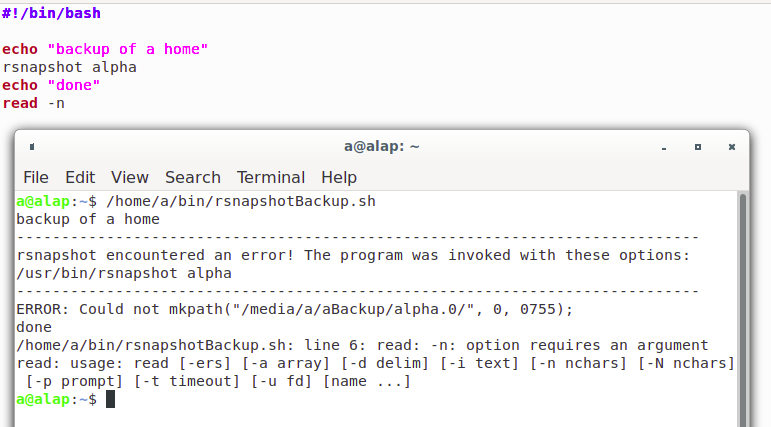
Is this the script Jason wrote: Exec= /home/a/.local/share/Trash/files/bin/rsnapshotBackup.sh If so can I copy it from the "Trash" and place it in the file system at /home/a/bin/rsnapshotBackup.sh The script Jason wrote, si or no? (below) echo "backup of a home" rsnapshot alpha echo "done" read -n a@alap:~$ locate rsnapshotBackup.sh bash: locate: command not found a@alap:~$ sudo find / -name rsnapshotBackup.sh [sudo] password for a: /media/a/aBackup/alpha.17/alap/home/a/bin/rsnapshotBackup.sh /media/a/aBackup/alpha.16/alap/home/a/bin/rsnapshotBackup.sh /media/a/aBackup/alpha.15/alap/home/a/bin/rsnapshotBackup.sh /media/a/aBackup/alpha.14/alap/home/a/bin/rsnapshotBackup.sh /media/a/aBackup/alpha.13/alap/home/a/bin/rsnapshotBackup.sh find: ‘/media/a/aBackup/alpha.0’: No such file or directory /home/a/.local/share/Trash/files/bin/rsnapshotBackup.sh find: ‘/run/user/1000/gvfs’: Permission denied /home/a/Desktop/emblem-symbolic-link.png /media/a/aBackup : opened with notepad,results: [Desktop Entry][Desktop Entry] Name=aBackup Exec=/home/a/bin/rsnapshotBackup.sh Comment= Terminal=true Type=Application Icon=/usr/share/icons/mate/256x256/emblems/emblem-symbolic-link.png Name=aBackup Exec=/home/a/bin/rsnapshotBackup.sh Comment= Terminal=true Type=Application Icon=/usr/share/icons/mate/256x256/emblems/emblem-symbolic-link.png On 10/11/20 11:19 AM, a wrote:
"/bin/rsnapshotBackup.sh" (attach) is sitting in the "trash", can I copy this part "/rsnapshotBackup.sh" and drop in in the file system and if do drop it in the files system will it auto place in correct order? Any insight? Thanks, a
On 10/11/20 10:58 AM, a wrote:
I located this in the trash opening the file contents:
On 10/11/20 10:39 AM, a wrote:#!/bin/bash
echo "backup of a home" rsnapshot alpha echo "done" read -n there are several option for file placement i.e. send to aBackup .... If usable how to proceed it known, Thanks a
I had previous copied immediately below early on, before I proceed with "Fix" attempt, using that information in attempted restore.
/home/a/Desktop/emblem-symbolic-link.png
/media/a/aBackup : opened with notepad,results:
[Desktop Entry][Desktop Entry] Name=aBackup Exec=/home/a/bin/rsnapshotBackup.sh Comment= Terminal=true Type=Application Icon=/usr/share/icons/mate/256x256/emblems/emblem-symbolic-link.png Name=aBackup Exec=/home/a/bin/rsnapshotBackup.sh Comment= Terminal=true Type=Application Icon=/usr/share/icons/mate/256x256/emblems/emblem-symbolic-link.png
a@alap:~$ locate rsnapshotBackup.sh bash: locate: command not found a@alap:~$ sudo find / -name rsnapshotBackup.sh [sudo] password for a: /media/a/aBackup/alpha.17/alap/home/a/bin/rsnapshotBackup.sh /media/a/aBackup/alpha.16/alap/home/a/bin/rsnapshotBackup.sh /media/a/aBackup/alpha.15/alap/home/a/bin/rsnapshotBackup.sh /media/a/aBackup/alpha.14/alap/home/a/bin/rsnapshotBackup.sh /media/a/aBackup/alpha.13/alap/home/a/bin/rsnapshotBackup.sh find: ‘/media/a/aBackup/alpha.0’: No such file or directory /home/a/.local/share/Trash/files/bin/rsnapshotBackup.sh find: ‘/run/user/1000/gvfs’: Permission denied a@alap:~$
On 10/11/20 9:44 AM, Akkana Peck wrote:
sudo find / -name rsnapshotBackup.sh
nmglug mailing list nmglug@lists.nmglug.org http://lists.nmglug.org/listinfo.cgi/nmglug-nmglug.org
nmglug mailing list nmglug@lists.nmglug.org http://lists.nmglug.org/listinfo.cgi/nmglug-nmglug.org
_______________________________________________ nmglug mailing list nmglug@lists.nmglug.org http://lists.nmglug.org/listinfo.cgi/nmglug-nmglug.org
participants (5)
-
 a
a -
 Akkana Peck
 -
 Geoff Chesshire
 -
 Harold Furbiter
 -
 Mark Galassi