
Hi I have ordered a 500G ssd to install my laptop, with my limited knowledge and support devices.(i no need a live disc) My tentative plan follow the Https below transfer to external HDD then reverse the process to the ssd? IN 1.) ( SUDO LINE BELOW FROM; https://www.ostechnix.com/backup-entire-linux-system-using-rsync/) USING THERE SITE EXAMPLE FOLLOWING: $ sudo rsync -aAXv / --exclude={"/dev/*","/proc/*","/sys/*","/tmp/*","/run/*","/mnt/*","/media/*","/lost+found"} /mnt Q.) IS MY DESTINATION CORRECTLY CONFIGURED?. SUBSTITUTING /MNT LAST PART PREVIOUS LINE FOR: /home/a//media/a/6fbdc743-fc0f-46e4-aea3-8160914c34ec/backup_HDD TO GET THE COMPOSITE LINE BELOW: $ sudo rsync -aAXv / --exclude={"/dev/*","/proc/*","/sys/*","/tmp/*","/run/*","/mnt/*","/media/*","/lost+found"} /home/a//media/a/6fbdc743-fc0f-46e4-aea3-8160914c34ec/backup_HDD BEST.a

Hi a and the rest of the mailing list, There are two ways _I_ would approach this... The first approach: If you are wanting to make a backup for all your files, then rysnc is probably the way to go. I typically do this if I want to pick-and-choose which files are put back onto the hard drive. I *also* will do this from a live USB. I don't typically like doing a root backup on a "live" system. I also don't prefer using --exclude since I pick-and-choose what I want to move over. I typically delete the extra stuff once I have set everything up on the new hard drive, tested to make sure everything I use works, then wait about 1 month before I clean off the remaining files. Of course you can always just keep the old hard drive in an ESD bag, and leave it in a safe place. If you need it, you can always mount the drive externally. rsync -PvvaAXc / /home/a//media/a/6fbdc743-fc0f-46e4-aea3-8160914c34ec/backup_HDD The second approach: Clonezilla can be used to take the source device and give it a 1:1 copy on the destination device. You can even copy over the boot/swap partitions to the destination device. This is the fastest way to transfer data from a old hard drive to a new hard drive and have the ability to pick up right where you left off on the old hard drive. I typically go down this route when clients of mine are in a rush to get their computer back ASAP. Once you have Clonezilla on a USB drive, and have loaded the live USB in the boot manager to your computer, you can follow this tutorial. https://www.youtube.com/watch?v=41tTudaQb0I&feature=youtu.be&t=10m8s If you do device-to-device and make sure you copy over all the partitions, you should be able to boot off the SSD right after you're done with Clonezilla. I hope I answered your question! Jared On 5/30/19 5:42 PM, a wrote:
Hi
I have ordered a 500G ssd to install my laptop, with my limited knowledge and support devices.(i no need a live disc) My tentative plan follow the Https below transfer to external HDD then reverse the process to the ssd?
IN 1.)
( SUDO LINE BELOW FROM;https://www.ostechnix.com/backup-entire-linux-system-using-rsync/) USING THERE SITE EXAMPLE FOLLOWING:
$ sudo rsync -aAXv / --exclude={"/dev/*","/proc/*","/sys/*","/tmp/*","/run/*","/mnt/*","/media/*","/lost+found"} /mnt
Q.) IS MY DESTINATION CORRECTLY CONFIGURED?. SUBSTITUTING /MNT LAST PART PREVIOUS LINE FOR: /home/a//media/a/6fbdc743-fc0f-46e4-aea3-8160914c34ec/backup_HDD TO GET THE COMPOSITE LINE BELOW:
$ sudo rsync -aAXv / --exclude={"/dev/*","/proc/*","/sys/*","/tmp/*","/run/*","/mnt/*","/media/*","/lost+found"} /home/a//media/a/6fbdc743-fc0f-46e4-aea3-8160914c34ec/backup_HDD
BEST.a
_______________________________________________ nmglug mailing list nmglug@lists.nmglug.org http://lists.nmglug.org/listinfo.cgi/nmglug-nmglug.org

I've had great results with dd on several drive upgrades On 5/30/19 7:15 PM, ABQLUG wrote:
Hi a and the rest of the mailing list,
There are two ways _I_ would approach this...
The first approach:
If you are wanting to make a backup for all your files, then rysnc is probably the way to go. I typically do this if I want to pick-and-choose which files are put back onto the hard drive. I *also* will do this from a live USB. I don't typically like doing a root backup on a "live" system. I also don't prefer using --exclude since I pick-and-choose what I want to move over. I typically delete the extra stuff once I have set everything up on the new hard drive, tested to make sure everything I use works, then wait about 1 month before I clean off the remaining files. Of course you can always just keep the old hard drive in an ESD bag, and leave it in a safe place. If you need it, you can always mount the drive externally.
rsync -PvvaAXc / /home/a//media/a/6fbdc743-fc0f-46e4-aea3-8160914c34ec/backup_HDD
The second approach:
Clonezilla can be used to take the source device and give it a 1:1 copy on the destination device. You can even copy over the boot/swap partitions to the destination device. This is the fastest way to transfer data from a old hard drive to a new hard drive and have the ability to pick up right where you left off on the old hard drive. I typically go down this route when clients of mine are in a rush to get their computer back ASAP.
Once you have Clonezilla on a USB drive, and have loaded the live USB in the boot manager to your computer, you can follow this tutorial. https://www.youtube.com/watch?v=41tTudaQb0I&feature=youtu.be&t=10m8s
If you do device-to-device and make sure you copy over all the partitions, you should be able to boot off the SSD right after you're done with Clonezilla.
I hope I answered your question!
Jared
On 5/30/19 5:42 PM, a wrote:
Hi
I have ordered a 500G ssd to install my laptop, with my limited knowledge and support devices.(i no need a live disc) My tentative plan follow the Https below transfer to external HDD then reverse the process to the ssd?
IN 1.)
( SUDO LINE BELOW FROM;https://www.ostechnix.com/backup-entire-linux-system-using-rsync/) USING THERE SITE EXAMPLE FOLLOWING:
$ sudo rsync -aAXv / --exclude={"/dev/*","/proc/*","/sys/*","/tmp/*","/run/*","/mnt/*","/media/*","/lost+found"} /mnt
Q.) IS MY DESTINATION CORRECTLY CONFIGURED?. SUBSTITUTING /MNT LAST PART PREVIOUS LINE FOR: /home/a//media/a/6fbdc743-fc0f-46e4-aea3-8160914c34ec/backup_HDD TO GET THE COMPOSITE LINE BELOW:
$ sudo rsync -aAXv / --exclude={"/dev/*","/proc/*","/sys/*","/tmp/*","/run/*","/mnt/*","/media/*","/lost+found"} /home/a//media/a/6fbdc743-fc0f-46e4-aea3-8160914c34ec/backup_HDD
BEST.a
_______________________________________________ nmglug mailing list nmglug@lists.nmglug.org http://lists.nmglug.org/listinfo.cgi/nmglug-nmglug.org
_______________________________________________ nmglug mailing list nmglug@lists.nmglug.org http://lists.nmglug.org/listinfo.cgi/nmglug-nmglug.org --

Jared Okay, I watched the video a delight, I'll watch it a few more times, didn't quite catch the file system suitability NTFS? I'll listen for that again. My understanding of the video, at this point,i'll call fuzzy logic one or two more viewings should answer most, I have a little youtube anxiety. I have been watching youtube for years ad free, last month they asked for a signup which I have been trying to skirt. so if I am not prevented by you tube I'll enjoy watching the video which is invaluable, Thanks for having the interest, taking the time making this herein informative, detailed recommendation. Best, a On 5/30/19 7:15 PM, ABQLUG wrote:
Hi a and the rest of the mailing list,
There are two ways _I_ would approach this...
The first approach:
If you are wanting to make a backup for all your files, then rysnc is probably the way to go. I typically do this if I want to pick-and-choose which files are put back onto the hard drive. I *also* will do this from a live USB. I don't typically like doing a root backup on a "live" system. I also don't prefer using --exclude since I pick-and-choose what I want to move over. I typically delete the extra stuff once I have set everything up on the new hard drive, tested to make sure everything I use works, then wait about 1 month before I clean off the remaining files. Of course you can always just keep the old hard drive in an ESD bag, and leave it in a safe place. If you need it, you can always mount the drive externally.
rsync -PvvaAXc / /home/a//media/a/6fbdc743-fc0f-46e4-aea3-8160914c34ec/backup_HDD
The second approach:
Clonezilla can be used to take the source device and give it a 1:1 copy on the destination device. You can even copy over the boot/swap partitions to the destination device. This is the fastest way to transfer data from a old hard drive to a new hard drive and have the ability to pick up right where you left off on the old hard drive. I typically go down this route when clients of mine are in a rush to get their computer back ASAP.
Once you have Clonezilla on a USB drive, and have loaded the live USB in the boot manager to your computer, you can follow this tutorial. https://www.youtube.com/watch?v=41tTudaQb0I&feature=youtu.be&t=10m8s
If you do device-to-device and make sure you copy over all the partitions, you should be able to boot off the SSD right after you're done with Clonezilla.
I hope I answered your question!
Jared
On 5/30/19 5:42 PM, a wrote:
Hi
I have ordered a 500G ssd to install my laptop, with my limited knowledge and support devices.(i no need a live disc) My tentative plan follow the Https below transfer to external HDD then reverse the process to the ssd?
IN 1.)
( SUDO LINE BELOW FROM;https://www.ostechnix.com/backup-entire-linux-system-using-rsync/) USING THERE SITE EXAMPLE FOLLOWING:
$ sudo rsync -aAXv / --exclude={"/dev/*","/proc/*","/sys/*","/tmp/*","/run/*","/mnt/*","/media/*","/lost+found"} /mnt
Q.) IS MY DESTINATION CORRECTLY CONFIGURED?. SUBSTITUTING /MNT LAST PART PREVIOUS LINE FOR: /home/a//media/a/6fbdc743-fc0f-46e4-aea3-8160914c34ec/backup_HDD TO GET THE COMPOSITE LINE BELOW:
$ sudo rsync -aAXv / --exclude={"/dev/*","/proc/*","/sys/*","/tmp/*","/run/*","/mnt/*","/media/*","/lost+found"} /home/a//media/a/6fbdc743-fc0f-46e4-aea3-8160914c34ec/backup_HDD
BEST.a
_______________________________________________ nmglug mailing list nmglug@lists.nmglug.org http://lists.nmglug.org/listinfo.cgi/nmglug-nmglug.org

Hi a I highly recommend coming to a meeting to get this done in person. For something like this its good to get confirmation that someone is willing and able to help you at the meeting. It would also be good to meet this person early to allow time for such a migration. I might be able to be this person next week but my days are so crazy its hard to say what time I would be able to get to the meeting. Jason On 5/30/19 5:42 PM, a wrote:
Hi
I have ordered a 500G ssd to install my laptop, with my limited knowledge and support devices.(i no need a live disc) My tentative plan follow the Https below transfer to external HDD then reverse the process to the ssd?
IN 1.)
( SUDO LINE BELOW FROM; https://www.ostechnix.com/backup-entire-linux-system-using-rsync/) USING THERE SITE EXAMPLE FOLLOWING:
$ sudo rsync -aAXv / --exclude={"/dev/*","/proc/*","/sys/*","/tmp/*","/run/*","/mnt/*","/media/*","/lost+found"} /mnt
Q.) IS MY DESTINATION CORRECTLY CONFIGURED?. SUBSTITUTING /MNT LAST PART PREVIOUS LINE FOR: /home/a//media/a/6fbdc743-fc0f-46e4-aea3-8160914c34ec/backup_HDD TO GET THE COMPOSITE LINE BELOW:
$ sudo rsync -aAXv / --exclude={"/dev/*","/proc/*","/sys/*","/tmp/*","/run/*","/mnt/*","/media/*","/lost+found"} /home/a//media/a/6fbdc743-fc0f-46e4-aea3-8160914c34ec/backup_HDD
BEST.a
_______________________________________________ nmglug mailing list nmglug@lists.nmglug.org http://lists.nmglug.org/listinfo.cgi/nmglug-nmglug.org
The SSD has been ordered with a delivery date of May 4-7, On 5/30/19 9:02 PM, jason schaefer wrote:
Hi a
I highly recommend coming to a meeting to get this done in person. For something like this its good to get confirmation that someone is willing and able to help you at the meeting. It would also be good to meet this person early to allow time for such a migration. I might be able to be this person next week but my days are so crazy its hard to say what time I would be able to get to the meeting.
Jason
On 5/30/19 5:42 PM, a wrote:
Hi
I have ordered a 500G ssd to install my laptop, with my limited knowledge and support devices.(i no need a live disc) My tentative plan follow the Https below transfer to external HDD then reverse the process to the ssd?
IN 1.)
( SUDO LINE BELOW FROM;https://www.ostechnix.com/backup-entire-linux-system-using-rsync/) USING THERE SITE EXAMPLE FOLLOWING:
$ sudo rsync -aAXv / --exclude={"/dev/*","/proc/*","/sys/*","/tmp/*","/run/*","/mnt/*","/media/*","/lost+found"} /mnt
Q.) IS MY DESTINATION CORRECTLY CONFIGURED?. SUBSTITUTING /MNT LAST PART PREVIOUS LINE FOR: /home/a//media/a/6fbdc743-fc0f-46e4-aea3-8160914c34ec/backup_HDD TO GET THE COMPOSITE LINE BELOW:
$ sudo rsync -aAXv / --exclude={"/dev/*","/proc/*","/sys/*","/tmp/*","/run/*","/mnt/*","/media/*","/lost+found"} /home/a//media/a/6fbdc743-fc0f-46e4-aea3-8160914c34ec/backup_HDD
BEST.a
_______________________________________________ nmglug mailing list nmglug@lists.nmglug.org http://lists.nmglug.org/listinfo.cgi/nmglug-nmglug.org
_______________________________________________ nmglug mailing list nmglug@lists.nmglug.org http://lists.nmglug.org/listinfo.cgi/nmglug-nmglug.org
Hi a, You have the old drive, an external, and the new SSD on order, right? Just wanted to make sure that you have all those components. If you wanted to bring the bring the laptop by to the meeting I'm hosting in Albuquerque, that's totally fine! I hope your shipping provider delivers the SSD in time... It on May the 4th at 6 pm. https://www.abqlug.com/attendee/ Remember moving large files can take a while, do you know how large your data is? df -h -x squashfs Run that command to list how much data you're using on the current system. I would be willing to help you after the meetup is over. If you would like my help, that is. XD Regards, Jared On 5/31/19 6:20 AM, a wrote:
The SSD has been ordered with a delivery date of May 4-7,
On 5/30/19 9:02 PM, jason schaefer wrote:
Hi a
I highly recommend coming to a meeting to get this done in person. For something like this its good to get confirmation that someone is willing and able to help you at the meeting. It would also be good to meet this person early to allow time for such a migration. I might be able to be this person next week but my days are so crazy its hard to say what time I would be able to get to the meeting.
Jason
On 5/30/19 5:42 PM, a wrote:
Hi
I have ordered a 500G ssd to install my laptop, with my limited knowledge and support devices.(i no need a live disc) My tentative plan follow the Https below transfer to external HDD then reverse the process to the ssd?
IN 1.)
( SUDO LINE BELOW FROM;https://www.ostechnix.com/backup-entire-linux-system-using-rsync/) USING THERE SITE EXAMPLE FOLLOWING:
$ sudo rsync -aAXv / --exclude={"/dev/*","/proc/*","/sys/*","/tmp/*","/run/*","/mnt/*","/media/*","/lost+found"} /mnt
Q.) IS MY DESTINATION CORRECTLY CONFIGURED?. SUBSTITUTING /MNT LAST PART PREVIOUS LINE FOR: /home/a//media/a/6fbdc743-fc0f-46e4-aea3-8160914c34ec/backup_HDD TO GET THE COMPOSITE LINE BELOW:
$ sudo rsync -aAXv / --exclude={"/dev/*","/proc/*","/sys/*","/tmp/*","/run/*","/mnt/*","/media/*","/lost+found"} /home/a//media/a/6fbdc743-fc0f-46e4-aea3-8160914c34ec/backup_HDD
BEST.a
_______________________________________________ nmglug mailing list nmglug@lists.nmglug.org http://lists.nmglug.org/listinfo.cgi/nmglug-nmglug.org
_______________________________________________ nmglug mailing list nmglug@lists.nmglug.org http://lists.nmglug.org/listinfo.cgi/nmglug-nmglug.org
_______________________________________________ nmglug mailing list nmglug@lists.nmglug.org http://lists.nmglug.org/listinfo.cgi/nmglug-nmglug.org
Thanks for the invite, I live in Taos I can manage nmglug Santa Fe, Burque is hard to do in one day.Thanks anyway. a a@alap:~$ df -h -x squashfs Filesystem Size Used Avail Use% Mounted on udev 2.0G 0 2.0G 0% /dev tmpfs 395M 12M 384M 3% /run /dev/sda1 289G 165G 110G 61% / tmpfs 2.0G 68K 2.0G 1% /dev/shm tmpfs 5.0M 4.0K 5.0M 1% /run/lock tmpfs 2.0G 0 2.0G 0% /sys/fs/cgroup tmpfs 395M 20K 395M 1% /run/user/121 tmpfs 395M 48K 395M 1% /run/user/1000 tmpfs 395M 0 395M 0% /run/user/0 On 5/31/19 2:03 PM, ABQLUG wrote:
df -h -x squashfs
Hi a, It's no problem. For the record I said May 4th, I meant June 4th. Sorry. The / is 165 GB, so it should take about 1 hours - 1 1/2 hours to completely backup all of it's contents. The point of that youtube video was to show you the process of how I similarly use clonezilla. That's why I sent you the video with the time code starting right at the time where he boots to clonezilla. I probably should have given you this link instead of the YT video. https://clonezilla.org/show-live-doc-content.php?topic=clonezilla-live/doc/0... He installs it with that Yumi iso loader since he is on Windows . I don't recommend that. If you were going to use Windows I would recommend Rufus. If you're using Linux, I would just dd the iso to the usb drive. sudo dd if=/path/to.iso of=/dev/sdX bs=8192 However, if you mess up the of= part, you can destroy any disk. So please make sure you have the right (usb) drive. Run lsblk to make sure you have the right drive. lsblk Etcher is okay, but isn't perfect (if you wanted a GUI). https://www.balena.io/etcher/ Regards, Jared On 5/31/19 2:20 PM, a wrote:
Thanks for the invite, I live in Taos I can manage nmglug Santa Fe, Burque is hard to do in one day.Thanks anyway. a
a@alap:~$ df -h -x squashfs Filesystem Size Used Avail Use% Mounted on udev 2.0G 0 2.0G 0% /dev tmpfs 395M 12M 384M 3% /run /dev/sda1 289G 165G 110G 61% / tmpfs 2.0G 68K 2.0G 1% /dev/shm tmpfs 5.0M 4.0K 5.0M 1% /run/lock tmpfs 2.0G 0 2.0G 0% /sys/fs/cgroup tmpfs 395M 20K 395M 1% /run/user/121 tmpfs 395M 48K 395M 1% /run/user/1000 tmpfs 395M 0 395M 0% /run/user/0
On 5/31/19 2:03 PM, ABQLUG wrote:
df -h -x squashfs
As they say in Greece it's all Chinese to me. thanks for the try. On 5/31/19 3:03 PM, ABQLUG wrote:
Hi a,
It's no problem. For the record I said May 4th, I meant June 4th. Sorry.
The / is 165 GB, so it should take about 1 hours - 1 1/2 hours to completely backup all of it's contents.
The point of that youtube video was to show you the process of how I similarly use clonezilla. That's why I sent you the video with the time code starting right at the time where he boots to clonezilla.
I probably should have given you this link instead of the YT video. https://clonezilla.org/show-live-doc-content.php?topic=clonezilla-live/doc/0...
He installs it with that Yumi iso loader since he is on Windows . I don't recommend that. If you were going to use Windows I would recommend Rufus.
If you're using Linux, I would just dd the iso to the usb drive.
sudo dd if=/path/to.iso of=/dev/sdX bs=8192
However, if you mess up the of= part, you can destroy any disk. So please make sure you have the right (usb) drive. Run lsblk to make sure you have the right drive.
lsblk
Etcher is okay, but isn't perfect (if you wanted a GUI). https://www.balena.io/etcher/
Regards,
Jared
On 5/31/19 2:20 PM, a wrote:
Thanks for the invite, I live in Taos I can manage nmglug Santa Fe, Burque is hard to do in one day.Thanks anyway. a
a@alap:~$ df -h -x squashfs Filesystem Size Used Avail Use% Mounted on udev 2.0G 0 2.0G 0% /dev tmpfs 395M 12M 384M 3% /run /dev/sda1 289G 165G 110G 61% / tmpfs 2.0G 68K 2.0G 1% /dev/shm tmpfs 5.0M 4.0K 5.0M 1% /run/lock tmpfs 2.0G 0 2.0G 0% /sys/fs/cgroup tmpfs 395M 20K 395M 1% /run/user/121 tmpfs 395M 48K 395M 1% /run/user/1000 tmpfs 395M 0 395M 0% /run/user/0
On 5/31/19 2:03 PM, ABQLUG wrote:
df -h -x squashfs
_______________________________________________ nmglug mailing list nmglug@lists.nmglug.org http://lists.nmglug.org/listinfo.cgi/nmglug-nmglug.org
Hi Jason Thanks for the good thought, i do not know who that person, to meet early, could be?. If you will be around Thursday lunch get things rolling, under 300Gb. or wait till later in the week, see how things "shake out", another meeting is okay, the ssd has arrived I have a usb adapter, Best a On 5/30/19 9:02 PM, jason schaefer wrote:
Hi a
I highly recommend coming to a meeting to get this done in person. For something like this its good to get confirmation that someone is willing and able to help you at the meeting. It would also be good to meet this person early to allow time for such a migration. I might be able to be this person next week but my days are so crazy its hard to say what time I would be able to get to the meeting.
Jason
On 5/30/19 5:42 PM, a wrote:
Hi
I have ordered a 500G ssd to install my laptop, with my limited knowledge and support devices.(i no need a live disc) My tentative plan follow the Https below transfer to external HDD then reverse the process to the ssd?
IN 1.)
( SUDO LINE BELOW FROM;https://www.ostechnix.com/backup-entire-linux-system-using-rsync/) USING THERE SITE EXAMPLE FOLLOWING:
$ sudo rsync -aAXv / --exclude={"/dev/*","/proc/*","/sys/*","/tmp/*","/run/*","/mnt/*","/media/*","/lost+found"} /mnt
Q.) IS MY DESTINATION CORRECTLY CONFIGURED?. SUBSTITUTING /MNT LAST PART PREVIOUS LINE FOR: /home/a//media/a/6fbdc743-fc0f-46e4-aea3-8160914c34ec/backup_HDD TO GET THE COMPOSITE LINE BELOW:
$ sudo rsync -aAXv / --exclude={"/dev/*","/proc/*","/sys/*","/tmp/*","/run/*","/mnt/*","/media/*","/lost+found"} /home/a//media/a/6fbdc743-fc0f-46e4-aea3-8160914c34ec/backup_HDD
BEST.a
_______________________________________________ nmglug mailing list nmglug@lists.nmglug.org http://lists.nmglug.org/listinfo.cgi/nmglug-nmglug.org
_______________________________________________ nmglug mailing list nmglug@lists.nmglug.org http://lists.nmglug.org/listinfo.cgi/nmglug-nmglug.org
Hi All, I've mentioned before but dd makes this a simple and fool-proof method of cloning the old drive to the new one. It takes an enclosure for the new drive w/ usb connection and that's it. After checking the drive names to get the correct info into the command line it is simply running something along the following (in case your drives show up differently but this is what I did upon fellow NMGLUGgers. Special thanks to Eric almost 10 years ago!!): dd if=/dev/sda of=/dev/sdb bs=1M conv=notrunc,noerror ...will copy everything from hard drive sda to sdb (i.e. all partitions, swap and all data), a true clone. No need to create partitions or format them on the target hard drive as the dd command will create them because it is copy of every single block of sda. Now if you where copying a single partition to a new drive yes you would have to create the target partition on the new hard drive. dd if=/dev/sda1 of=/dev/sdb1 bs=1M conv=notrunc,noerror In the command above this would clone partition 1 on drive sda to partition 1 on drive sdb. In this case you would not need to format the new target partition either as it is again copying every block of partition 1 of the source sda1 to the target sdb1. Hope this helps. - Eric On 6/3/19 6:47 PM, a wrote:
Hi Jason
Thanks for the good thought, i do not know who that person, to meet early, could be?. If you will be around Thursday lunch get things rolling, under 300Gb. or wait till later in the week, see how things "shake out", another meeting is okay, the ssd has arrived I have a usb adapter,
Best a
On 5/30/19 9:02 PM, jason schaefer wrote:
Hi a
I highly recommend coming to a meeting to get this done in person. For something like this its good to get confirmation that someone is willing and able to help you at the meeting. It would also be good to meet this person early to allow time for such a migration. I might be able to be this person next week but my days are so crazy its hard to say what time I would be able to get to the meeting.
Jason
On 5/30/19 5:42 PM, a wrote:
Hi
I have ordered a 500G ssd to install my laptop, with my limited knowledge and support devices.(i no need a live disc) My tentative plan follow the Https below transfer to external HDD then reverse the process to the ssd?
IN 1.)
( SUDO LINE BELOW FROM;https://www.ostechnix.com/backup-entire-linux-system-using-rsync/) USING THERE SITE EXAMPLE FOLLOWING:
$ sudo rsync -aAXv / --exclude={"/dev/*","/proc/*","/sys/*","/tmp/*","/run/*","/mnt/*","/media/*","/lost+found"} /mnt
Q.) IS MY DESTINATION CORRECTLY CONFIGURED?. SUBSTITUTING /MNT LAST PART PREVIOUS LINE FOR: /home/a//media/a/6fbdc743-fc0f-46e4-aea3-8160914c34ec/backup_HDD TO GET THE COMPOSITE LINE BELOW:
$ sudo rsync -aAXv / --exclude={"/dev/*","/proc/*","/sys/*","/tmp/*","/run/*","/mnt/*","/media/*","/lost+found"} /home/a//media/a/6fbdc743-fc0f-46e4-aea3-8160914c34ec/backup_HDD
BEST.a
_______________________________________________ nmglug mailing list nmglug@lists.nmglug.org http://lists.nmglug.org/listinfo.cgi/nmglug-nmglug.org
_______________________________________________ nmglug mailing list nmglug@lists.nmglug.org http://lists.nmglug.org/listinfo.cgi/nmglug-nmglug.org
_______________________________________________ nmglug mailing list nmglug@lists.nmglug.org http://lists.nmglug.org/listinfo.cgi/nmglug-nmglug.org
--


This is great info, Brian. On Mon, Jun 3, 2019 at 7:08 PM Brian O'Keefe <okeefe@cybermesa.com> wrote:
Hi All,
I've mentioned before but dd makes this a simple and fool-proof method of cloning the old drive to the new one. It takes an enclosure for the new drive w/ usb connection and that's it. After checking the drive names to get the correct info into the command line it is simply running something along the following (in case your drives show up differently but this is what I did upon fellow NMGLUGgers. Special thanks to Eric almost 10 years ago!!):
dd if=/dev/sda of=/dev/sdb bs=1M conv=notrunc,noerror
...will copy everything from hard drive sda to sdb (i.e. all partitions, swap and all data), a true clone. No need to create partitions or format them on the target hard drive as the dd command will create them because it is copy of every single block of sda.
Now if you where copying a single partition to a new drive yes you would have to create the target partition on the new hard drive.
dd if=/dev/sda1 of=/dev/sdb1 bs=1M conv=notrunc,noerror
In the command above this would clone partition 1 on drive sda to partition 1 on drive sdb. In this case you would not need to format the new target partition either as it is again copying every block of partition 1 of the source sda1 to the target sdb1.
Hope this helps.
- Eric
On 6/3/19 6:47 PM, a wrote:
Hi Jason
Thanks for the good thought, i do not know who that person, to meet early, could be?. If you will be around Thursday lunch get things rolling, under 300Gb. or wait till later in the week, see how things "shake out", another meeting is okay, the ssd has arrived I have a usb adapter,
Best a
On 5/30/19 9:02 PM, jason schaefer wrote:
Hi a
I highly recommend coming to a meeting to get this done in person. For something like this its good to get confirmation that someone is willing and able to help you at the meeting. It would also be good to meet this person early to allow time for such a migration. I might be able to be this person next week but my days are so crazy its hard to say what time I would be able to get to the meeting.
Jason
On 5/30/19 5:42 PM, a wrote:
Hi
I have ordered a 500G ssd to install my laptop, with my limited knowledge and support devices.(i no need a live disc) My tentative plan follow the Https below transfer to external HDD then reverse the process to the ssd?
IN 1.)
( SUDO LINE BELOW FROM; https://www.ostechnix.com/backup-entire-linux-system-using-rsync/) USING THERE SITE EXAMPLE FOLLOWING:
$ sudo rsync -aAXv / --exclude={"/dev/*","/proc/*","/sys/*","/tmp/*","/run/*","/mnt/*","/media/*","/lost+found"} /mnt
Q.) IS MY DESTINATION CORRECTLY CONFIGURED?. SUBSTITUTING /MNT LAST PART PREVIOUS LINE FOR: /home/a//media/a/6fbdc743-fc0f-46e4-aea3-8160914c34ec/backup_HDD TO GET THE COMPOSITE LINE BELOW:
$ sudo rsync -aAXv / --exclude={"/dev/*","/proc/*","/sys/*","/tmp/*","/run/*","/mnt/*","/media/*","/lost+found"} /home/a//media/a/6fbdc743-fc0f-46e4-aea3-8160914c34ec/backup_HDD
BEST.a
_______________________________________________ nmglug mailing listnmglug@lists.nmglug.orghttp://lists.nmglug.org/listinfo.cgi/nmglug-nmglug.org
_______________________________________________ nmglug mailing listnmglug@lists.nmglug.orghttp://lists.nmglug.org/listinfo.cgi/nmglug-nmglug.org
_______________________________________________ nmglug mailing listnmglug@lists.nmglug.orghttp://lists.nmglug.org/listinfo.cgi/nmglug-nmglug.org
-- _______________________________________________ nmglug mailing list nmglug@lists.nmglug.org http://lists.nmglug.org/listinfo.cgi/nmglug-nmglug.org

You bet Satsangat. I used a Gparted disk to find the definition of the drives and then the command line in the included terminal emulator after checking, rechecking and then checking again that I had the correct drive designations. I think the cloning took less that an hour and no data loss or other glitch. Just a new, larger SSD with all, everything. If someone wants to walk a through it that would be a good thin. I think Jason helped me as well as Eric but that was so long ago I don't know, besides you, who can walk a through it. It scared me aft first also but it turns out to be a simple process and I will do it again should my 1 TB SSD ever need to have more capacity. I can't imagine that but then I also thought that my Apple G3 desktop with 4GB drive was enormous! It wasn't Brian On 6/4/19 9:39 AM, Satsangat Khalsa wrote:
This is great info, Brian.
On Mon, Jun 3, 2019 at 7:08 PM Brian O'Keefe <okeefe@cybermesa.com <mailto:okeefe@cybermesa.com>> wrote:
Hi All,
I've mentioned before but dd makes this a simple and fool-proof method of cloning the old drive to the new one. It takes an enclosure for the new drive w/ usb connection and that's it. After checking the drive names to get the correct info into the command line it is simply running something along the following (in case your drives show up differently but this is what I did upon fellow NMGLUGgers. Special thanks to Eric almost 10 years ago!!):
dd if=/dev/sda of=/dev/sdb bs=1M conv=notrunc,noerror
...will copy everything from hard drive sda to sdb (i.e. all partitions, swap and all data), a true clone. No need to create partitions or format them on the target hard drive as the dd command will create them because it is copy of every single block of sda.
Now if you where copying a single partition to a new drive yes you would have to create the target partition on the new hard drive.
dd if=/dev/sda1 of=/dev/sdb1 bs=1M conv=notrunc,noerror
In the command above this would clone partition 1 on drive sda to partition 1 on drive sdb. In this case you would not need to format the new target partition either as it is again copying every block of partition 1 of the source sda1 to the target sdb1.
Hope this helps.
- Eric
On 6/3/19 6:47 PM, a wrote:
Hi Jason
Thanks for the good thought, i do not know who that person, to meet early, could be?. If you will be around Thursday lunch get things rolling, under 300Gb. or wait till later in the week, see how things "shake out", another meeting is okay, the ssd has arrived I have a usb adapter,
Best a
On 5/30/19 9:02 PM, jason schaefer wrote:
Hi a
I highly recommend coming to a meeting to get this done in person. For something like this its good to get confirmation that someone is willing and able to help you at the meeting. It would also be good to meet this person early to allow time for such a migration. I might be able to be this person next week but my days are so crazy its hard to say what time I would be able to get to the meeting.
Jason
On 5/30/19 5:42 PM, a wrote:
Hi
I have ordered a 500G ssd to install my laptop, with my limited knowledge and support devices.(i no need a live disc) My tentative plan follow the Https below transfer to external HDD then reverse the process to the ssd?
IN 1.)
( SUDO LINE BELOW FROM;https://www.ostechnix.com/backup-entire-linux-system-using-rsync/) USING THERE SITE EXAMPLE FOLLOWING:
$ sudo rsync -aAXv / --exclude={"/dev/*","/proc/*","/sys/*","/tmp/*","/run/*","/mnt/*","/media/*","/lost+found"} /mnt
Q.) IS MY DESTINATION CORRECTLY CONFIGURED?. SUBSTITUTING /MNT LAST PART PREVIOUS LINE FOR: /home/a//media/a/6fbdc743-fc0f-46e4-aea3-8160914c34ec/backup_HDD TO GET THE COMPOSITE LINE BELOW:
$ sudo rsync -aAXv / --exclude={"/dev/*","/proc/*","/sys/*","/tmp/*","/run/*","/mnt/*","/media/*","/lost+found"} /home/a//media/a/6fbdc743-fc0f-46e4-aea3-8160914c34ec/backup_HDD
BEST.a
_______________________________________________ nmglug mailing list nmglug@lists.nmglug.org <mailto:nmglug@lists.nmglug.org> http://lists.nmglug.org/listinfo.cgi/nmglug-nmglug.org
_______________________________________________ nmglug mailing list nmglug@lists.nmglug.org <mailto:nmglug@lists.nmglug.org> http://lists.nmglug.org/listinfo.cgi/nmglug-nmglug.org
_______________________________________________ nmglug mailing list nmglug@lists.nmglug.org <mailto:nmglug@lists.nmglug.org> http://lists.nmglug.org/listinfo.cgi/nmglug-nmglug.org
-- _______________________________________________ nmglug mailing list nmglug@lists.nmglug.org <mailto:nmglug@lists.nmglug.org> http://lists.nmglug.org/listinfo.cgi/nmglug-nmglug.org
_______________________________________________ nmglug mailing list nmglug@lists.nmglug.org http://lists.nmglug.org/listinfo.cgi/nmglug-nmglug.org --


I created two clonezilla USB sticks using Windows 7 and then again using LINUX. Both went smoothly exactly as described in the video and in checking the USB sticks there were no errors and a physical examination indicates that all the files appear to be there. I am using a EFI Motherboard from Gigabyte for an Intel 5 processor. BIOS Date 07/22/2013 Vendor American Megatrends Inc. (American Megatrends, www.ami.com) Version V10.0 Board Name Z87-G55 (MS-7821) Vendor MSI Version 2.0 But it won't boot. It tries to, gives up, and then starts LINUX Mint or it just throws an error about there not being a system. Any ideas of what I should check? I tried all the normal things like switching back and forth from EFI to Legacy plus EFI boot and making the USB the primary boot disk manually. The beast is about 6 years old or more. Its never had anything other than Mint on it. Could it be too old? The BIOS is one of the original EFI versions (i.e, buggy and hard to manage) and I have never updated it. PS I built this computer myself and the Linux system is mounted on a 500 gig Samsung SSD and has 24 gigs of memory. On 6/4/19 12:20 PM, Brian O'Keefe wrote:
You bet Satsangat. I used a Gparted disk to find the definition of the drives and then the command line in the included terminal emulator after checking, rechecking and then checking again that I had the correct drive designations. I think the cloning took less that an hour and no data loss or other glitch. Just a new, larger SSD with all, everything. If someone wants to walk a through it that would be a good thin. I think Jason helped me as well as Eric but that was so long ago I don't know, besides you, who can walk a through it. It scared me aft first also but it turns out to be a simple process and I will do it again should my 1 TB SSD ever need to have more capacity. I can't imagine that but then I also thought that my Apple G3 desktop with 4GB drive was enormous! It wasn't
Brian
On 6/4/19 9:39 AM, Satsangat Khalsa wrote:
This is great info, Brian.
On Mon, Jun 3, 2019 at 7:08 PM Brian O'Keefe <okeefe@cybermesa.com <mailto:okeefe@cybermesa.com>> wrote:
Hi All,
I've mentioned before but dd makes this a simple and fool-proof method of cloning the old drive to the new one. It takes an enclosure for the new drive w/ usb connection and that's it. After checking the drive names to get the correct info into the command line it is simply running something along the following (in case your drives show up differently but this is what I did upon fellow NMGLUGgers. Special thanks to Eric almost 10 years ago!!):
dd if=/dev/sda of=/dev/sdb bs=1M conv=notrunc,noerror
...will copy everything from hard drive sda to sdb (i.e. all partitions, swap and all data), a true clone. No need to create partitions or format them on the target hard drive as the dd command will create them because it is copy of every single block of sda.
Now if you where copying a single partition to a new drive yes you would have to create the target partition on the new hard drive.
dd if=/dev/sda1 of=/dev/sdb1 bs=1M conv=notrunc,noerror
In the command above this would clone partition 1 on drive sda to partition 1 on drive sdb. In this case you would not need to format the new target partition either as it is again copying every block of partition 1 of the source sda1 to the target sdb1.
Hope this helps.
- Eric
On 6/3/19 6:47 PM, a wrote:
Hi Jason
Thanks for the good thought, i do not know who that person, to meet early, could be?. If you will be around Thursday lunch get things rolling, under 300Gb. or wait till later in the week, see how things "shake out", another meeting is okay, the ssd has arrived I have a usb adapter,
Best a
On 5/30/19 9:02 PM, jason schaefer wrote:
Hi a
I highly recommend coming to a meeting to get this done in person. For something like this its good to get confirmation that someone is willing and able to help you at the meeting. It would also be good to meet this person early to allow time for such a migration. I might be able to be this person next week but my days are so crazy its hard to say what time I would be able to get to the meeting.
Jason
On 5/30/19 5:42 PM, a wrote:
Hi
I have ordered a 500G ssd to install my laptop, with my limited knowledge and support devices.(i no need a live disc) My tentative plan follow the Https below transfer to external HDD then reverse the process to the ssd?
IN 1.)
( SUDO LINE BELOW FROM; https://www.ostechnix.com/backup-entire-linux-system-using-rsync/) USING THERE SITE EXAMPLE FOLLOWING:
$ sudo rsync -aAXv / --exclude={"/dev/*","/proc/*","/sys/*","/tmp/*","/run/*","/mnt/*","/media/*","/lost+found"} /mnt
Q.) IS MY DESTINATION CORRECTLY CONFIGURED?. SUBSTITUTING /MNT LAST PART PREVIOUS LINE FOR: /home/a//media/a/6fbdc743-fc0f-46e4-aea3-8160914c34ec/backup_HDD TO GET THE COMPOSITE LINE BELOW:
$ sudo rsync -aAXv / --exclude={"/dev/*","/proc/*","/sys/*","/tmp/*","/run/*","/mnt/*","/media/*","/lost+found"} /home/a//media/a/6fbdc743-fc0f-46e4-aea3-8160914c34ec/backup_HDD
BEST.a
_______________________________________________ nmglug mailing list nmglug@lists.nmglug.org <mailto:nmglug@lists.nmglug.org> http://lists.nmglug.org/listinfo.cgi/nmglug-nmglug.org
_______________________________________________ nmglug mailing list nmglug@lists.nmglug.org <mailto:nmglug@lists.nmglug.org> http://lists.nmglug.org/listinfo.cgi/nmglug-nmglug.org
_______________________________________________ nmglug mailing list nmglug@lists.nmglug.org <mailto:nmglug@lists.nmglug.org> http://lists.nmglug.org/listinfo.cgi/nmglug-nmglug.org
-- _______________________________________________ nmglug mailing list nmglug@lists.nmglug.org <mailto:nmglug@lists.nmglug.org> http://lists.nmglug.org/listinfo.cgi/nmglug-nmglug.org
_______________________________________________ nmglug mailing list nmglug@lists.nmglug.org http://lists.nmglug.org/listinfo.cgi/nmglug-nmglug.org --
_______________________________________________ nmglug mailing list nmglug@lists.nmglug.org http://lists.nmglug.org/listinfo.cgi/nmglug-nmglug.org
Ignore the last email. Turns out I have an MSI motherboard. I build so many of these that I lose track. I can now get the USB stick to begin to boot but I get the error that it can't find or run (can't remember which) ldlinux.c32. The file is there under syslinux. Anyone familiar with this error? -------- Forwarded Message -------- Subject: Re: [nmglug] HDD > SSD Date: Wed, 5 Jun 2019 10:55:52 -0600 From: M <chochoms@earthlink.net> Reply-To: NMGLUG.org mailing list <nmglug@lists.nmglug.org> To: nmglug@lists.nmglug.org I created two clonezilla USB sticks using Windows 7 and then again using LINUX. Both went smoothly exactly as described in the video and in checking the USB sticks there were no errors and a physical examination indicates that all the files appear to be there. I am using a EFI Motherboard from Gigabyte for an Intel 5 processor. BIOS Date 07/22/2013 Vendor American Megatrends Inc. (American Megatrends, www.ami.com) Version V10.0 Board Name Z87-G55 (MS-7821) Vendor MSI Version 2.0 But it won't boot. It tries to, gives up, and then starts LINUX Mint or it just throws an error about there not being a system. Any ideas of what I should check? I tried all the normal things like switching back and forth from EFI to Legacy plus EFI boot and making the USB the primary boot disk manually. The beast is about 6 years old or more. Its never had anything other than Mint on it. Could it be too old? The BIOS is one of the original EFI versions (i.e, buggy and hard to manage) and I have never updated it. PS I built this computer myself and the Linux system is mounted on a 500 gig Samsung SSD and has 24 gigs of memory.
Hi Mark, Are you referring to the YouTube video I sent out about a week ago? It wasn't a good video to learn how to 'burn' the .iso file to a USB drive. Sorry if that caused confusion. What program are you using to write the .iso to the USB drive? Typically Rufus (windows only) will take care of the syslinux files for you. Though dd on Linux should have worked as well. With older motherboards sometimes the USB3.0 ports don't work well with booting. Have you tried using a 2.0 port (and drive for that matter)? It feels like (from what I read) that the fault is probably on how the .iso file was 'burned' to the USB drive. Let us know how this goes for you! Jared On 6/5/19 11:34 AM, M wrote:
Ignore the last email. Turns out I have an MSI motherboard. I build so many of these that I lose track. I can now get the USB stick to begin to boot but I get the error that it can't find or run (can't remember which) ldlinux.c32. The file is there under syslinux. Anyone familiar with this error?
-------- Forwarded Message -------- Subject: Re: [nmglug] HDD > SSD Date: Wed, 5 Jun 2019 10:55:52 -0600 From: M <chochoms@earthlink.net> Reply-To: NMGLUG.org mailing list <nmglug@lists.nmglug.org> To: nmglug@lists.nmglug.org
I created two clonezilla USB sticks using Windows 7 and then again using LINUX. Both went smoothly exactly as described in the video and in checking the USB sticks there were no errors and a physical examination indicates that all the files appear to be there. I am using a EFI Motherboard from Gigabyte for an Intel 5 processor.
BIOS Date 07/22/2013 Vendor American Megatrends Inc. (American Megatrends, www.ami.com) Version V10.0 Board Name Z87-G55 (MS-7821) Vendor MSI Version 2.0
But it won't boot. It tries to, gives up, and then starts LINUX Mint or it just throws an error about there not being a system.
Any ideas of what I should check? I tried all the normal things like switching back and forth from EFI to Legacy plus EFI boot and making the USB the primary boot disk manually.
The beast is about 6 years old or more. Its never had anything other than Mint on it. Could it be too old? The BIOS is one of the original EFI versions (i.e, buggy and hard to manage) and I have never updated it.
PS I built this computer myself and the Linux system is mounted on a 500 gig Samsung SSD and has 24 gigs of memory.
_______________________________________________ nmglug mailing list nmglug@lists.nmglug.org http://lists.nmglug.org/listinfo.cgi/nmglug-nmglug.org
Brian I downloaded to ssd just under two hours got the message invalid partition table on /dev/sdd ----signature aa74 so i cancelled download because I realized it may not be mounted reason does no show on the file list. so tried to open gparted but will not open. Any suggestions? Thanks a dd if=/dev/sda of=/dev/sdd bs=1M conv=notrunc,noerror a@alap:~$ lsblk NAME MAJ:MIN RM SIZE RO TYPE MOUNTPOINT sda 8:0 0 298.1G 0 disk ├─sda1 8:1 0 294.1G 0 part / └─sda5 8:5 0 4G 0 part [SWAP] sdd 8:48 0 465.8G 0 disk ├─sdd1 8:49 0 294.1G 0 part └─sdd2 8:50 0 1K 0 part sr0 11:0 1 1024M 0 rom On 6/3/19 7:08 PM, Brian O'Keefe wrote:
Hi All,
I've mentioned before but dd makes this a simple and fool-proof method of cloning the old drive to the new one. It takes an enclosure for the new drive w/ usb connection and that's it. After checking the drive names to get the correct info into the command line it is simply running something along the following (in case your drives show up differently but this is what I did upon fellow NMGLUGgers. Special thanks to Eric almost 10 years ago!!):
dd if=/dev/sda of=/dev/sdb bs=1M conv=notrunc,noerror
...will copy everything from hard drive sda to sdb (i.e. all partitions, swap and all data), a true clone. No need to create partitions or format them on the target hard drive as the dd command will create them because it is copy of every single block of sda.
Now if you where copying a single partition to a new drive yes you would have to create the target partition on the new hard drive.
dd if=/dev/sda1 of=/dev/sdb1 bs=1M conv=notrunc,noerror
In the command above this would clone partition 1 on drive sda to partition 1 on drive sdb. In this case you would not need to format the new target partition either as it is again copying every block of partition 1 of the source sda1 to the target sdb1.
Hope this helps.
- Eric
On 6/3/19 6:47 PM, a wrote:
Hi Jason
Thanks for the good thought, i do not know who that person, to meet early, could be?. If you will be around Thursday lunch get things rolling, under 300Gb. or wait till later in the week, see how things "shake out", another meeting is okay, the ssd has arrived I have a usb adapter,
Best a
On 5/30/19 9:02 PM, jason schaefer wrote:
Hi a
I highly recommend coming to a meeting to get this done in person. For something like this its good to get confirmation that someone is willing and able to help you at the meeting. It would also be good to meet this person early to allow time for such a migration. I might be able to be this person next week but my days are so crazy its hard to say what time I would be able to get to the meeting.
Jason
On 5/30/19 5:42 PM, a wrote:
Hi
I have ordered a 500G ssd to install my laptop, with my limited knowledge and support devices.(i no need a live disc) My tentative plan follow the Https below transfer to external HDD then reverse the process to the ssd?
IN 1.)
( SUDO LINE BELOW FROM;https://www.ostechnix.com/backup-entire-linux-system-using-rsync/) USING THERE SITE EXAMPLE FOLLOWING:
$ sudo rsync -aAXv / --exclude={"/dev/*","/proc/*","/sys/*","/tmp/*","/run/*","/mnt/*","/media/*","/lost+found"} /mnt
Q.) IS MY DESTINATION CORRECTLY CONFIGURED?. SUBSTITUTING /MNT LAST PART PREVIOUS LINE FOR: /home/a//media/a/6fbdc743-fc0f-46e4-aea3-8160914c34ec/backup_HDD TO GET THE COMPOSITE LINE BELOW:
$ sudo rsync -aAXv / --exclude={"/dev/*","/proc/*","/sys/*","/tmp/*","/run/*","/mnt/*","/media/*","/lost+found"} /home/a//media/a/6fbdc743-fc0f-46e4-aea3-8160914c34ec/backup_HDD
BEST.a
_______________________________________________ nmglug mailing list nmglug@lists.nmglug.org http://lists.nmglug.org/listinfo.cgi/nmglug-nmglug.org
_______________________________________________ nmglug mailing list nmglug@lists.nmglug.org http://lists.nmglug.org/listinfo.cgi/nmglug-nmglug.org
_______________________________________________ nmglug mailing list nmglug@lists.nmglug.org http://lists.nmglug.org/listinfo.cgi/nmglug-nmglug.org
--
_______________________________________________ nmglug mailing list nmglug@lists.nmglug.org http://lists.nmglug.org/listinfo.cgi/nmglug-nmglug.org

Brian Doesn't look too bad, should be able to come up with a quick fix, We'll probably need to sleep on it. Best, a On 6/3/19 7:08 PM, Brian O'Keefe wrote:
Hi All,
I've mentioned before but dd makes this a simple and fool-proof method of cloning the old drive to the new one. It takes an enclosure for the new drive w/ usb connection and that's it. After checking the drive names to get the correct info into the command line it is simply running something along the following (in case your drives show up differently but this is what I did upon fellow NMGLUGgers. Special thanks to Eric almost 10 years ago!!):
dd if=/dev/sda of=/dev/sdb bs=1M conv=notrunc,noerror
...will copy everything from hard drive sda to sdb (i.e. all partitions, swap and all data), a true clone. No need to create partitions or format them on the target hard drive as the dd command will create them because it is copy of every single block of sda.
Now if you where copying a single partition to a new drive yes you would have to create the target partition on the new hard drive.
dd if=/dev/sda1 of=/dev/sdb1 bs=1M conv=notrunc,noerror
In the command above this would clone partition 1 on drive sda to partition 1 on drive sdb. In this case you would not need to format the new target partition either as it is again copying every block of partition 1 of the source sda1 to the target sdb1.
Hope this helps.
- Eric
On 6/3/19 6:47 PM, a wrote:
Hi Jason
Thanks for the good thought, i do not know who that person, to meet early, could be?. If you will be around Thursday lunch get things rolling, under 300Gb. or wait till later in the week, see how things "shake out", another meeting is okay, the ssd has arrived I have a usb adapter,
Best a
On 5/30/19 9:02 PM, jason schaefer wrote:
Hi a
I highly recommend coming to a meeting to get this done in person. For something like this its good to get confirmation that someone is willing and able to help you at the meeting. It would also be good to meet this person early to allow time for such a migration. I might be able to be this person next week but my days are so crazy its hard to say what time I would be able to get to the meeting.
Jason
On 5/30/19 5:42 PM, a wrote:
Hi
I have ordered a 500G ssd to install my laptop, with my limited knowledge and support devices.(i no need a live disc) My tentative plan follow the Https below transfer to external HDD then reverse the process to the ssd?
IN 1.)
( SUDO LINE BELOW FROM;https://www.ostechnix.com/backup-entire-linux-system-using-rsync/) USING THERE SITE EXAMPLE FOLLOWING:
$ sudo rsync -aAXv / --exclude={"/dev/*","/proc/*","/sys/*","/tmp/*","/run/*","/mnt/*","/media/*","/lost+found"} /mnt
Q.) IS MY DESTINATION CORRECTLY CONFIGURED?. SUBSTITUTING /MNT LAST PART PREVIOUS LINE FOR: /home/a//media/a/6fbdc743-fc0f-46e4-aea3-8160914c34ec/backup_HDD TO GET THE COMPOSITE LINE BELOW:
$ sudo rsync -aAXv / --exclude={"/dev/*","/proc/*","/sys/*","/tmp/*","/run/*","/mnt/*","/media/*","/lost+found"} /home/a//media/a/6fbdc743-fc0f-46e4-aea3-8160914c34ec/backup_HDD
BEST.a
_______________________________________________ nmglug mailing list nmglug@lists.nmglug.org http://lists.nmglug.org/listinfo.cgi/nmglug-nmglug.org
_______________________________________________ nmglug mailing list nmglug@lists.nmglug.org http://lists.nmglug.org/listinfo.cgi/nmglug-nmglug.org
_______________________________________________ nmglug mailing list nmglug@lists.nmglug.org http://lists.nmglug.org/listinfo.cgi/nmglug-nmglug.org
--
_______________________________________________ nmglug mailing list nmglug@lists.nmglug.org http://lists.nmglug.org/listinfo.cgi/nmglug-nmglug.org

Hi a I think there's a meeting tomorrow? I know that you live away out and that you may not make the meeting. At this point Jared is pretty right on about getting hands on help. For my last HD up grade I did exactly what Jared pointed out and I installed Ubuntu 18.04 onto the new drive and then just copied data I wanted from the old drive. I did this because my old drive's OS had been upgraded over the years (and cloned to newer drives) since Ubuntu 6.04 and had many configuration file patches, or work-arounds to get it to function. It did until one day when it blew and luckily, with Mark's help, I saved data and was able to preserve everything important with a few exceptions. Had my system not been pretty hosed and I anted the SSD I would have used dd but couldn't. That's a back story but it works just fine. I had to reinstall some apps and futz with my browser and mail client to get all of that data too but it wasn't difficult. It's not as "perfect" as a dd clone where you don't have to do anything but the cloning. It has potential downsides as you have found out, if one doesn't grok what is going on. Since I've never had an error yours is mysterious to me. It is very weird that you have no boot partition on your HDD. I have a sense that in cancelling the dd op something got snipped out there. This happened with my hosed OS that I refer to above and luckily Mark was able to stop the bleed and rsync'd most of everything onto a spare drive. (I have 4 or 5 drives that I've kept from these dd upgraded drives so I have plenty of storage or salvage, depending on the need). But losing a partition is strange but could be that you did not use a bootable cd or thumb drive. Is that the case? As I wrote I use dd with a live cd and so the HDs aren't involved in anything other than the cloning. You can imagine that a drive, the one in your machine, is trying to run the command to clone itself while it is running processes as it always does. It's a moving source of data that is copying blocks that may include running processes, like GParted for instance. A question that a I think I know the answer to, but did you get the lsblk info after your attempted cloning? So do you have a functional OS on your machine? Can you run apps, etc.? Is your data there? If these are the case then a fix can be made, I'm pretty sure. It will take one of the supreme GLUGGers I believe. BTW, I have found tons of info on support sites as almost every issue has been experienced by someone else at sometime. Here's and example of what a google search of your error brought up: http://tinyurl.com/yxks8hww Sorry that this happened but I have learned more from my mistakes than anything and one thing I have learned is that almost anything can be fixed and if I can't figure it out the answer is out there and in our cases we have a vast storehouse of brainiacs in out GLUGGer groups and they all have great dispositions and are happy to help! Sorry for my verbose emails. It's how my mind works. Brian On 6/5/19 4:02 PM, a wrote:
Brian
Doesn't look too bad, should be able to come up with a quick fix, We'll probably need to sleep on it.
Best, a
On 6/3/19 7:08 PM, Brian O'Keefe wrote:
Hi All,
I've mentioned before but dd makes this a simple and fool-proof method of cloning the old drive to the new one. It takes an enclosure for the new drive w/ usb connection and that's it. After checking the drive names to get the correct info into the command line it is simply running something along the following (in case your drives show up differently but this is what I did upon fellow NMGLUGgers. Special thanks to Eric almost 10 years ago!!):
dd if=/dev/sda of=/dev/sdb bs=1M conv=notrunc,noerror
...will copy everything from hard drive sda to sdb (i.e. all partitions, swap and all data), a true clone. No need to create partitions or format them on the target hard drive as the dd command will create them because it is copy of every single block of sda.
Now if you where copying a single partition to a new drive yes you would have to create the target partition on the new hard drive.
dd if=/dev/sda1 of=/dev/sdb1 bs=1M conv=notrunc,noerror
In the command above this would clone partition 1 on drive sda to partition 1 on drive sdb. In this case you would not need to format the new target partition either as it is again copying every block of partition 1 of the source sda1 to the target sdb1.
Hope this helps.
- Eric
On 6/3/19 6:47 PM, a wrote:
Hi Jason
Thanks for the good thought, i do not know who that person, to meet early, could be?. If you will be around Thursday lunch get things rolling, under 300Gb. or wait till later in the week, see how things "shake out", another meeting is okay, the ssd has arrived I have a usb adapter,
Best a
On 5/30/19 9:02 PM, jason schaefer wrote:
Hi a
I highly recommend coming to a meeting to get this done in person. For something like this its good to get confirmation that someone is willing and able to help you at the meeting. It would also be good to meet this person early to allow time for such a migration. I might be able to be this person next week but my days are so crazy its hard to say what time I would be able to get to the meeting.
Jason
On 5/30/19 5:42 PM, a wrote:
Hi
I have ordered a 500G ssd to install my laptop, with my limited knowledge and support devices.(i no need a live disc) My tentative plan follow the Https below transfer to external HDD then reverse the process to the ssd?
IN 1.)
( SUDO LINE BELOW FROM;https://www.ostechnix.com/backup-entire-linux-system-using-rsync/) USING THERE SITE EXAMPLE FOLLOWING:
$ sudo rsync -aAXv / --exclude={"/dev/*","/proc/*","/sys/*","/tmp/*","/run/*","/mnt/*","/media/*","/lost+found"} /mnt
Q.) IS MY DESTINATION CORRECTLY CONFIGURED?. SUBSTITUTING /MNT LAST PART PREVIOUS LINE FOR: /home/a//media/a/6fbdc743-fc0f-46e4-aea3-8160914c34ec/backup_HDD TO GET THE COMPOSITE LINE BELOW:
$ sudo rsync -aAXv / --exclude={"/dev/*","/proc/*","/sys/*","/tmp/*","/run/*","/mnt/*","/media/*","/lost+found"} /home/a//media/a/6fbdc743-fc0f-46e4-aea3-8160914c34ec/backup_HDD
BEST.a
_______________________________________________ nmglug mailing list nmglug@lists.nmglug.org http://lists.nmglug.org/listinfo.cgi/nmglug-nmglug.org
_______________________________________________ nmglug mailing list nmglug@lists.nmglug.org http://lists.nmglug.org/listinfo.cgi/nmglug-nmglug.org
_______________________________________________ nmglug mailing list nmglug@lists.nmglug.org http://lists.nmglug.org/listinfo.cgi/nmglug-nmglug.org
--
_______________________________________________ nmglug mailing list nmglug@lists.nmglug.org http://lists.nmglug.org/listinfo.cgi/nmglug-nmglug.org
--

Brian I was planning to attend the meeting tomorrow if I received a supportive response to my various queries this past week, Gparted loaded after I rebooted, I used the given option to terminate the os load so the followed offered choice which I image was used to avert error , I would have tried again if I had known if the receiving SSD needed to be mounted or unmounted. whether the unallocated file system needed any tweeking a few basic things of that sort, I have erased the ssd contents, If you will be there to assist and enough time to do the load otherwise without assurance of assistance I will not make attendance a priority. Nevertheless thanks for your persistence in this venture. Best, a On 6/5/19 7:18 PM, Brian O'Keefe wrote:
Hi a
I think there's a meeting tomorrow? I know that you live away out and that you may not make the meeting.
At this point Jared is pretty right on about getting hands on help. For my last HD up grade I did exactly what Jared pointed out and I installed Ubuntu 18.04 onto the new drive and then just copied data I wanted from the old drive. I did this because my old drive's OS had been upgraded over the years (and cloned to newer drives) since Ubuntu 6.04 and had many configuration file patches, or work-arounds to get it to function. It did until one day when it blew and luckily, with Mark's help, I saved data and was able to preserve everything important with a few exceptions. Had my system not been pretty hosed and I anted the SSD I would have used dd but couldn't. That's a back story but it works just fine. I had to reinstall some apps and futz with my browser and mail client to get all of that data too but it wasn't difficult. It's not as "perfect" as a dd clone where you don't have to do anything but the cloning. It has potential downsides as you have found out, if one doesn't grok what is going on. Since I've never had an error yours is mysterious to me.
It is very weird that you have no boot partition on your HDD. I have a sense that in cancelling the dd op something got snipped out there. This happened with my hosed OS that I refer to above and luckily Mark was able to stop the bleed and rsync'd most of everything onto a spare drive. (I have 4 or 5 drives that I've kept from these dd upgraded drives so I have plenty of storage or salvage, depending on the need). But losing a partition is strange but could be that you did not use a bootable cd or thumb drive. Is that the case? As I wrote I use dd with a live cd and so the HDs aren't involved in anything other than the cloning. You can imagine that a drive, the one in your machine, is trying to run the command to clone itself while it is running processes as it always does. It's a moving source of data that is copying blocks that may include running processes, like GParted for instance.
A question that a I think I know the answer to, but did you get the lsblk info after your attempted cloning?
So do you have a functional OS on your machine? Can you run apps, etc.? Is your data there? If these are the case then a fix can be made, I'm pretty sure. It will take one of the supreme GLUGGers I believe. BTW, I have found tons of info on support sites as almost every issue has been experienced by someone else at sometime. Here's and example of what a google search of your error brought up: http://tinyurl.com/yxks8hww
Sorry that this happened but I have learned more from my mistakes than anything and one thing I have learned is that almost anything can be fixed and if I can't figure it out the answer is out there and in our cases we have a vast storehouse of brainiacs in out GLUGGer groups and they all have great dispositions and are happy to help!
Sorry for my verbose emails. It's how my mind works.
Brian
On 6/5/19 4:02 PM, a wrote:
Brian
Doesn't look too bad, should be able to come up with a quick fix, We'll probably need to sleep on it.
Best, a
On 6/3/19 7:08 PM, Brian O'Keefe wrote:
Hi All,
I've mentioned before but dd makes this a simple and fool-proof method of cloning the old drive to the new one. It takes an enclosure for the new drive w/ usb connection and that's it. After checking the drive names to get the correct info into the command line it is simply running something along the following (in case your drives show up differently but this is what I did upon fellow NMGLUGgers. Special thanks to Eric almost 10 years ago!!):
dd if=/dev/sda of=/dev/sdb bs=1M conv=notrunc,noerror
...will copy everything from hard drive sda to sdb (i.e. all partitions, swap and all data), a true clone. No need to create partitions or format them on the target hard drive as the dd command will create them because it is copy of every single block of sda.
Now if you where copying a single partition to a new drive yes you would have to create the target partition on the new hard drive.
dd if=/dev/sda1 of=/dev/sdb1 bs=1M conv=notrunc,noerror
In the command above this would clone partition 1 on drive sda to partition 1 on drive sdb. In this case you would not need to format the new target partition either as it is again copying every block of partition 1 of the source sda1 to the target sdb1.
Hope this helps.
- Eric
On 6/3/19 6:47 PM, a wrote:
Hi Jason
Thanks for the good thought, i do not know who that person, to meet early, could be?. If you will be around Thursday lunch get things rolling, under 300Gb. or wait till later in the week, see how things "shake out", another meeting is okay, the ssd has arrived I have a usb adapter,
Best a
On 5/30/19 9:02 PM, jason schaefer wrote:
Hi a
I highly recommend coming to a meeting to get this done in person. For something like this its good to get confirmation that someone is willing and able to help you at the meeting. It would also be good to meet this person early to allow time for such a migration. I might be able to be this person next week but my days are so crazy its hard to say what time I would be able to get to the meeting.
Jason
On 5/30/19 5:42 PM, a wrote:
Hi
I have ordered a 500G ssd to install my laptop, with my limited knowledge and support devices.(i no need a live disc) My tentative plan follow the Https below transfer to external HDD then reverse the process to the ssd?
IN 1.)
( SUDO LINE BELOW FROM;https://www.ostechnix.com/backup-entire-linux-system-using-rsync/) USING THERE SITE EXAMPLE FOLLOWING:
$ sudo rsync -aAXv / --exclude={"/dev/*","/proc/*","/sys/*","/tmp/*","/run/*","/mnt/*","/media/*","/lost+found"} /mnt
Q.) IS MY DESTINATION CORRECTLY CONFIGURED?. SUBSTITUTING /MNT LAST PART PREVIOUS LINE FOR: /home/a//media/a/6fbdc743-fc0f-46e4-aea3-8160914c34ec/backup_HDD TO GET THE COMPOSITE LINE BELOW:
$ sudo rsync -aAXv / --exclude={"/dev/*","/proc/*","/sys/*","/tmp/*","/run/*","/mnt/*","/media/*","/lost+found"} /home/a//media/a/6fbdc743-fc0f-46e4-aea3-8160914c34ec/backup_HDD
BEST.a
_______________________________________________ nmglug mailing list nmglug@lists.nmglug.org http://lists.nmglug.org/listinfo.cgi/nmglug-nmglug.org
_______________________________________________ nmglug mailing list nmglug@lists.nmglug.org http://lists.nmglug.org/listinfo.cgi/nmglug-nmglug.org
_______________________________________________ nmglug mailing list nmglug@lists.nmglug.org http://lists.nmglug.org/listinfo.cgi/nmglug-nmglug.org
--
_______________________________________________ nmglug mailing list nmglug@lists.nmglug.org http://lists.nmglug.org/listinfo.cgi/nmglug-nmglug.org
--


Brian & a, it would be nice to see you at the NMGLug meeting tonight. I hah been reading the thread, but would like to know the whole story and the outcome. Thank you, Ted P. On Wed, Jun 5, 2019, 10:07 PM a <a@kaluta.us> wrote:
Brian
I was planning to attend the meeting tomorrow if I received a supportive response to my various queries this past week, Gparted loaded after I rebooted, I used the given option to terminate the os load so the followed offered choice which I image was used to avert error , I would have tried again if I had known if the receiving SSD needed to be mounted or unmounted. whether the unallocated file system needed any tweeking a few basic things of that sort, I have erased the ssd contents, If you will be there to assist and enough time to do the load otherwise without assurance of assistance I will not make attendance a priority. Nevertheless thanks for your persistence in this venture.
Best, a
On 6/5/19 7:18 PM, Brian O'Keefe wrote:
Hi a
I think there's a meeting tomorrow? I know that you live away out and that you may not make the meeting.
At this point Jared is pretty right on about getting hands on help. For my last HD up grade I did exactly what Jared pointed out and I installed Ubuntu 18.04 onto the new drive and then just copied data I wanted from the old drive. I did this because my old drive's OS had been upgraded over the years (and cloned to newer drives) since Ubuntu 6.04 and had many configuration file patches, or work-arounds to get it to function. It did until one day when it blew and luckily, with Mark's help, I saved data and was able to preserve everything important with a few exceptions. Had my system not been pretty hosed and I anted the SSD I would have used dd but couldn't. That's a back story but it works just fine. I had to reinstall some apps and futz with my browser and mail client to get all of that data too but it wasn't difficult. It's not as "perfect" as a dd clone where you don't have to do anything but the cloning. It has potential downsides as you have found out, if one doesn't grok what is going on. Since I've never had an error yours is mysterious to me.
It is very weird that you have no boot partition on your HDD. I have a sense that in cancelling the dd op something got snipped out there. This happened with my hosed OS that I refer to above and luckily Mark was able to stop the bleed and rsync'd most of everything onto a spare drive. (I have 4 or 5 drives that I've kept from these dd upgraded drives so I have plenty of storage or salvage, depending on the need). But losing a partition is strange but could be that you did not use a bootable cd or thumb drive. Is that the case? As I wrote I use dd with a live cd and so the HDs aren't involved in anything other than the cloning. You can imagine that a drive, the one in your machine, is trying to run the command to clone itself while it is running processes as it always does. It's a moving source of data that is copying blocks that may include running processes, like GParted for instance.
A question that a I think I know the answer to, but did you get the lsblk info after your attempted cloning?
So do you have a functional OS on your machine? Can you run apps, etc.? Is your data there? If these are the case then a fix can be made, I'm pretty sure. It will take one of the supreme GLUGGers I believe. BTW, I have found tons of info on support sites as almost every issue has been experienced by someone else at sometime. Here's and example of what a google search of your error brought up: http://tinyurl.com/yxks8hww
Sorry that this happened but I have learned more from my mistakes than anything and one thing I have learned is that almost anything can be fixed and if I can't figure it out the answer is out there and in our cases we have a vast storehouse of brainiacs in out GLUGGer groups and they all have great dispositions and are happy to help!
Sorry for my verbose emails. It's how my mind works.
Brian
On 6/5/19 4:02 PM, a wrote:
Brian
Doesn't look too bad, should be able to come up with a quick fix, We'll probably need to sleep on it.
Best, a On 6/3/19 7:08 PM, Brian O'Keefe wrote:
Hi All,
I've mentioned before but dd makes this a simple and fool-proof method of cloning the old drive to the new one. It takes an enclosure for the new drive w/ usb connection and that's it. After checking the drive names to get the correct info into the command line it is simply running something along the following (in case your drives show up differently but this is what I did upon fellow NMGLUGgers. Special thanks to Eric almost 10 years ago!!):
dd if=/dev/sda of=/dev/sdb bs=1M conv=notrunc,noerror
...will copy everything from hard drive sda to sdb (i.e. all partitions, swap and all data), a true clone. No need to create partitions or format them on the target hard drive as the dd command will create them because it is copy of every single block of sda.
Now if you where copying a single partition to a new drive yes you would have to create the target partition on the new hard drive.
dd if=/dev/sda1 of=/dev/sdb1 bs=1M conv=notrunc,noerror
In the command above this would clone partition 1 on drive sda to partition 1 on drive sdb. In this case you would not need to format the new target partition either as it is again copying every block of partition 1 of the source sda1 to the target sdb1.
Hope this helps.
- Eric
On 6/3/19 6:47 PM, a wrote:
Hi Jason
Thanks for the good thought, i do not know who that person, to meet early, could be?. If you will be around Thursday lunch get things rolling, under 300Gb. or wait till later in the week, see how things "shake out", another meeting is okay, the ssd has arrived I have a usb adapter,
Best a
On 5/30/19 9:02 PM, jason schaefer wrote:
Hi a
I highly recommend coming to a meeting to get this done in person. For something like this its good to get confirmation that someone is willing and able to help you at the meeting. It would also be good to meet this person early to allow time for such a migration. I might be able to be this person next week but my days are so crazy its hard to say what time I would be able to get to the meeting.
Jason
On 5/30/19 5:42 PM, a wrote:
Hi
I have ordered a 500G ssd to install my laptop, with my limited knowledge and support devices.(i no need a live disc) My tentative plan follow the Https below transfer to external HDD then reverse the process to the ssd?
IN 1.)
( SUDO LINE BELOW FROM; https://www.ostechnix.com/backup-entire-linux-system-using-rsync/) USING THERE SITE EXAMPLE FOLLOWING:
$ sudo rsync -aAXv / --exclude={"/dev/*","/proc/*","/sys/*","/tmp/*","/run/*","/mnt/*","/media/*","/lost+found"} /mnt
Q.) IS MY DESTINATION CORRECTLY CONFIGURED?. SUBSTITUTING /MNT LAST PART PREVIOUS LINE FOR: /home/a//media/a/6fbdc743-fc0f-46e4-aea3-8160914c34ec/backup_HDD TO GET THE COMPOSITE LINE BELOW:
$ sudo rsync -aAXv / --exclude={"/dev/*","/proc/*","/sys/*","/tmp/*","/run/*","/mnt/*","/media/*","/lost+found"} /home/a//media/a/6fbdc743-fc0f-46e4-aea3-8160914c34ec/backup_HDD
BEST.a
_______________________________________________ nmglug mailing listnmglug@lists.nmglug.orghttp://lists.nmglug.org/listinfo.cgi/nmglug-nmglug.org
_______________________________________________ nmglug mailing listnmglug@lists.nmglug.orghttp://lists.nmglug.org/listinfo.cgi/nmglug-nmglug.org
_______________________________________________ nmglug mailing listnmglug@lists.nmglug.orghttp://lists.nmglug.org/listinfo.cgi/nmglug-nmglug.org
--
_______________________________________________ nmglug mailing listnmglug@lists.nmglug.orghttp://lists.nmglug.org/listinfo.cgi/nmglug-nmglug.org
--
_______________________________________________ nmglug mailing list nmglug@lists.nmglug.org http://lists.nmglug.org/listinfo.cgi/nmglug-nmglug.org

Hi everyone, When I went home I had some more time to look at why the /boot partition wasn't there. TIL https://askubuntu.com/questions/6490/is-a-boot-partition-necessary-anymore https://superuser.com/questions/522971/is-a-boot-partition-always-necessary/... TL;DR: Some circumstances require separate partitions for swap and/or /boot, and even gain performance under certain circumstances. However there is no technical reason for a"normal" system to have separate partitions. Likely this was the default setup at some point. Sorry I didn't notice that the first time. Normally I manually setup the partitions, and have just added the /boot out of a "legacy" habit. Regards, Jared On 6/5/19 10:07 PM, a wrote:
Brian
I was planning to attend the meeting tomorrow if I received a supportive response to my various queries this past week, Gparted loaded after I rebooted, I used the given option to terminate the os load so the followed offered choice which I image was used to avert error , I would have tried again if I had known if the receiving SSD needed to be mounted or unmounted. whether the unallocated file system needed any tweeking a few basic things of that sort, I have erased the ssd contents, If you will be there to assist and enough time to do the load otherwise without assurance of assistance I will not make attendance a priority. Nevertheless thanks for your persistence in this venture.
Best, a
On 6/5/19 7:18 PM, Brian O'Keefe wrote:
Hi a
I think there's a meeting tomorrow? I know that you live away out and that you may not make the meeting.
At this point Jared is pretty right on about getting hands on help. For my last HD up grade I did exactly what Jared pointed out and I installed Ubuntu 18.04 onto the new drive and then just copied data I wanted from the old drive. I did this because my old drive's OS had been upgraded over the years (and cloned to newer drives) since Ubuntu 6.04 and had many configuration file patches, or work-arounds to get it to function. It did until one day when it blew and luckily, with Mark's help, I saved data and was able to preserve everything important with a few exceptions. Had my system not been pretty hosed and I anted the SSD I would have used dd but couldn't. That's a back story but it works just fine. I had to reinstall some apps and futz with my browser and mail client to get all of that data too but it wasn't difficult. It's not as "perfect" as a dd clone where you don't have to do anything but the cloning. It has potential downsides as you have found out, if one doesn't grok what is going on. Since I've never had an error yours is mysterious to me.
It is very weird that you have no boot partition on your HDD. I have a sense that in cancelling the dd op something got snipped out there. This happened with my hosed OS that I refer to above and luckily Mark was able to stop the bleed and rsync'd most of everything onto a spare drive. (I have 4 or 5 drives that I've kept from these dd upgraded drives so I have plenty of storage or salvage, depending on the need). But losing a partition is strange but could be that you did not use a bootable cd or thumb drive. Is that the case? As I wrote I use dd with a live cd and so the HDs aren't involved in anything other than the cloning. You can imagine that a drive, the one in your machine, is trying to run the command to clone itself while it is running processes as it always does. It's a moving source of data that is copying blocks that may include running processes, like GParted for instance.
A question that a I think I know the answer to, but did you get the lsblk info after your attempted cloning?
So do you have a functional OS on your machine? Can you run apps, etc.? Is your data there? If these are the case then a fix can be made, I'm pretty sure. It will take one of the supreme GLUGGers I believe. BTW, I have found tons of info on support sites as almost every issue has been experienced by someone else at sometime. Here's and example of what a google search of your error brought up: http://tinyurl.com/yxks8hww
Sorry that this happened but I have learned more from my mistakes than anything and one thing I have learned is that almost anything can be fixed and if I can't figure it out the answer is out there and in our cases we have a vast storehouse of brainiacs in out GLUGGer groups and they all have great dispositions and are happy to help!
Sorry for my verbose emails. It's how my mind works.
Brian
On 6/5/19 4:02 PM, a wrote:
Brian
Doesn't look too bad, should be able to come up with a quick fix, We'll probably need to sleep on it.
Best, a
On 6/3/19 7:08 PM, Brian O'Keefe wrote:
Hi All,
I've mentioned before but dd makes this a simple and fool-proof method of cloning the old drive to the new one. It takes an enclosure for the new drive w/ usb connection and that's it. After checking the drive names to get the correct info into the command line it is simply running something along the following (in case your drives show up differently but this is what I did upon fellow NMGLUGgers. Special thanks to Eric almost 10 years ago!!):
dd if=/dev/sda of=/dev/sdb bs=1M conv=notrunc,noerror
...will copy everything from hard drive sda to sdb (i.e. all partitions, swap and all data), a true clone. No need to create partitions or format them on the target hard drive as the dd command will create them because it is copy of every single block of sda.
Now if you where copying a single partition to a new drive yes you would have to create the target partition on the new hard drive.
dd if=/dev/sda1 of=/dev/sdb1 bs=1M conv=notrunc,noerror
In the command above this would clone partition 1 on drive sda to partition 1 on drive sdb. In this case you would not need to format the new target partition either as it is again copying every block of partition 1 of the source sda1 to the target sdb1.
Hope this helps.
- Eric
On 6/3/19 6:47 PM, a wrote:
Hi Jason
Thanks for the good thought, i do not know who that person, to meet early, could be?. If you will be around Thursday lunch get things rolling, under 300Gb. or wait till later in the week, see how things "shake out", another meeting is okay, the ssd has arrived I have a usb adapter,
Best a
On 5/30/19 9:02 PM, jason schaefer wrote:
Hi a
I highly recommend coming to a meeting to get this done in person. For something like this its good to get confirmation that someone is willing and able to help you at the meeting. It would also be good to meet this person early to allow time for such a migration. I might be able to be this person next week but my days are so crazy its hard to say what time I would be able to get to the meeting.
Jason
On 5/30/19 5:42 PM, a wrote: > Hi > > I have ordered a 500G ssd to install my laptop, with my limited knowledge and support devices.(i no need a live disc) My tentative plan follow the Https below transfer to external HDD then reverse > the process to the ssd? > > > IN 1.) > > ( SUDO LINE BELOW FROM;https://www.ostechnix.com/backup-entire-linux-system-using-rsync/) USING THERE SITE EXAMPLE FOLLOWING: > > $ sudo rsync -aAXv / --exclude={"/dev/*","/proc/*","/sys/*","/tmp/*","/run/*","/mnt/*","/media/*","/lost+found"} /mnt > > > Q.) IS MY DESTINATION CORRECTLY CONFIGURED?. SUBSTITUTING /MNT LAST PART PREVIOUS LINE FOR: /home/a//media/a/6fbdc743-fc0f-46e4-aea3-8160914c34ec/backup_HDD TO GET > THE COMPOSITE LINE BELOW: > > $ sudo rsync -aAXv / --exclude={"/dev/*","/proc/*","/sys/*","/tmp/*","/run/*","/mnt/*","/media/*","/lost+found"} /home/a//media/a/6fbdc743-fc0f-46e4-aea3-8160914c34ec/backup_HDD > > > > BEST.a > > _______________________________________________ > nmglug mailing list > nmglug@lists.nmglug.org > http://lists.nmglug.org/listinfo.cgi/nmglug-nmglug.org
_______________________________________________ nmglug mailing list nmglug@lists.nmglug.org http://lists.nmglug.org/listinfo.cgi/nmglug-nmglug.org
_______________________________________________ nmglug mailing list nmglug@lists.nmglug.org http://lists.nmglug.org/listinfo.cgi/nmglug-nmglug.org
--
_______________________________________________ nmglug mailing list nmglug@lists.nmglug.org http://lists.nmglug.org/listinfo.cgi/nmglug-nmglug.org
--
_______________________________________________ nmglug mailing list nmglug@lists.nmglug.org http://lists.nmglug.org/listinfo.cgi/nmglug-nmglug.org

Hi all Here is the latest, erased sdd put ext4, downloaded today for 2 3/4 hours led still flashing closed the download these attachments are all gathered after download close down. still uncertain if there is a mount unmount consideration. Best, a On 6/6/19 7:57 AM, ABQLUG wrote:
Hi everyone,
When I went home I had some more time to look at why the /boot partition wasn't there. TIL
https://askubuntu.com/questions/6490/is-a-boot-partition-necessary-anymore
https://superuser.com/questions/522971/is-a-boot-partition-always-necessary/...
TL;DR: Some circumstances require separate partitions for swap and/or /boot, and even gain performance under certain circumstances. However there is no technical reason for a"normal" system to have separate partitions.
Likely this was the default setup at some point. Sorry I didn't notice that the first time. Normally I manually setup the partitions, and have just added the /boot out of a "legacy" habit.
Regards,
Jared
On 6/5/19 10:07 PM, a wrote:
Brian
I was planning to attend the meeting tomorrow if I received a supportive response to my various queries this past week, Gparted loaded after I rebooted, I used the given option to terminate the os load so the followed offered choice which I image was used to avert error , I would have tried again if I had known if the receiving SSD needed to be mounted or unmounted. whether the unallocated file system needed any tweeking a few basic things of that sort, I have erased the ssd contents, If you will be there to assist and enough time to do the load otherwise without assurance of assistance I will not make attendance a priority. Nevertheless thanks for your persistence in this venture.
Best, a
On 6/5/19 7:18 PM, Brian O'Keefe wrote:
Hi a
I think there's a meeting tomorrow? I know that you live away out and that you may not make the meeting.
At this point Jared is pretty right on about getting hands on help. For my last HD up grade I did exactly what Jared pointed out and I installed Ubuntu 18.04 onto the new drive and then just copied data I wanted from the old drive. I did this because my old drive's OS had been upgraded over the years (and cloned to newer drives) since Ubuntu 6.04 and had many configuration file patches, or work-arounds to get it to function. It did until one day when it blew and luckily, with Mark's help, I saved data and was able to preserve everything important with a few exceptions. Had my system not been pretty hosed and I anted the SSD I would have used dd but couldn't. That's a back story but it works just fine. I had to reinstall some apps and futz with my browser and mail client to get all of that data too but it wasn't difficult. It's not as "perfect" as a dd clone where you don't have to do anything but the cloning. It has potential downsides as you have found out, if one doesn't grok what is going on. Since I've never had an error yours is mysterious to me.
It is very weird that you have no boot partition on your HDD. I have a sense that in cancelling the dd op something got snipped out there. This happened with my hosed OS that I refer to above and luckily Mark was able to stop the bleed and rsync'd most of everything onto a spare drive. (I have 4 or 5 drives that I've kept from these dd upgraded drives so I have plenty of storage or salvage, depending on the need). But losing a partition is strange but could be that you did not use a bootable cd or thumb drive. Is that the case? As I wrote I use dd with a live cd and so the HDs aren't involved in anything other than the cloning. You can imagine that a drive, the one in your machine, is trying to run the command to clone itself while it is running processes as it always does. It's a moving source of data that is copying blocks that may include running processes, like GParted for instance.
A question that a I think I know the answer to, but did you get the lsblk info after your attempted cloning?
So do you have a functional OS on your machine? Can you run apps, etc.? Is your data there? If these are the case then a fix can be made, I'm pretty sure. It will take one of the supreme GLUGGers I believe. BTW, I have found tons of info on support sites as almost every issue has been experienced by someone else at sometime. Here's and example of what a google search of your error brought up: http://tinyurl.com/yxks8hww
Sorry that this happened but I have learned more from my mistakes than anything and one thing I have learned is that almost anything can be fixed and if I can't figure it out the answer is out there and in our cases we have a vast storehouse of brainiacs in out GLUGGer groups and they all have great dispositions and are happy to help!
Sorry for my verbose emails. It's how my mind works.
Brian
On 6/5/19 4:02 PM, a wrote:
Brian
Doesn't look too bad, should be able to come up with a quick fix, We'll probably need to sleep on it.
Best, a
On 6/3/19 7:08 PM, Brian O'Keefe wrote:
Hi All,
I've mentioned before but dd makes this a simple and fool-proof method of cloning the old drive to the new one. It takes an enclosure for the new drive w/ usb connection and that's it. After checking the drive names to get the correct info into the command line it is simply running something along the following (in case your drives show up differently but this is what I did upon fellow NMGLUGgers. Special thanks to Eric almost 10 years ago!!):
dd if=/dev/sda of=/dev/sdb bs=1M conv=notrunc,noerror
...will copy everything from hard drive sda to sdb (i.e. all partitions, swap and all data), a true clone. No need to create partitions or format them on the target hard drive as the dd command will create them because it is copy of every single block of sda.
Now if you where copying a single partition to a new drive yes you would have to create the target partition on the new hard drive.
dd if=/dev/sda1 of=/dev/sdb1 bs=1M conv=notrunc,noerror
In the command above this would clone partition 1 on drive sda to partition 1 on drive sdb. In this case you would not need to format the new target partition either as it is again copying every block of partition 1 of the source sda1 to the target sdb1.
Hope this helps.
- Eric
On 6/3/19 6:47 PM, a wrote:
Hi Jason
Thanks for the good thought, i do not know who that person, to meet early, could be?. If you will be around Thursday lunch get things rolling, under 300Gb. or wait till later in the week, see how things "shake out", another meeting is okay, the ssd has arrived I have a usb adapter,
Best a
On 5/30/19 9:02 PM, jason schaefer wrote: > > Hi a > > I highly recommend coming to a meeting to get this done in > person. For something like this its good to get confirmation > that someone is willing and able to help you at the meeting. It > would also be good to meet this person early to allow time for > such a migration. I might be able to be this person next week > but my days are so crazy its hard to say what time I would be > able to get to the meeting. > > Jason > > > On 5/30/19 5:42 PM, a wrote: >> Hi >> >> I have ordered a 500G ssd to install my laptop, with my limited knowledge and support devices.(i no need a live disc) My tentative plan follow the Https below transfer to external HDD then reverse >> the process to the ssd? >> >> >> IN 1.) >> >> ( SUDO LINE BELOW FROM;https://www.ostechnix.com/backup-entire-linux-system-using-rsync/) USING THERE SITE EXAMPLE FOLLOWING: >> >> $ sudo rsync -aAXv / --exclude={"/dev/*","/proc/*","/sys/*","/tmp/*","/run/*","/mnt/*","/media/*","/lost+found"} /mnt >> >> >> Q.) IS MY DESTINATION CORRECTLY CONFIGURED?. SUBSTITUTING /MNT LAST PART PREVIOUS LINE FOR: /home/a//media/a/6fbdc743-fc0f-46e4-aea3-8160914c34ec/backup_HDD TO GET >> THE COMPOSITE LINE BELOW: >> >> $ sudo rsync -aAXv / --exclude={"/dev/*","/proc/*","/sys/*","/tmp/*","/run/*","/mnt/*","/media/*","/lost+found"} /home/a//media/a/6fbdc743-fc0f-46e4-aea3-8160914c34ec/backup_HDD >> >> >> >> BEST.a >> >> _______________________________________________ >> nmglug mailing list >> nmglug@lists.nmglug.org >> http://lists.nmglug.org/listinfo.cgi/nmglug-nmglug.org > > _______________________________________________ > nmglug mailing list > nmglug@lists.nmglug.org > http://lists.nmglug.org/listinfo.cgi/nmglug-nmglug.org
_______________________________________________ nmglug mailing list nmglug@lists.nmglug.org http://lists.nmglug.org/listinfo.cgi/nmglug-nmglug.org
--
_______________________________________________ nmglug mailing list nmglug@lists.nmglug.org http://lists.nmglug.org/listinfo.cgi/nmglug-nmglug.org
--
_______________________________________________ nmglug mailing list nmglug@lists.nmglug.org http://lists.nmglug.org/listinfo.cgi/nmglug-nmglug.org
_______________________________________________ nmglug mailing list nmglug@lists.nmglug.org http://lists.nmglug.org/listinfo.cgi/nmglug-nmglug.org

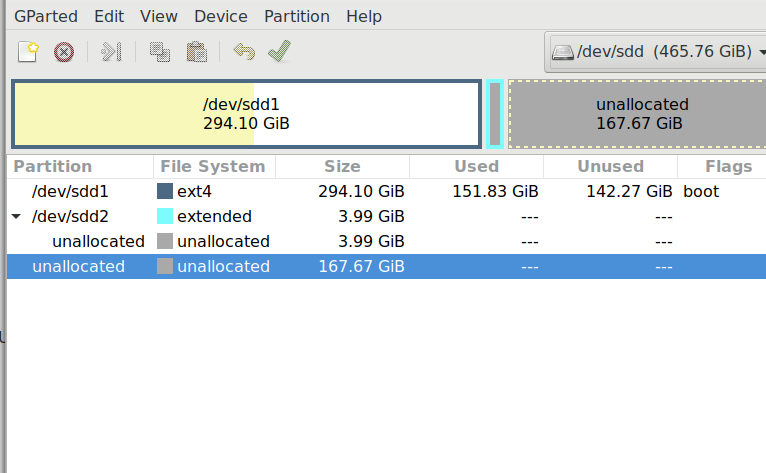
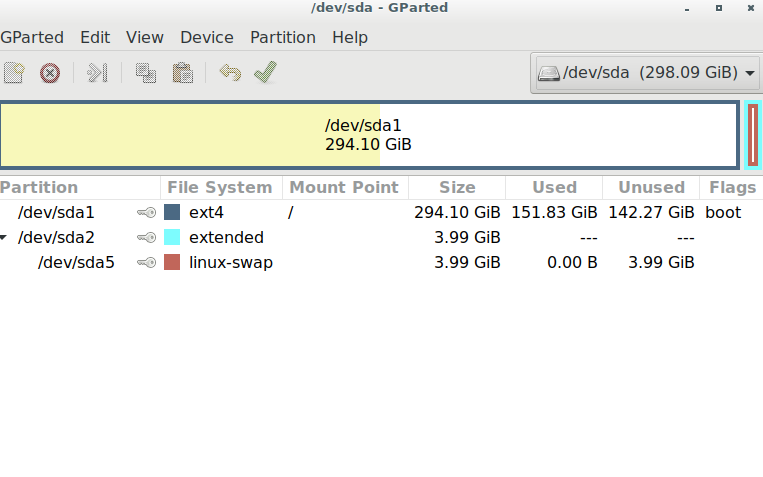
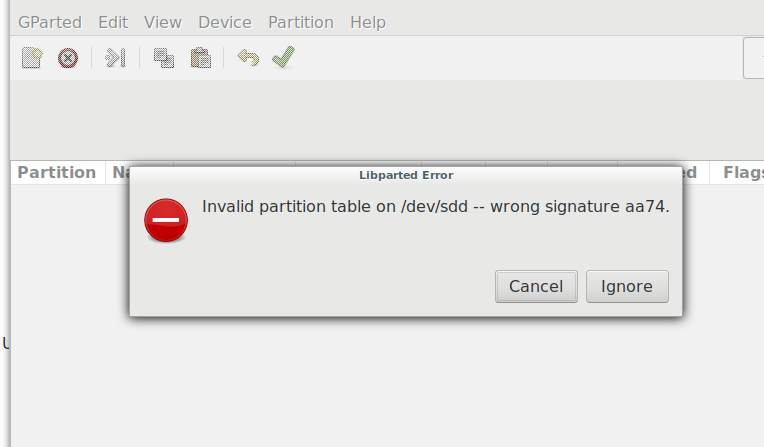
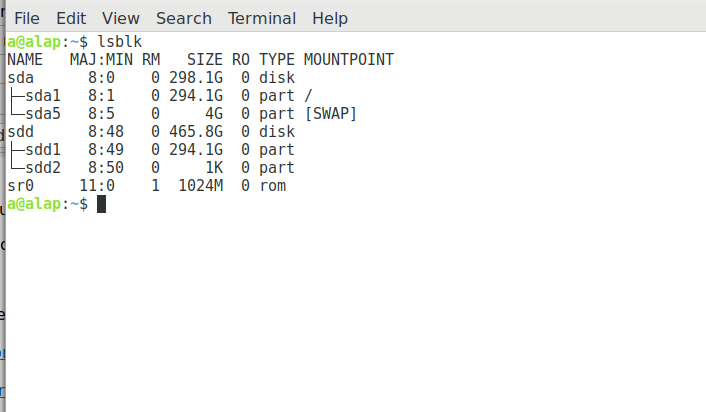
Hi a, Are you able to boot off the SSD? Should be a boot option from the BIOS menu. Sometimes it's F9-12. Sometimes Del. Depends on the model. If it's a USB mount, you might have some issues, but worth a quick test. Regards, Jared On 6/6/19 11:04 AM, a wrote:
Hi all
Here is the latest, erased sdd put ext4, downloaded today for 2 3/4 hours led still flashing closed the download these attachments are all gathered after
download close down.
still uncertain if there is a mount unmount consideration.
Best, a
On 6/6/19 7:57 AM, ABQLUG wrote:
Hi everyone,
When I went home I had some more time to look at why the /boot partition wasn't there. TIL
https://askubuntu.com/questions/6490/is-a-boot-partition-necessary-anymore
https://superuser.com/questions/522971/is-a-boot-partition-always-necessary/...
TL;DR: Some circumstances require separate partitions for swap and/or /boot, and even gain performance under certain circumstances. However there is no technical reason for a"normal" system to have separate partitions.
Likely this was the default setup at some point. Sorry I didn't notice that the first time. Normally I manually setup the partitions, and have just added the /boot out of a "legacy" habit.
Regards,
Jared
On 6/5/19 10:07 PM, a wrote:
Brian
I was planning to attend the meeting tomorrow if I received a supportive response to my various queries this past week, Gparted loaded after I rebooted, I used the given option to terminate the os load so the followed offered choice which I image was used to avert error , I would have tried again if I had known if the receiving SSD needed to be mounted or unmounted. whether the unallocated file system needed any tweeking a few basic things of that sort, I have erased the ssd contents, If you will be there to assist and enough time to do the load otherwise without assurance of assistance I will not make attendance a priority. Nevertheless thanks for your persistence in this venture.
Best, a
On 6/5/19 7:18 PM, Brian O'Keefe wrote:
Hi a
I think there's a meeting tomorrow? I know that you live away out and that you may not make the meeting.
At this point Jared is pretty right on about getting hands on help. For my last HD up grade I did exactly what Jared pointed out and I installed Ubuntu 18.04 onto the new drive and then just copied data I wanted from the old drive. I did this because my old drive's OS had been upgraded over the years (and cloned to newer drives) since Ubuntu 6.04 and had many configuration file patches, or work-arounds to get it to function. It did until one day when it blew and luckily, with Mark's help, I saved data and was able to preserve everything important with a few exceptions. Had my system not been pretty hosed and I anted the SSD I would have used dd but couldn't. That's a back story but it works just fine. I had to reinstall some apps and futz with my browser and mail client to get all of that data too but it wasn't difficult. It's not as "perfect" as a dd clone where you don't have to do anything but the cloning. It has potential downsides as you have found out, if one doesn't grok what is going on. Since I've never had an error yours is mysterious to me.
It is very weird that you have no boot partition on your HDD. I have a sense that in cancelling the dd op something got snipped out there. This happened with my hosed OS that I refer to above and luckily Mark was able to stop the bleed and rsync'd most of everything onto a spare drive. (I have 4 or 5 drives that I've kept from these dd upgraded drives so I have plenty of storage or salvage, depending on the need). But losing a partition is strange but could be that you did not use a bootable cd or thumb drive. Is that the case? As I wrote I use dd with a live cd and so the HDs aren't involved in anything other than the cloning. You can imagine that a drive, the one in your machine, is trying to run the command to clone itself while it is running processes as it always does. It's a moving source of data that is copying blocks that may include running processes, like GParted for instance.
A question that a I think I know the answer to, but did you get the lsblk info after your attempted cloning?
So do you have a functional OS on your machine? Can you run apps, etc.? Is your data there? If these are the case then a fix can be made, I'm pretty sure. It will take one of the supreme GLUGGers I believe. BTW, I have found tons of info on support sites as almost every issue has been experienced by someone else at sometime. Here's and example of what a google search of your error brought up: http://tinyurl.com/yxks8hww
Sorry that this happened but I have learned more from my mistakes than anything and one thing I have learned is that almost anything can be fixed and if I can't figure it out the answer is out there and in our cases we have a vast storehouse of brainiacs in out GLUGGer groups and they all have great dispositions and are happy to help!
Sorry for my verbose emails. It's how my mind works.
Brian
On 6/5/19 4:02 PM, a wrote:
Brian
Doesn't look too bad, should be able to come up with a quick fix, We'll probably need to sleep on it.
Best, a
On 6/3/19 7:08 PM, Brian O'Keefe wrote:
Hi All,
I've mentioned before but dd makes this a simple and fool-proof method of cloning the old drive to the new one. It takes an enclosure for the new drive w/ usb connection and that's it. After checking the drive names to get the correct info into the command line it is simply running something along the following (in case your drives show up differently but this is what I did upon fellow NMGLUGgers. Special thanks to Eric almost 10 years ago!!):
dd if=/dev/sda of=/dev/sdb bs=1M conv=notrunc,noerror
...will copy everything from hard drive sda to sdb (i.e. all partitions, swap and all data), a true clone. No need to create partitions or format them on the target hard drive as the dd command will create them because it is copy of every single block of sda.
Now if you where copying a single partition to a new drive yes you would have to create the target partition on the new hard drive.
dd if=/dev/sda1 of=/dev/sdb1 bs=1M conv=notrunc,noerror
In the command above this would clone partition 1 on drive sda to partition 1 on drive sdb. In this case you would not need to format the new target partition either as it is again copying every block of partition 1 of the source sda1 to the target sdb1.
Hope this helps.
- Eric
On 6/3/19 6:47 PM, a wrote: > > Hi Jason > > Thanks for the good thought, i do not know who that person, to > meet early, could be?. If you will be around Thursday lunch get > things rolling, under 300Gb. or wait till later in the week, see > how things "shake out", another meeting is okay, the ssd has > arrived I have a usb adapter, > > Best a > > > On 5/30/19 9:02 PM, jason schaefer wrote: >> >> Hi a >> >> I highly recommend coming to a meeting to get this done in >> person. For something like this its good to get confirmation >> that someone is willing and able to help you at the meeting. It >> would also be good to meet this person early to allow time for >> such a migration. I might be able to be this person next week >> but my days are so crazy its hard to say what time I would be >> able to get to the meeting. >> >> Jason >> >> >> On 5/30/19 5:42 PM, a wrote: >>> Hi >>> >>> I have ordered a 500G ssd to install my laptop, with my limited knowledge and support devices.(i no need a live disc) My tentative plan follow the Https below transfer to external HDD then reverse >>> the process to the ssd? >>> >>> >>> IN 1.) >>> >>> ( SUDO LINE BELOW FROM;https://www.ostechnix.com/backup-entire-linux-system-using-rsync/) USING THERE SITE EXAMPLE FOLLOWING: >>> >>> $ sudo rsync -aAXv / --exclude={"/dev/*","/proc/*","/sys/*","/tmp/*","/run/*","/mnt/*","/media/*","/lost+found"} /mnt >>> >>> >>> Q.) IS MY DESTINATION CORRECTLY CONFIGURED?. SUBSTITUTING /MNT LAST PART PREVIOUS LINE FOR: /home/a//media/a/6fbdc743-fc0f-46e4-aea3-8160914c34ec/backup_HDD TO GET >>> THE COMPOSITE LINE BELOW: >>> >>> $ sudo rsync -aAXv / --exclude={"/dev/*","/proc/*","/sys/*","/tmp/*","/run/*","/mnt/*","/media/*","/lost+found"} /home/a//media/a/6fbdc743-fc0f-46e4-aea3-8160914c34ec/backup_HDD >>> >>> >>> >>> BEST.a >>> >>> _______________________________________________ >>> nmglug mailing list >>> nmglug@lists.nmglug.org >>> http://lists.nmglug.org/listinfo.cgi/nmglug-nmglug.org >> >> _______________________________________________ >> nmglug mailing list >> nmglug@lists.nmglug.org >> http://lists.nmglug.org/listinfo.cgi/nmglug-nmglug.org > > _______________________________________________ > nmglug mailing list > nmglug@lists.nmglug.org > http://lists.nmglug.org/listinfo.cgi/nmglug-nmglug.org --
_______________________________________________ nmglug mailing list nmglug@lists.nmglug.org http://lists.nmglug.org/listinfo.cgi/nmglug-nmglug.org
--
_______________________________________________ nmglug mailing list nmglug@lists.nmglug.org http://lists.nmglug.org/listinfo.cgi/nmglug-nmglug.org
_______________________________________________ nmglug mailing list nmglug@lists.nmglug.org http://lists.nmglug.org/listinfo.cgi/nmglug-nmglug.org

What time are we starting this meeting now? Should be earlier than usual, right? Best to all, Satsangat On Thu, Jun 6, 2019 at 11:10 AM ABQLUG <community@abqlug.com> wrote:
Hi a,
Are you able to boot off the SSD?
Should be a boot option from the BIOS menu. Sometimes it's F9-12. Sometimes Del. Depends on the model.
If it's a USB mount, you might have some issues, but worth a quick test.
Regards,
Jared
On 6/6/19 11:04 AM, a wrote:
Hi all
Here is the latest, erased sdd put ext4, downloaded today for 2 3/4 hours led still flashing closed the download these attachments are all gathered after
download close down.
still uncertain if there is a mount unmount consideration.
Best, a On 6/6/19 7:57 AM, ABQLUG wrote:
Hi everyone,
When I went home I had some more time to look at why the /boot partition wasn't there. TIL
https://askubuntu.com/questions/6490/is-a-boot-partition-necessary-anymore
https://superuser.com/questions/522971/is-a-boot-partition-always-necessary/...
TL;DR: Some circumstances require separate partitions for swap and/or /boot, and even gain performance under certain circumstances. However there is no technical reason for a"normal" system to have separate partitions.
Likely this was the default setup at some point. Sorry I didn't notice that the first time. Normally I manually setup the partitions, and have just added the /boot out of a "legacy" habit.
Regards,
Jared
On 6/5/19 10:07 PM, a wrote:
Brian
I was planning to attend the meeting tomorrow if I received a supportive response to my various queries this past week, Gparted loaded after I rebooted, I used the given option to terminate the os load so the followed offered choice which I image was used to avert error , I would have tried again if I had known if the receiving SSD needed to be mounted or unmounted. whether the unallocated file system needed any tweeking a few basic things of that sort, I have erased the ssd contents, If you will be there to assist and enough time to do the load otherwise without assurance of assistance I will not make attendance a priority. Nevertheless thanks for your persistence in this venture.
Best, a
On 6/5/19 7:18 PM, Brian O'Keefe wrote:
Hi a
I think there's a meeting tomorrow? I know that you live away out and that you may not make the meeting.
At this point Jared is pretty right on about getting hands on help. For my last HD up grade I did exactly what Jared pointed out and I installed Ubuntu 18.04 onto the new drive and then just copied data I wanted from the old drive. I did this because my old drive's OS had been upgraded over the years (and cloned to newer drives) since Ubuntu 6.04 and had many configuration file patches, or work-arounds to get it to function. It did until one day when it blew and luckily, with Mark's help, I saved data and was able to preserve everything important with a few exceptions. Had my system not been pretty hosed and I anted the SSD I would have used dd but couldn't. That's a back story but it works just fine. I had to reinstall some apps and futz with my browser and mail client to get all of that data too but it wasn't difficult. It's not as "perfect" as a dd clone where you don't have to do anything but the cloning. It has potential downsides as you have found out, if one doesn't grok what is going on. Since I've never had an error yours is mysterious to me.
It is very weird that you have no boot partition on your HDD. I have a sense that in cancelling the dd op something got snipped out there. This happened with my hosed OS that I refer to above and luckily Mark was able to stop the bleed and rsync'd most of everything onto a spare drive. (I have 4 or 5 drives that I've kept from these dd upgraded drives so I have plenty of storage or salvage, depending on the need). But losing a partition is strange but could be that you did not use a bootable cd or thumb drive. Is that the case? As I wrote I use dd with a live cd and so the HDs aren't involved in anything other than the cloning. You can imagine that a drive, the one in your machine, is trying to run the command to clone itself while it is running processes as it always does. It's a moving source of data that is copying blocks that may include running processes, like GParted for instance.
A question that a I think I know the answer to, but did you get the lsblk info after your attempted cloning?
So do you have a functional OS on your machine? Can you run apps, etc.? Is your data there? If these are the case then a fix can be made, I'm pretty sure. It will take one of the supreme GLUGGers I believe. BTW, I have found tons of info on support sites as almost every issue has been experienced by someone else at sometime. Here's and example of what a google search of your error brought up: http://tinyurl.com/yxks8hww
Sorry that this happened but I have learned more from my mistakes than anything and one thing I have learned is that almost anything can be fixed and if I can't figure it out the answer is out there and in our cases we have a vast storehouse of brainiacs in out GLUGGer groups and they all have great dispositions and are happy to help!
Sorry for my verbose emails. It's how my mind works.
Brian
On 6/5/19 4:02 PM, a wrote:
Brian
Doesn't look too bad, should be able to come up with a quick fix, We'll probably need to sleep on it.
Best, a On 6/3/19 7:08 PM, Brian O'Keefe wrote:
Hi All,
I've mentioned before but dd makes this a simple and fool-proof method of cloning the old drive to the new one. It takes an enclosure for the new drive w/ usb connection and that's it. After checking the drive names to get the correct info into the command line it is simply running something along the following (in case your drives show up differently but this is what I did upon fellow NMGLUGgers. Special thanks to Eric almost 10 years ago!!):
dd if=/dev/sda of=/dev/sdb bs=1M conv=notrunc,noerror
...will copy everything from hard drive sda to sdb (i.e. all partitions, swap and all data), a true clone. No need to create partitions or format them on the target hard drive as the dd command will create them because it is copy of every single block of sda.
Now if you where copying a single partition to a new drive yes you would have to create the target partition on the new hard drive.
dd if=/dev/sda1 of=/dev/sdb1 bs=1M conv=notrunc,noerror
In the command above this would clone partition 1 on drive sda to partition 1 on drive sdb. In this case you would not need to format the new target partition either as it is again copying every block of partition 1 of the source sda1 to the target sdb1.
Hope this helps.
- Eric
On 6/3/19 6:47 PM, a wrote:
Hi Jason
Thanks for the good thought, i do not know who that person, to meet early, could be?. If you will be around Thursday lunch get things rolling, under 300Gb. or wait till later in the week, see how things "shake out", another meeting is okay, the ssd has arrived I have a usb adapter,
Best a
On 5/30/19 9:02 PM, jason schaefer wrote:
Hi a
I highly recommend coming to a meeting to get this done in person. For something like this its good to get confirmation that someone is willing and able to help you at the meeting. It would also be good to meet this person early to allow time for such a migration. I might be able to be this person next week but my days are so crazy its hard to say what time I would be able to get to the meeting.
Jason
On 5/30/19 5:42 PM, a wrote:
Hi
I have ordered a 500G ssd to install my laptop, with my limited knowledge and support devices.(i no need a live disc) My tentative plan follow the Https below transfer to external HDD then reverse the process to the ssd?
IN 1.)
( SUDO LINE BELOW FROM; https://www.ostechnix.com/backup-entire-linux-system-using-rsync/) USING THERE SITE EXAMPLE FOLLOWING:
$ sudo rsync -aAXv / --exclude={"/dev/*","/proc/*","/sys/*","/tmp/*","/run/*","/mnt/*","/media/*","/lost+found"} /mnt
Q.) IS MY DESTINATION CORRECTLY CONFIGURED?. SUBSTITUTING /MNT LAST PART PREVIOUS LINE FOR: /home/a//media/a/6fbdc743-fc0f-46e4-aea3-8160914c34ec/backup_HDD TO GET THE COMPOSITE LINE BELOW:
$ sudo rsync -aAXv / --exclude={"/dev/*","/proc/*","/sys/*","/tmp/*","/run/*","/mnt/*","/media/*","/lost+found"} /home/a//media/a/6fbdc743-fc0f-46e4-aea3-8160914c34ec/backup_HDD
BEST.a
_______________________________________________ nmglug mailing listnmglug@lists.nmglug.orghttp://lists.nmglug.org/listinfo.cgi/nmglug-nmglug.org
_______________________________________________ nmglug mailing listnmglug@lists.nmglug.orghttp://lists.nmglug.org/listinfo.cgi/nmglug-nmglug.org
_______________________________________________ nmglug mailing listnmglug@lists.nmglug.orghttp://lists.nmglug.org/listinfo.cgi/nmglug-nmglug.org
--
_______________________________________________ nmglug mailing listnmglug@lists.nmglug.orghttp://lists.nmglug.org/listinfo.cgi/nmglug-nmglug.org
--
_______________________________________________ nmglug mailing listnmglug@lists.nmglug.orghttp://lists.nmglug.org/listinfo.cgi/nmglug-nmglug.org
_______________________________________________ nmglug mailing listnmglug@lists.nmglug.orghttp://lists.nmglug.org/listinfo.cgi/nmglug-nmglug.org
_______________________________________________ nmglug mailing list nmglug@lists.nmglug.org http://lists.nmglug.org/listinfo.cgi/nmglug-nmglug.org

NMGLUGER s, I will be at the Baking Co. at 5.30. That would give us 90 minutes for an install. I can be there at 5 if I get a reply that somebody is coming that early with the unit that needs some help with installation. Ted P. On Thu, Jun 6, 2019, 12:09 PM Satsangat Khalsa <satsangat@khalsa.com> wrote:
What time are we starting this meeting now? Should be earlier than usual, right?
Best to all, Satsangat
On Thu, Jun 6, 2019 at 11:10 AM ABQLUG <community@abqlug.com> wrote:
Hi a,
Are you able to boot off the SSD?
Should be a boot option from the BIOS menu. Sometimes it's F9-12. Sometimes Del. Depends on the model.
If it's a USB mount, you might have some issues, but worth a quick test.
Regards,
Jared
On 6/6/19 11:04 AM, a wrote:
Hi all
Here is the latest, erased sdd put ext4, downloaded today for 2 3/4 hours led still flashing closed the download these attachments are all gathered after
download close down.
still uncertain if there is a mount unmount consideration.
Best, a On 6/6/19 7:57 AM, ABQLUG wrote:
Hi everyone,
When I went home I had some more time to look at why the /boot partition wasn't there. TIL
https://askubuntu.com/questions/6490/is-a-boot-partition-necessary-anymore
https://superuser.com/questions/522971/is-a-boot-partition-always-necessary/...
TL;DR: Some circumstances require separate partitions for swap and/or /boot, and even gain performance under certain circumstances. However there is no technical reason for a"normal" system to have separate partitions.
Likely this was the default setup at some point. Sorry I didn't notice that the first time. Normally I manually setup the partitions, and have just added the /boot out of a "legacy" habit.
Regards,
Jared
On 6/5/19 10:07 PM, a wrote:
Brian
I was planning to attend the meeting tomorrow if I received a supportive response to my various queries this past week, Gparted loaded after I rebooted, I used the given option to terminate the os load so the followed offered choice which I image was used to avert error , I would have tried again if I had known if the receiving SSD needed to be mounted or unmounted. whether the unallocated file system needed any tweeking a few basic things of that sort, I have erased the ssd contents, If you will be there to assist and enough time to do the load otherwise without assurance of assistance I will not make attendance a priority. Nevertheless thanks for your persistence in this venture.
Best, a
On 6/5/19 7:18 PM, Brian O'Keefe wrote:
Hi a
I think there's a meeting tomorrow? I know that you live away out and that you may not make the meeting.
At this point Jared is pretty right on about getting hands on help. For my last HD up grade I did exactly what Jared pointed out and I installed Ubuntu 18.04 onto the new drive and then just copied data I wanted from the old drive. I did this because my old drive's OS had been upgraded over the years (and cloned to newer drives) since Ubuntu 6.04 and had many configuration file patches, or work-arounds to get it to function. It did until one day when it blew and luckily, with Mark's help, I saved data and was able to preserve everything important with a few exceptions. Had my system not been pretty hosed and I anted the SSD I would have used dd but couldn't. That's a back story but it works just fine. I had to reinstall some apps and futz with my browser and mail client to get all of that data too but it wasn't difficult. It's not as "perfect" as a dd clone where you don't have to do anything but the cloning. It has potential downsides as you have found out, if one doesn't grok what is going on. Since I've never had an error yours is mysterious to me.
It is very weird that you have no boot partition on your HDD. I have a sense that in cancelling the dd op something got snipped out there. This happened with my hosed OS that I refer to above and luckily Mark was able to stop the bleed and rsync'd most of everything onto a spare drive. (I have 4 or 5 drives that I've kept from these dd upgraded drives so I have plenty of storage or salvage, depending on the need). But losing a partition is strange but could be that you did not use a bootable cd or thumb drive. Is that the case? As I wrote I use dd with a live cd and so the HDs aren't involved in anything other than the cloning. You can imagine that a drive, the one in your machine, is trying to run the command to clone itself while it is running processes as it always does. It's a moving source of data that is copying blocks that may include running processes, like GParted for instance.
A question that a I think I know the answer to, but did you get the lsblk info after your attempted cloning?
So do you have a functional OS on your machine? Can you run apps, etc.? Is your data there? If these are the case then a fix can be made, I'm pretty sure. It will take one of the supreme GLUGGers I believe. BTW, I have found tons of info on support sites as almost every issue has been experienced by someone else at sometime. Here's and example of what a google search of your error brought up: http://tinyurl.com/yxks8hww
Sorry that this happened but I have learned more from my mistakes than anything and one thing I have learned is that almost anything can be fixed and if I can't figure it out the answer is out there and in our cases we have a vast storehouse of brainiacs in out GLUGGer groups and they all have great dispositions and are happy to help!
Sorry for my verbose emails. It's how my mind works.
Brian
On 6/5/19 4:02 PM, a wrote:
Brian
Doesn't look too bad, should be able to come up with a quick fix, We'll probably need to sleep on it.
Best, a On 6/3/19 7:08 PM, Brian O'Keefe wrote:
Hi All,
I've mentioned before but dd makes this a simple and fool-proof method of cloning the old drive to the new one. It takes an enclosure for the new drive w/ usb connection and that's it. After checking the drive names to get the correct info into the command line it is simply running something along the following (in case your drives show up differently but this is what I did upon fellow NMGLUGgers. Special thanks to Eric almost 10 years ago!!):
dd if=/dev/sda of=/dev/sdb bs=1M conv=notrunc,noerror
...will copy everything from hard drive sda to sdb (i.e. all partitions, swap and all data), a true clone. No need to create partitions or format them on the target hard drive as the dd command will create them because it is copy of every single block of sda.
Now if you where copying a single partition to a new drive yes you would have to create the target partition on the new hard drive.
dd if=/dev/sda1 of=/dev/sdb1 bs=1M conv=notrunc,noerror
In the command above this would clone partition 1 on drive sda to partition 1 on drive sdb. In this case you would not need to format the new target partition either as it is again copying every block of partition 1 of the source sda1 to the target sdb1.
Hope this helps.
- Eric
On 6/3/19 6:47 PM, a wrote:
Hi Jason
Thanks for the good thought, i do not know who that person, to meet early, could be?. If you will be around Thursday lunch get things rolling, under 300Gb. or wait till later in the week, see how things "shake out", another meeting is okay, the ssd has arrived I have a usb adapter,
Best a
On 5/30/19 9:02 PM, jason schaefer wrote:
Hi a
I highly recommend coming to a meeting to get this done in person. For something like this its good to get confirmation that someone is willing and able to help you at the meeting. It would also be good to meet this person early to allow time for such a migration. I might be able to be this person next week but my days are so crazy its hard to say what time I would be able to get to the meeting.
Jason
On 5/30/19 5:42 PM, a wrote:
Hi
I have ordered a 500G ssd to install my laptop, with my limited knowledge and support devices.(i no need a live disc) My tentative plan follow the Https below transfer to external HDD then reverse the process to the ssd?
IN 1.)
( SUDO LINE BELOW FROM; https://www.ostechnix.com/backup-entire-linux-system-using-rsync/) USING THERE SITE EXAMPLE FOLLOWING:
$ sudo rsync -aAXv / --exclude={"/dev/*","/proc/*","/sys/*","/tmp/*","/run/*","/mnt/*","/media/*","/lost+found"} /mnt
Q.) IS MY DESTINATION CORRECTLY CONFIGURED?. SUBSTITUTING /MNT LAST PART PREVIOUS LINE FOR: /home/a//media/a/6fbdc743-fc0f-46e4-aea3-8160914c34ec/backup_HDD TO GET THE COMPOSITE LINE BELOW:
$ sudo rsync -aAXv / --exclude={"/dev/*","/proc/*","/sys/*","/tmp/*","/run/*","/mnt/*","/media/*","/lost+found"} /home/a//media/a/6fbdc743-fc0f-46e4-aea3-8160914c34ec/backup_HDD
BEST.a
_______________________________________________ nmglug mailing listnmglug@lists.nmglug.orghttp://lists.nmglug.org/listinfo.cgi/nmglug-nmglug.org
_______________________________________________ nmglug mailing listnmglug@lists.nmglug.orghttp://lists.nmglug.org/listinfo.cgi/nmglug-nmglug.org
_______________________________________________ nmglug mailing listnmglug@lists.nmglug.orghttp://lists.nmglug.org/listinfo.cgi/nmglug-nmglug.org
--
_______________________________________________ nmglug mailing listnmglug@lists.nmglug.orghttp://lists.nmglug.org/listinfo.cgi/nmglug-nmglug.org
--
_______________________________________________ nmglug mailing listnmglug@lists.nmglug.orghttp://lists.nmglug.org/listinfo.cgi/nmglug-nmglug.org
_______________________________________________ nmglug mailing listnmglug@lists.nmglug.orghttp://lists.nmglug.org/listinfo.cgi/nmglug-nmglug.org
_______________________________________________ nmglug mailing list nmglug@lists.nmglug.org http://lists.nmglug.org/listinfo.cgi/nmglug-nmglug.org
_______________________________________________ nmglug mailing list nmglug@lists.nmglug.org http://lists.nmglug.org/listinfo.cgi/nmglug-nmglug.org

I can be there at 5:30. As far as a's cloning, it's great the ssd boots. Is the OS usable after it boots? I've never had a problem booting from a usb connected HDD. I must be misunderstanding you a, but did you let the cloning run until the led stop blinking? You definitely don't want to stop the process cold because of time constraints. The time sounds about right to clone. Again, I don't really understand but you would not need to format the SSD to ext4 since cloning to it would create all the partitions and other parameters that the old drive has. I've never formatted the target drive so again, I don't know what the ramifications of doing so are. Later this evening Brian On 6/6/19 12:23 PM, Ted Pomeroy wrote:
NMGLUGER s, I will be at the Baking Co. at 5.30. That would give us 90 minutes for an install. I can be there at 5 if I get a reply that somebody is coming that early with the unit that needs some help with installation. Ted P.
On Thu, Jun 6, 2019, 12:09 PM Satsangat Khalsa <satsangat@khalsa.com <mailto:satsangat@khalsa.com>> wrote:
What time are we starting this meeting now? Should be earlier than usual, right?
Best to all, Satsangat
On Thu, Jun 6, 2019 at 11:10 AM ABQLUG <community@abqlug.com <mailto:community@abqlug.com>> wrote:
Hi a,
Are you able to boot off the SSD?
Should be a boot option from the BIOS menu. Sometimes it's F9-12. Sometimes Del. Depends on the model.
If it's a USB mount, you might have some issues, but worth a quick test.
Regards,
Jared
On 6/6/19 11:04 AM, a wrote:
Hi all
Here is the latest, erased sdd put ext4, downloaded today for 2 3/4 hours led still flashing closed the download these attachments are all gathered after
download close down.
still uncertain if there is a mount unmount consideration.
Best, a
On 6/6/19 7:57 AM, ABQLUG wrote:
Hi everyone,
When I went home I had some more time to look at why the /boot partition wasn't there. TIL
https://askubuntu.com/questions/6490/is-a-boot-partition-necessary-anymore
https://superuser.com/questions/522971/is-a-boot-partition-always-necessary/...
TL;DR: Some circumstances require separate partitions for swap and/or /boot, and even gain performance under certain circumstances. However there is no technical reason for a"normal" system to have separate partitions.
Likely this was the default setup at some point. Sorry I didn't notice that the first time. Normally I manually setup the partitions, and have just added the /boot out of a "legacy" habit.
Regards,
Jared
On 6/5/19 10:07 PM, a wrote:
Brian
I was planning to attend the meeting tomorrow if I received a supportive response to my various queries this past week, Gparted loaded after I rebooted, I used the given option to terminate the os load so the followed offered choice which I image was used to avert error , I would have tried again if I had known if the receiving SSD needed to be mounted or unmounted. whether the unallocated file system needed any tweeking a few basic things of that sort, I have erased the ssd contents, If you will be there to assist and enough time to do the load otherwise without assurance of assistance I will not make attendance a priority. Nevertheless thanks for your persistence in this venture.
Best, a
On 6/5/19 7:18 PM, Brian O'Keefe wrote:
Hi a
I think there's a meeting tomorrow? I know that you live away out and that you may not make the meeting.
At this point Jared is pretty right on about getting hands on help. For my last HD up grade I did exactly what Jared pointed out and I installed Ubuntu 18.04 onto the new drive and then just copied data I wanted from the old drive. I did this because my old drive's OS had been upgraded over the years (and cloned to newer drives) since Ubuntu 6.04 and had many configuration file patches, or work-arounds to get it to function. It did until one day when it blew and luckily, with Mark's help, I saved data and was able to preserve everything important with a few exceptions. Had my system not been pretty hosed and I anted the SSD I would have used dd but couldn't. That's a back story but it works just fine. I had to reinstall some apps and futz with my browser and mail client to get all of that data too but it wasn't difficult. It's not as "perfect" as a dd clone where you don't have to do anything but the cloning. It has potential downsides as you have found out, if one doesn't grok what is going on. Since I've never had an error yours is mysterious to me.
It is very weird that you have no boot partition on your HDD. I have a sense that in cancelling the dd op something got snipped out there. This happened with my hosed OS that I refer to above and luckily Mark was able to stop the bleed and rsync'd most of everything onto a spare drive. (I have 4 or 5 drives that I've kept from these dd upgraded drives so I have plenty of storage or salvage, depending on the need). But losing a partition is strange but could be that you did not use a bootable cd or thumb drive. Is that the case? As I wrote I use dd with a live cd and so the HDs aren't involved in anything other than the cloning. You can imagine that a drive, the one in your machine, is trying to run the command to clone itself while it is running processes as it always does. It's a moving source of data that is copying blocks that may include running processes, like GParted for instance.
A question that a I think I know the answer to, but did you get the lsblk info after your attempted cloning?
So do you have a functional OS on your machine? Can you run apps, etc.? Is your data there? If these are the case then a fix can be made, I'm pretty sure. It will take one of the supreme GLUGGers I believe. BTW, I have found tons of info on support sites as almost every issue has been experienced by someone else at sometime. Here's and example of what a google search of your error brought up: http://tinyurl.com/yxks8hww
Sorry that this happened but I have learned more from my mistakes than anything and one thing I have learned is that almost anything can be fixed and if I can't figure it out the answer is out there and in our cases we have a vast storehouse of brainiacs in out GLUGGer groups and they all have great dispositions and are happy to help!
Sorry for my verbose emails. It's how my mind works.
Brian
On 6/5/19 4:02 PM, a wrote:
Brian
Doesn't look too bad, should be able to come up with a quick fix, We'll probably need to sleep on it.
Best, a
On 6/3/19 7:08 PM, Brian O'Keefe wrote: > > Hi All, > > I've mentioned before but dd makes this a simple and > fool-proof method of cloning the old drive to the new > one. It takes an enclosure for the new drive w/ usb > connection and that's it. After checking the drive names > to get the correct info into the command line it is > simply running something along the following (in case > your drives show up differently but this is what I did > upon fellow NMGLUGgers. Special thanks to Eric almost 10 > years ago!!): > > dd if=/dev/sda of=/dev/sdb bs=1M conv=notrunc,noerror > > > ...will copy everything from hard drive sda to sdb (i.e. all > partitions, swap and all data), a true clone. No need to create > partitions or format them on the target hard drive as the dd command > will create them because it is copy of every single block of sda. > > Now if you where copying a single partition to a new drive yes you > would have to create the target partition on the new hard drive. > > dd if=/dev/sda1 of=/dev/sdb1 bs=1M conv=notrunc,noerror > > In the command above this would clone partition 1 on drive sda to > partition 1 on drive sdb. In this case you would not need to format > the new target partition either as it is again copying every block of > partition 1 of the source sda1 to the target sdb1. > > Hope this helps. > > - Eric > > > On 6/3/19 6:47 PM, a wrote: >> >> Hi Jason >> >> Thanks for the good thought, i do not know who that >> person, to meet early, could be?. If you will be >> around Thursday lunch get things rolling, under 300Gb. >> or wait till later in the week, see how things "shake >> out", another meeting is okay, the ssd has arrived I >> have a usb adapter, >> >> Best a >> >> >> On 5/30/19 9:02 PM, jason schaefer wrote: >>> >>> Hi a >>> >>> I highly recommend coming to a meeting to get this >>> done in person. For something like this its good to >>> get confirmation that someone is willing and able to >>> help you at the meeting. It would also be good to meet >>> this person early to allow time for such a migration. >>> I might be able to be this person next week but my >>> days are so crazy its hard to say what time I would be >>> able to get to the meeting. >>> >>> Jason >>> >>> >>> On 5/30/19 5:42 PM, a wrote: >>>> Hi >>>> >>>> I have ordered a 500G ssd to install my laptop, with my limited knowledge and support devices.(i no need a live disc) My tentative plan follow the Https below transfer to external HDD then reverse >>>> the process to the ssd? >>>> >>>> >>>> IN 1.) >>>> >>>> ( SUDO LINE BELOW FROM;https://www.ostechnix.com/backup-entire-linux-system-using-rsync/) USING THERE SITE EXAMPLE FOLLOWING: >>>> >>>> $ sudo rsync -aAXv / --exclude={"/dev/*","/proc/*","/sys/*","/tmp/*","/run/*","/mnt/*","/media/*","/lost+found"} /mnt >>>> >>>> >>>> Q.) IS MY DESTINATION CORRECTLY CONFIGURED?. SUBSTITUTING /MNT LAST PART PREVIOUS LINE FOR: /home/a//media/a/6fbdc743-fc0f-46e4-aea3-8160914c34ec/backup_HDD TO GET >>>> THE COMPOSITE LINE BELOW: >>>> >>>> $ sudo rsync -aAXv / --exclude={"/dev/*","/proc/*","/sys/*","/tmp/*","/run/*","/mnt/*","/media/*","/lost+found"} /home/a//media/a/6fbdc743-fc0f-46e4-aea3-8160914c34ec/backup_HDD >>>> >>>> >>>> >>>> BEST.a >>>> >>>> _______________________________________________ >>>> nmglug mailing list >>>> nmglug@lists.nmglug.org <mailto:nmglug@lists.nmglug.org> >>>> http://lists.nmglug.org/listinfo.cgi/nmglug-nmglug.org >>> >>> _______________________________________________ >>> nmglug mailing list >>> nmglug@lists.nmglug.org <mailto:nmglug@lists.nmglug.org> >>> http://lists.nmglug.org/listinfo.cgi/nmglug-nmglug.org >> >> _______________________________________________ >> nmglug mailing list >> nmglug@lists.nmglug.org <mailto:nmglug@lists.nmglug.org> >> http://lists.nmglug.org/listinfo.cgi/nmglug-nmglug.org > -- > > _______________________________________________ > nmglug mailing list > nmglug@lists.nmglug.org <mailto:nmglug@lists.nmglug.org> > http://lists.nmglug.org/listinfo.cgi/nmglug-nmglug.org
--
_______________________________________________ nmglug mailing list nmglug@lists.nmglug.org <mailto:nmglug@lists.nmglug.org> http://lists.nmglug.org/listinfo.cgi/nmglug-nmglug.org
_______________________________________________ nmglug mailing list nmglug@lists.nmglug.org <mailto:nmglug@lists.nmglug.org> http://lists.nmglug.org/listinfo.cgi/nmglug-nmglug.org
_______________________________________________ nmglug mailing list nmglug@lists.nmglug.org <mailto:nmglug@lists.nmglug.org> http://lists.nmglug.org/listinfo.cgi/nmglug-nmglug.org
_______________________________________________ nmglug mailing list nmglug@lists.nmglug.org <mailto:nmglug@lists.nmglug.org> http://lists.nmglug.org/listinfo.cgi/nmglug-nmglug.org
_______________________________________________ nmglug mailing list nmglug@lists.nmglug.org http://lists.nmglug.org/listinfo.cgi/nmglug-nmglug.org --

participants (7)
-
 a
a -
 ABQLUG
 -
 Brian O'Keefe
 -
 jason schaefer
 -
 M
M -
 Satsangat Khalsa
 -
 Ted Pomeroy