rsync, what the hey?

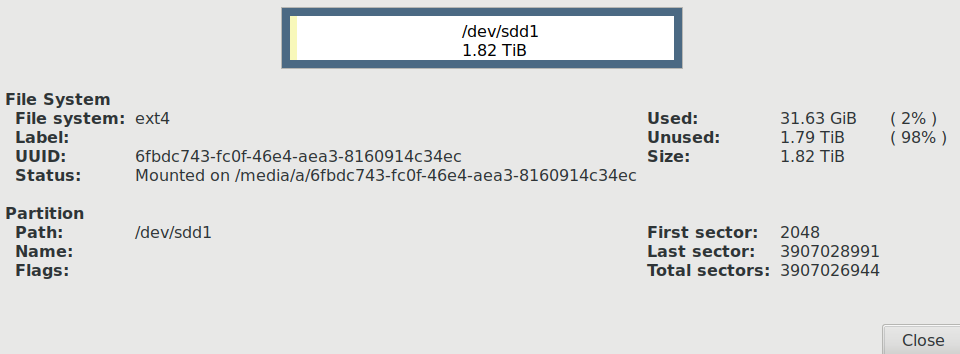
Hi Can anyone explain, attachment .png of uuid info. error seems to be between /media/a/uuid and a "switch" occurs /media/uuid, what the hey/ a@alap:~$ rsync -av --delete --exclude=".*/" /home/a/ /media/your_uuid/backup sending incremental file list rsync: mkdir "/media/your_uuid/backup" failed: No such file or directory (2) rsync error: error in file IO (code 11) at main.c(675) [Receiver=3.1.2] a@alap:~$ rsync -av --delete --exclude=".*/" /home/a/ /media/6fbdc743-fc0f-46e4-aea3-8160914c34ec/backup sending incremental file list rsync: mkdir "/media/6fbdc743-fc0f-46e4-aea3-8160914c34ec/backup" failed: No such file or directory (2) rsync error: error in file IO (code 11) at main.c(675) [Receiver=3.1.2] a@alap:~$ cd /media/0435f0ab-9dfd-4d9d-ae8b-53101d419ac8 bash: cd: /media/0435f0ab-9dfd-4d9d-ae8b-53101d419ac8: No such file or directory a@alap:~$ mkdir backup a@alap:~$ cd /media/a/6fbdc743-fc0f-46e4-aea3-8160914c34ec a@alap:/media/a/6fbdc743-fc0f-46e4-aea3-8160914c34ec$ mkdir backup mkdir: cannot create directory ‘backup’: File exists a@alap:/media/a/6fbdc743-fc0f-46e4-aea3-8160914c34ec$ a@alap:/media/a/6fbdc743-fc0f-46e4-aea3-8160914c34ec$ cd a@alap:~$ rsync -av --delete --exclude=".*/" /home/a/ /media/6fbdc743-fc0f-46e4-aea3-8160914c34ec/backup sending incremental file list rsync: mkdir "/media/6fbdc743-fc0f-46e4-aea3-8160914c34ec/backup" failed: No such file or directory (2) rsync error: error in file IO (code 11) at main.c(675) [Receiver=3.1.2] a@alap:~$

Hi a, When using rsync, the destination path needs to exist. rsync -Prvvac /path/to/old/archive /path/to/new/archive Both of those paths needs to already exist. If they don't you will need to mkdir and mount accordingly. However, your original question is how to change folder/file permissions. This is how to change which user and group can access/edit a file. sudo chown username:usergroup /path/to/file This is how to change which user and group can access/edit a folder and everything in that folder: sudo chown -R username:usergroup /path/to/folder This is how I would do it on my current system (to change user access to a folder): sudo chown jr:jr /path/to/file I know to use jr:jr because I did this: ls -l .bash_history -rw------- 1 jr jr 69881 May 24 13:34 .bash_history To do this you will need to be in your user folder. pwd /home/jr I didn't cover chmod, so let us know if you still can't access the folder you're trying to access. Regards, Jared On 5/27/19 9:25 AM, a wrote:
Hi
Can anyone explain, attachment .png of uuid info. error seems to be between /media/a/uuid and a "switch" occurs /media/uuid, what the hey/
a@alap:~$ rsync -av --delete --exclude=".*/" /home/a/ /media/your_uuid/backup sending incremental file list rsync: mkdir "/media/your_uuid/backup" failed: No such file or directory (2) rsync error: error in file IO (code 11) at main.c(675) [Receiver=3.1.2] a@alap:~$ rsync -av --delete --exclude=".*/" /home/a/ /media/6fbdc743-fc0f-46e4-aea3-8160914c34ec/backup sending incremental file list rsync: mkdir "/media/6fbdc743-fc0f-46e4-aea3-8160914c34ec/backup" failed: No such file or directory (2) rsync error: error in file IO (code 11) at main.c(675) [Receiver=3.1.2] a@alap:~$ cd /media/0435f0ab-9dfd-4d9d-ae8b-53101d419ac8 bash: cd: /media/0435f0ab-9dfd-4d9d-ae8b-53101d419ac8: No such file or directory a@alap:~$ mkdir backup a@alap:~$ cd /media/a/6fbdc743-fc0f-46e4-aea3-8160914c34ec a@alap:/media/a/6fbdc743-fc0f-46e4-aea3-8160914c34ec$ mkdir backup mkdir: cannot create directory ‘backup’: File exists a@alap:/media/a/6fbdc743-fc0f-46e4-aea3-8160914c34ec$ a@alap:/media/a/6fbdc743-fc0f-46e4-aea3-8160914c34ec$ cd a@alap:~$ rsync -av --delete --exclude=".*/" /home/a/ /media/6fbdc743-fc0f-46e4-aea3-8160914c34ec/backup sending incremental file list rsync: mkdir "/media/6fbdc743-fc0f-46e4-aea3-8160914c34ec/backup" failed: No such file or directory (2) rsync error: error in file IO (code 11) at main.c(675) [Receiver=3.1.2] a@alap:~$
_______________________________________________ nmglug mailing list nmglug@lists.nmglug.org http://lists.nmglug.org/listinfo.cgi/nmglug-nmglug.org
Hi a, When using rsync, the destination and originating path needs to exist. rsync -Prvvac /path/to/old/archive /path/to/new/archive If the destination path doesn't exist, you will need to mkdir and mount accordingly. However, your original question is how to change folder/file permissions. This is how to change which user and group can access/edit a file. sudo chown username:usergroup /path/to/file.txt This is how to change which user and group can access/edit a folder and everything in that folder: sudo chown -R username:usergroup /path/to/folder This is how I would do it on my current system (to change user access to a folder): sudo chown jr:jr /path/to/file I know to use jr:jr because I did this: ls -l .bash_history -rw------- 1 jr jr 69881 May 24 13:34 .bash_history To do this you will need to be in your user folder (or ls a file you know that you own). pwd /home/jr I didn't cover chmod, so let us know if you still can't access the folder you're trying to access. Regards, Jared On 5/27/19 9:25 AM, a wrote:
Hi
Can anyone explain, attachment .png of uuid info. error seems to be between /media/a/uuid and a "switch" occurs /media/uuid, what the hey/
a@alap:~$ rsync -av --delete --exclude=".*/" /home/a/ /media/your_uuid/backup sending incremental file list rsync: mkdir "/media/your_uuid/backup" failed: No such file or directory (2) rsync error: error in file IO (code 11) at main.c(675) [Receiver=3.1.2] a@alap:~$ rsync -av --delete --exclude=".*/" /home/a/ /media/6fbdc743-fc0f-46e4-aea3-8160914c34ec/backup sending incremental file list rsync: mkdir "/media/6fbdc743-fc0f-46e4-aea3-8160914c34ec/backup" failed: No such file or directory (2) rsync error: error in file IO (code 11) at main.c(675) [Receiver=3.1.2] a@alap:~$ cd /media/0435f0ab-9dfd-4d9d-ae8b-53101d419ac8 bash: cd: /media/0435f0ab-9dfd-4d9d-ae8b-53101d419ac8: No such file or directory a@alap:~$ mkdir backup a@alap:~$ cd /media/a/6fbdc743-fc0f-46e4-aea3-8160914c34ec a@alap:/media/a/6fbdc743-fc0f-46e4-aea3-8160914c34ec$ mkdir backup mkdir: cannot create directory ‘backup’: File exists a@alap:/media/a/6fbdc743-fc0f-46e4-aea3-8160914c34ec$ a@alap:/media/a/6fbdc743-fc0f-46e4-aea3-8160914c34ec$ cd a@alap:~$ rsync -av --delete --exclude=".*/" /home/a/ /media/6fbdc743-fc0f-46e4-aea3-8160914c34ec/backup sending incremental file list rsync: mkdir "/media/6fbdc743-fc0f-46e4-aea3-8160914c34ec/backup" failed: No such file or directory (2) rsync error: error in file IO (code 11) at main.c(675) [Receiver=3.1.2] a@alap:~$
_______________________________________________ nmglug mailing list nmglug@lists.nmglug.org http://lists.nmglug.org/listinfo.cgi/nmglug-nmglug.org
Jared thanks for the reply I took the easy way out with permissions used sudo nautilius. although it did dredge up shadow of the past with chmod. If you have the inclination can you illustrate rsync suggestions by referring to the terminal output below in this email. I created a backup folder. but get the following" "Can anyone explain, attachment .png of uuid info. error seems to be between /media/a/uuid and a "switch" occurs /media/uuid, what the hey/" and this error message: "rsync error: error in file IO (code 11) at main.c(675) [Receiver=3.1.2] " If the problem is to messy to decipher I will concur. Then thanks all the same, congrats on the new club. Best, a On 5/27/19 3:17 PM, ABQLUG wrote:
Hi a,
When using rsync, the destination and originating path needs to exist.
rsync -Prvvac /path/to/old/archive /path/to/new/archive
If the destination path doesn't exist, you will need to mkdir and mount accordingly.
However, your original question is how to change folder/file permissions.
This is how to change which user and group can access/edit a file. sudo chown username:usergroup /path/to/file.txt
This is how to change which user and group can access/edit a folder and everything in that folder: sudo chown -R username:usergroup /path/to/folder
This is how I would do it on my current system (to change user access to a folder): sudo chown jr:jr /path/to/file
I know to use jr:jr because I did this:
ls -l .bash_history -rw------- 1 jr jr 69881 May 24 13:34 .bash_history
To do this you will need to be in your user folder (or ls a file you know that you own). pwd /home/jr
I didn't cover chmod, so let us know if you still can't access the folder you're trying to access.
Regards,
Jared
On 5/27/19 9:25 AM, a wrote:
Hi
Can anyone explain, attachment .png of uuid info. error seems to be between /media/a/uuid and a "switch" occurs /media/uuid, what the hey/
a@alap:~$ rsync -av --delete --exclude=".*/" /home/a/ /media/your_uuid/backup sending incremental file list rsync: mkdir "/media/your_uuid/backup" failed: No such file or directory (2) rsync error: error in file IO (code 11) at main.c(675) [Receiver=3.1.2] a@alap:~$ rsync -av --delete --exclude=".*/" /home/a/ /media/6fbdc743-fc0f-46e4-aea3-8160914c34ec/backup sending incremental file list rsync: mkdir "/media/6fbdc743-fc0f-46e4-aea3-8160914c34ec/backup" failed: No such file or directory (2) rsync error: error in file IO (code 11) at main.c(675) [Receiver=3.1.2] a@alap:~$ cd /media/0435f0ab-9dfd-4d9d-ae8b-53101d419ac8 bash: cd: /media/0435f0ab-9dfd-4d9d-ae8b-53101d419ac8: No such file or directory a@alap:~$ mkdir backup a@alap:~$ cd /media/a/6fbdc743-fc0f-46e4-aea3-8160914c34ec a@alap:/media/a/6fbdc743-fc0f-46e4-aea3-8160914c34ec$ mkdir backup mkdir: cannot create directory ‘backup’: File exists a@alap:/media/a/6fbdc743-fc0f-46e4-aea3-8160914c34ec$ a@alap:/media/a/6fbdc743-fc0f-46e4-aea3-8160914c34ec$ cd a@alap:~$ rsync -av --delete --exclude=".*/" /home/a/ /media/6fbdc743-fc0f-46e4-aea3-8160914c34ec/backup sending incremental file list rsync: mkdir "/media/6fbdc743-fc0f-46e4-aea3-8160914c34ec/backup" failed: No such file or directory (2) rsync error: error in file IO (code 11) at main.c(675) [Receiver=3.1.2] a@alap:~$
_______________________________________________ nmglug mailing list nmglug@lists.nmglug.org http://lists.nmglug.org/listinfo.cgi/nmglug-nmglug.org
Hi a, I believe that error is saying you're rsyncing to a non-existing folder. What is the command you are using? Also, what is the output of: lsblk Thanks, Jared On 5/27/19 3:57 PM, a wrote:
Jared
thanks for the reply I took the easy way out with permissions used sudo nautilius. although it did dredge up shadow of the past with chmod.
If you have the inclination can you illustrate rsync suggestions by referring to the terminal output below in this email. I created a backup folder. but get the following" "Can anyone explain, attachment .png of uuid info. error seems to be between /media/a/uuid and a "switch" occurs /media/uuid, what the hey/"
and this error message: "rsync error: error in file IO (code 11) at main.c(675) [Receiver=3.1.2] "
If the problem is to messy to decipher I will concur. Then thanks all the same, congrats on the new club. Best, a
On 5/27/19 3:17 PM, ABQLUG wrote:
Hi a,
When using rsync, the destination and originating path needs to exist.
rsync -Prvvac /path/to/old/archive /path/to/new/archive
If the destination path doesn't exist, you will need to mkdir and mount accordingly.
However, your original question is how to change folder/file permissions.
This is how to change which user and group can access/edit a file. sudo chown username:usergroup /path/to/file.txt
This is how to change which user and group can access/edit a folder and everything in that folder: sudo chown -R username:usergroup /path/to/folder
This is how I would do it on my current system (to change user access to a folder): sudo chown jr:jr /path/to/file
I know to use jr:jr because I did this:
ls -l .bash_history -rw------- 1 jr jr 69881 May 24 13:34 .bash_history
To do this you will need to be in your user folder (or ls a file you know that you own). pwd /home/jr
I didn't cover chmod, so let us know if you still can't access the folder you're trying to access.
Regards,
Jared
On 5/27/19 9:25 AM, a wrote:
Hi
Can anyone explain, attachment .png of uuid info. error seems to be between /media/a/uuid and a "switch" occurs /media/uuid, what the hey/
a@alap:~$ rsync -av --delete --exclude=".*/" /home/a/ /media/your_uuid/backup sending incremental file list rsync: mkdir "/media/your_uuid/backup" failed: No such file or directory (2) rsync error: error in file IO (code 11) at main.c(675) [Receiver=3.1.2] a@alap:~$ rsync -av --delete --exclude=".*/" /home/a/ /media/6fbdc743-fc0f-46e4-aea3-8160914c34ec/backup sending incremental file list rsync: mkdir "/media/6fbdc743-fc0f-46e4-aea3-8160914c34ec/backup" failed: No such file or directory (2) rsync error: error in file IO (code 11) at main.c(675) [Receiver=3.1.2] a@alap:~$ cd /media/0435f0ab-9dfd-4d9d-ae8b-53101d419ac8 bash: cd: /media/0435f0ab-9dfd-4d9d-ae8b-53101d419ac8: No such file or directory a@alap:~$ mkdir backup a@alap:~$ cd /media/a/6fbdc743-fc0f-46e4-aea3-8160914c34ec a@alap:/media/a/6fbdc743-fc0f-46e4-aea3-8160914c34ec$ mkdir backup mkdir: cannot create directory ‘backup’: File exists a@alap:/media/a/6fbdc743-fc0f-46e4-aea3-8160914c34ec$ a@alap:/media/a/6fbdc743-fc0f-46e4-aea3-8160914c34ec$ cd a@alap:~$ rsync -av --delete --exclude=".*/" /home/a/ /media/6fbdc743-fc0f-46e4-aea3-8160914c34ec/backup sending incremental file list rsync: mkdir "/media/6fbdc743-fc0f-46e4-aea3-8160914c34ec/backup" failed: No such file or directory (2) rsync error: error in file IO (code 11) at main.c(675) [Receiver=3.1.2] a@alap:~$
_______________________________________________ nmglug mailing list nmglug@lists.nmglug.org http://lists.nmglug.org/listinfo.cgi/nmglug-nmglug.org
On 5/27/19 4:10 PM, ABQLUG wrote:
Hi a,
I believe that error is saying you're rsyncing to a non-existing folder. What is the command you are using?
Also, what is the output of: lsblk
Thanks,
Jared
On 5/27/19 3:57 PM, a wrote:
Jared
thanks for the reply I took the easy way out with permissions used sudo nautilius. although it did dredge up shadow of the past with chmod.
If you have the inclination can you illustrate rsync suggestions by referring to the terminal output below in this email. I created a backup folder. but get the following" "Can anyone explain, attachment .png of uuid info. error seems to be between /media/a/uuid and a "switch" occurs /media/uuid, what the hey/"
and this error message: "rsync error: error in file IO (code 11) at main.c(675) [Receiver=3.1.2] "
If the problem is to messy to decipher I will concur. Then thanks all the same, congrats on the new club. Best, a
On 5/27/19 3:17 PM, ABQLUG wrote:
Hi a,
When using rsync, the destination and originating path needs to exist.
rsync -Prvvac /path/to/old/archive /path/to/new/archive
If the destination path doesn't exist, you will need to mkdir and mount accordingly.
However, your original question is how to change folder/file permissions.
This is how to change which user and group can access/edit a file. sudo chown username:usergroup /path/to/file.txt
This is how to change which user and group can access/edit a folder and everything in that folder: sudo chown -R username:usergroup /path/to/folder
This is how I would do it on my current system (to change user access to a folder): sudo chown jr:jr /path/to/file
I know to use jr:jr because I did this:
ls -l .bash_history -rw------- 1 jr jr 69881 May 24 13:34 .bash_history
To do this you will need to be in your user folder (or ls a file you know that you own). pwd /home/jr
I didn't cover chmod, so let us know if you still can't access the folder you're trying to access.
Regards,
Jared
On 5/27/19 9:25 AM, a wrote:
Hi
Can anyone explain, attachment .png of uuid info. error seems to be between /media/a/uuid and a "switch" occurs /media/uuid, what the hey/
a@alap:~$ rsync -av --delete --exclude=".*/" /home/a/ /media/your_uuid/backup sending incremental file list rsync: mkdir "/media/your_uuid/backup" failed: No such file or directory (2) rsync error: error in file IO (code 11) at main.c(675) [Receiver=3.1.2] a@alap:~$ rsync -av --delete --exclude=".*/" /home/a/ /media/6fbdc743-fc0f-46e4-aea3-8160914c34ec/backup sending incremental file list rsync: mkdir "/media/6fbdc743-fc0f-46e4-aea3-8160914c34ec/backup" failed: No such file or directory (2) rsync error: error in file IO (code 11) at main.c(675) [Receiver=3.1.2] a@alap:~$ cd /media/0435f0ab-9dfd-4d9d-ae8b-53101d419ac8 bash: cd: /media/0435f0ab-9dfd-4d9d-ae8b-53101d419ac8: No such file or directory a@alap:~$ mkdir backup a@alap:~$ cd /media/a/6fbdc743-fc0f-46e4-aea3-8160914c34ec a@alap:/media/a/6fbdc743-fc0f-46e4-aea3-8160914c34ec$ mkdir backup mkdir: cannot create directory ‘backup’: File exists a@alap:/media/a/6fbdc743-fc0f-46e4-aea3-8160914c34ec$ a@alap:/media/a/6fbdc743-fc0f-46e4-aea3-8160914c34ec$ cd a@alap:~$ rsync -av --delete --exclude=".*/" /home/a/ /media/6fbdc743-fc0f-46e4-aea3-8160914c34ec/backup sending incremental file list rsync: mkdir "/media/6fbdc743-fc0f-46e4-aea3-8160914c34ec/backup" failed: No such file or directory (2) rsync error: error in file IO (code 11) at main.c(675) [Receiver=3.1.2] a@alap:~$
_______________________________________________ nmglug mailing list nmglug@lists.nmglug.org http://lists.nmglug.org/listinfo.cgi/nmglug-nmglug.org
This is below is my reference: https://justinsomnia.org/2009/03/how-to-rsync-your-ubuntu-home-directory-to-... rsync -av --delete --exclude=".*/" /home/*your_username*/ /media/*your_uuid*/backup 1.) rsync -av --delete --exclude=".*/" /home/a/ /media/your_uuid/backup sending incremental file list 2.) a@alap:/media/a/6fbdc743-fc0f-46e4-aea3-8160914c34ec$ mkdir backup mkdir: cannot create directory ‘backup’: File exists 3.) a@alap:~$ rsync -av --delete --exclude=".*/" /home/a/ /media/6fbdc743-fc0f-46e4-aea3-8160914c34ec/backup sending incremental file list Thanks On 5/27/19 4:10 PM, ABQLUG wrote:
Hi a,
I believe that error is saying you're rsyncing to a non-existing folder. What is the command you are using?
Also, what is the output of: lsblk
Thanks,
Jared
On 5/27/19 3:57 PM, a wrote:
Jared
thanks for the reply I took the easy way out with permissions used sudo nautilius. although it did dredge up shadow of the past with chmod.
If you have the inclination can you illustrate rsync suggestions by referring to the terminal output below in this email. I created a backup folder. but get the following" "Can anyone explain, attachment .png of uuid info. error seems to be between /media/a/uuid and a "switch" occurs /media/uuid, what the hey/"
and this error message: "rsync error: error in file IO (code 11) at main.c(675) [Receiver=3.1.2] "
If the problem is to messy to decipher I will concur. Then thanks all the same, congrats on the new club. Best, a
On 5/27/19 3:17 PM, ABQLUG wrote:
Hi a,
When using rsync, the destination and originating path needs to exist.
rsync -Prvvac /path/to/old/archive /path/to/new/archive
If the destination path doesn't exist, you will need to mkdir and mount accordingly.
However, your original question is how to change folder/file permissions.
This is how to change which user and group can access/edit a file. sudo chown username:usergroup /path/to/file.txt
This is how to change which user and group can access/edit a folder and everything in that folder: sudo chown -R username:usergroup /path/to/folder
This is how I would do it on my current system (to change user access to a folder): sudo chown jr:jr /path/to/file
I know to use jr:jr because I did this:
ls -l .bash_history -rw------- 1 jr jr 69881 May 24 13:34 .bash_history
To do this you will need to be in your user folder (or ls a file you know that you own). pwd /home/jr
I didn't cover chmod, so let us know if you still can't access the folder you're trying to access.
Regards,
Jared
On 5/27/19 9:25 AM, a wrote:
Hi
Can anyone explain, attachment .png of uuid info. error seems to be between /media/a/uuid and a "switch" occurs /media/uuid, what the hey/
a@alap:~$ rsync -av --delete --exclude=".*/" /home/a/ /media/your_uuid/backup sending incremental file list rsync: mkdir "/media/your_uuid/backup" failed: No such file or directory (2) rsync error: error in file IO (code 11) at main.c(675) [Receiver=3.1.2] a@alap:~$ rsync -av --delete --exclude=".*/" /home/a/ /media/6fbdc743-fc0f-46e4-aea3-8160914c34ec/backup sending incremental file list rsync: mkdir "/media/6fbdc743-fc0f-46e4-aea3-8160914c34ec/backup" failed: No such file or directory (2) rsync error: error in file IO (code 11) at main.c(675) [Receiver=3.1.2] a@alap:~$ cd /media/0435f0ab-9dfd-4d9d-ae8b-53101d419ac8 bash: cd: /media/0435f0ab-9dfd-4d9d-ae8b-53101d419ac8: No such file or directory a@alap:~$ mkdir backup a@alap:~$ cd /media/a/6fbdc743-fc0f-46e4-aea3-8160914c34ec a@alap:/media/a/6fbdc743-fc0f-46e4-aea3-8160914c34ec$ mkdir backup mkdir: cannot create directory ‘backup’: File exists a@alap:/media/a/6fbdc743-fc0f-46e4-aea3-8160914c34ec$ a@alap:/media/a/6fbdc743-fc0f-46e4-aea3-8160914c34ec$ cd a@alap:~$ rsync -av --delete --exclude=".*/" /home/a/ /media/6fbdc743-fc0f-46e4-aea3-8160914c34ec/backup sending incremental file list rsync: mkdir "/media/6fbdc743-fc0f-46e4-aea3-8160914c34ec/backup" failed: No such file or directory (2) rsync error: error in file IO (code 11) at main.c(675) [Receiver=3.1.2] a@alap:~$
_______________________________________________ nmglug mailing list nmglug@lists.nmglug.org http://lists.nmglug.org/listinfo.cgi/nmglug-nmglug.org
participants (2)
-
 a
a -
 ABQLUG