
Hi Brian, If you are able to get to a x session (GUI) I would adjust grub with grub-customizer. You can do this from command line, however, it would mean adjusting /etc/grub.d files. sudo add-apt-repository ppa:danielrichter2007/grub-customizer ; sudo apt update ; sudo apt install grub-customizer ; grub-customizer https://www.fosslinux.com/4300/how-to-edit-grub-bootloader-and-remove-unwant... However, I would probably would just tell grub to not display the menu. As long as you're going to manually enter the GRUB_DEFAULT option in /etc/default/grub I also forgot to tell you to run update-grub after you edit /etc/default/grub So this is what you should do. sudo cp -p -v /etc/default/grub /etc/default/grub.bak sudo nano /etc/default/grub (Change GRUB_DEFAULT=0 to GRUB_DEFAULT="Ubuntu, with Linux 4.15.0-48 generic" ) (Make sure you include the double quotes, "") (Also add this any where in the same file, just make sure it has it's own line to itself, GRUB_DISABLE_OS_PROBER=true ) (Ctrl + O then Ctrl + X to save and exit) sudo update-grub sudo systemctl reboot That should force that particular kernel to load on it's own, without a grub menu at boot time. Jared On 4/25/19 5:54 PM, Brian O'Keefe wrote:
Many thanks Jared,
I will give this a shot tomorrow. I don't think it will fix the restart issue but perhaps this kernel is magical. I will find out. Any idea why my user name would show up in the Bios boot order? Do you think it's something I could delete safely?
Cheers
Brian
On 4/25/19 5:40 PM, Alucard wrote:
Hi Brian,
I think this should work.
sudo cp -p -v /etc/default/grub /etc/default/grub.bak sudo nano /etc/default/grub (Change GRUB_DEFAULT=0 to GRUB_DEFAULT="Ubuntu, with Linux 4.15.0-48 generic" ) (Make sure you include the double quotes, "") (Ctrl + O then Ctrl + X to save and exit) sudo systemctl reboot
See if that will do what you're asking. TBH I'm use to systemd-boot, not grub. It's been a while since I've used grub. If that change broke things, you can move the grub.bak file back to /etc/default/grub
Jared
On 4/25/19 5:18 PM, Brian O'Keefe wrote:
I tried a bunch of fixes but found one that worked! I edited / "etc/default/grub" and manually changed the screen resolution to 1366x768. that may have worked so I shutdown (hard) and booted (after, once again, moving my user name down in the boot order in the Bios) and successfully bringing up the Grub menu. I arbitrarily picked 4.15.0-48 generic and lo and behold Wifi, sound, resolution, xrandr output shows many screen res. options and things seem to be ok, for now. I would like this kernel to be the first choice for booting. I'm sure there is a simple way to do this. can anyone enlighten me? I would really appreciate it but I can also search and I'm sure there is a solution to be found.
Talk about Ghosts in the Shell!!
Thanks for your indulgences!
--
_______________________________________________ nmglug mailing list nmglug@lists.nmglug.org http://lists.nmglug.org/listinfo.cgi/nmglug-nmglug.org
_______________________________________________ nmglug mailing list nmglug@lists.nmglug.org http://lists.nmglug.org/listinfo.cgi/nmglug-nmglug.org --

Thank you Jared and I will does this ASAP, probably tomorrow. I did update Grub so no worries there and will do so subsequently. I'll let you know if the settings stick as I did install grub-customizer. Now I just need to read how to use it correctly. Many thanks again. On 4/25/19 6:33 PM, Alucard wrote:
Hi Brian,
If you are able to get to a x session (GUI) I would adjust grub with grub-customizer. You can do this from command line, however, it would mean adjusting /etc/grub.d files.
sudo add-apt-repository ppa:danielrichter2007/grub-customizer ; sudo apt update ; sudo apt install grub-customizer ; grub-customizer
https://www.fosslinux.com/4300/how-to-edit-grub-bootloader-and-remove-unwant...
However, I would probably would just tell grub to not display the menu. As long as you're going to manually enter the GRUB_DEFAULT option in /etc/default/grub
I also forgot to tell you to run update-grub after you edit /etc/default/grub
So this is what you should do. sudo cp -p -v /etc/default/grub /etc/default/grub.bak sudo nano /etc/default/grub (Change GRUB_DEFAULT=0 to GRUB_DEFAULT="Ubuntu, with Linux 4.15.0-48 generic" ) (Make sure you include the double quotes, "") (Also add this any where in the same file, just make sure it has it's own line to itself, GRUB_DISABLE_OS_PROBER=true ) (Ctrl + O then Ctrl + X to save and exit) sudo update-grub sudo systemctl reboot
That should force that particular kernel to load on it's own, without a grub menu at boot time.
Jared
On 4/25/19 5:54 PM, Brian O'Keefe wrote:
Many thanks Jared,
I will give this a shot tomorrow. I don't think it will fix the restart issue but perhaps this kernel is magical. I will find out. Any idea why my user name would show up in the Bios boot order? Do you think it's something I could delete safely?
Cheers
Brian
On 4/25/19 5:40 PM, Alucard wrote:
Hi Brian,
I think this should work.
sudo cp -p -v /etc/default/grub /etc/default/grub.bak sudo nano /etc/default/grub (Change GRUB_DEFAULT=0 to GRUB_DEFAULT="Ubuntu, with Linux 4.15.0-48 generic" ) (Make sure you include the double quotes, "") (Ctrl + O then Ctrl + X to save and exit) sudo systemctl reboot
See if that will do what you're asking. TBH I'm use to systemd-boot, not grub. It's been a while since I've used grub. If that change broke things, you can move the grub.bak file back to /etc/default/grub
Jared
On 4/25/19 5:18 PM, Brian O'Keefe wrote:
I tried a bunch of fixes but found one that worked! I edited / "etc/default/grub" and manually changed the screen resolution to 1366x768. that may have worked so I shutdown (hard) and booted (after, once again, moving my user name down in the boot order in the Bios) and successfully bringing up the Grub menu. I arbitrarily picked 4.15.0-48 generic and lo and behold Wifi, sound, resolution, xrandr output shows many screen res. options and things seem to be ok, for now. I would like this kernel to be the first choice for booting. I'm sure there is a simple way to do this. can anyone enlighten me? I would really appreciate it but I can also search and I'm sure there is a solution to be found.
Talk about Ghosts in the Shell!!
Thanks for your indulgences!
--
_______________________________________________ nmglug mailing list nmglug@lists.nmglug.org http://lists.nmglug.org/listinfo.cgi/nmglug-nmglug.org
_______________________________________________ nmglug mailing list nmglug@lists.nmglug.org http://lists.nmglug.org/listinfo.cgi/nmglug-nmglug.org --
_______________________________________________ nmglug mailing list nmglug@lists.nmglug.org http://lists.nmglug.org/listinfo.cgi/nmglug-nmglug.org --
Hi a, I finally got around to this and implemented your suggestions. I' including my grub file as it now exists. After implementing the changes my machine shuts down in a reboot but loads only the splash screen and no further. If I boot it as opposes to reboot, I get the newer kernel and the bad graphics. If I choose, manually, the 4.15.0-48 kernel, it boots normally with the proper resolution. Here's my grub file and thanks again! Brian # If you change this file, run 'update-grub' afterwards to update # /boot/grub/grub.cfg. # For full documentation of the options in this file, see: # info -f grub -n 'Simple configuration' #GRUB_DEFAULT="0" GRUB_DEFAULT="Ubuntu, with Linux 4.15.0-48 generic" GRUB_TIMEOUT_STYLE="hidden" GRUB_TIMEOUT="0" GRUB_DISTRIBUTOR="`lsb_release -i -s 2> /dev/null || echo Debian`" GRUB_CMDLINE_LINUX_DEFAULT="quiet splash" GRUB_CMDLINE_LINUX="" GRUB_DISABLE_OS_PROBER=true # Uncomment to enable BadRAM filtering, modify to suit your needs # This works with Linux (no patch required) and with any kernel that obtains # the memory map information from GRUB (GNU Mach, kernel of FreeBSD ...) #GRUB_BADRAM="0x01234567,0xfefefefe,0x89abcdef,0xefefefef" # Uncomment to disable graphical terminal (grub-pc only) #GRUB_TERMINAL="console" # The resolution used on graphical terminal # note that you can use only modes which your graphic card supports via VBE # you can see them in real GRUB with the command `vbeinfo' GRUB_GFXMODE="1366x768" # Uncomment if you don't want GRUB to pass "root=UUID=xxx" parameter to Linux #GRUB_DISABLE_LINUX_UUID="true" # Uncomment to disable generation of recovery mode menu entries #GRUB_DISABLE_RECOVERY="true" # Uncomment to get a beep at grub start GRUB_INIT_TUNE="480 440 1" On 4/25/19 6:33 PM, Alucard wrote:
Hi Brian,
If you are able to get to a x session (GUI) I would adjust grub with grub-customizer. You can do this from command line, however, it would mean adjusting /etc/grub.d files.
sudo add-apt-repository ppa:danielrichter2007/grub-customizer ; sudo apt update ; sudo apt install grub-customizer ; grub-customizer
https://www.fosslinux.com/4300/how-to-edit-grub-bootloader-and-remove-unwant...
However, I would probably would just tell grub to not display the menu. As long as you're going to manually enter the GRUB_DEFAULT option in /etc/default/grub
I also forgot to tell you to run update-grub after you edit /etc/default/grub
So this is what you should do. sudo cp -p -v /etc/default/grub /etc/default/grub.bak sudo nano /etc/default/grub (Change GRUB_DEFAULT=0 to GRUB_DEFAULT="Ubuntu, with Linux 4.15.0-48 generic" ) (Make sure you include the double quotes, "") (Also add this any where in the same file, just make sure it has it's own line to itself, GRUB_DISABLE_OS_PROBER=true ) (Ctrl + O then Ctrl + X to save and exit) sudo update-grub sudo systemctl reboot
That should force that particular kernel to load on it's own, without a grub menu at boot time.
Jared
On 4/25/19 5:54 PM, Brian O'Keefe wrote:
Many thanks Jared,
I will give this a shot tomorrow. I don't think it will fix the restart issue but perhaps this kernel is magical. I will find out. Any idea why my user name would show up in the Bios boot order? Do you think it's something I could delete safely?
Cheers
Brian
On 4/25/19 5:40 PM, Alucard wrote:
Hi Brian,
I think this should work.
sudo cp -p -v /etc/default/grub /etc/default/grub.bak sudo nano /etc/default/grub (Change GRUB_DEFAULT=0 to GRUB_DEFAULT="Ubuntu, with Linux 4.15.0-48 generic" ) (Make sure you include the double quotes, "") (Ctrl + O then Ctrl + X to save and exit) sudo systemctl reboot
See if that will do what you're asking. TBH I'm use to systemd-boot, not grub. It's been a while since I've used grub. If that change broke things, you can move the grub.bak file back to /etc/default/grub
Jared
On 4/25/19 5:18 PM, Brian O'Keefe wrote:
I tried a bunch of fixes but found one that worked! I edited / "etc/default/grub" and manually changed the screen resolution to 1366x768. that may have worked so I shutdown (hard) and booted (after, once again, moving my user name down in the boot order in the Bios) and successfully bringing up the Grub menu. I arbitrarily picked 4.15.0-48 generic and lo and behold Wifi, sound, resolution, xrandr output shows many screen res. options and things seem to be ok, for now. I would like this kernel to be the first choice for booting. I'm sure there is a simple way to do this. can anyone enlighten me? I would really appreciate it but I can also search and I'm sure there is a solution to be found.
Talk about Ghosts in the Shell!!
Thanks for your indulgences!
--
_______________________________________________ nmglug mailing list nmglug@lists.nmglug.org http://lists.nmglug.org/listinfo.cgi/nmglug-nmglug.org
_______________________________________________ nmglug mailing list nmglug@lists.nmglug.org http://lists.nmglug.org/listinfo.cgi/nmglug-nmglug.org --
_______________________________________________ nmglug mailing list nmglug@lists.nmglug.org http://lists.nmglug.org/listinfo.cgi/nmglug-nmglug.org --

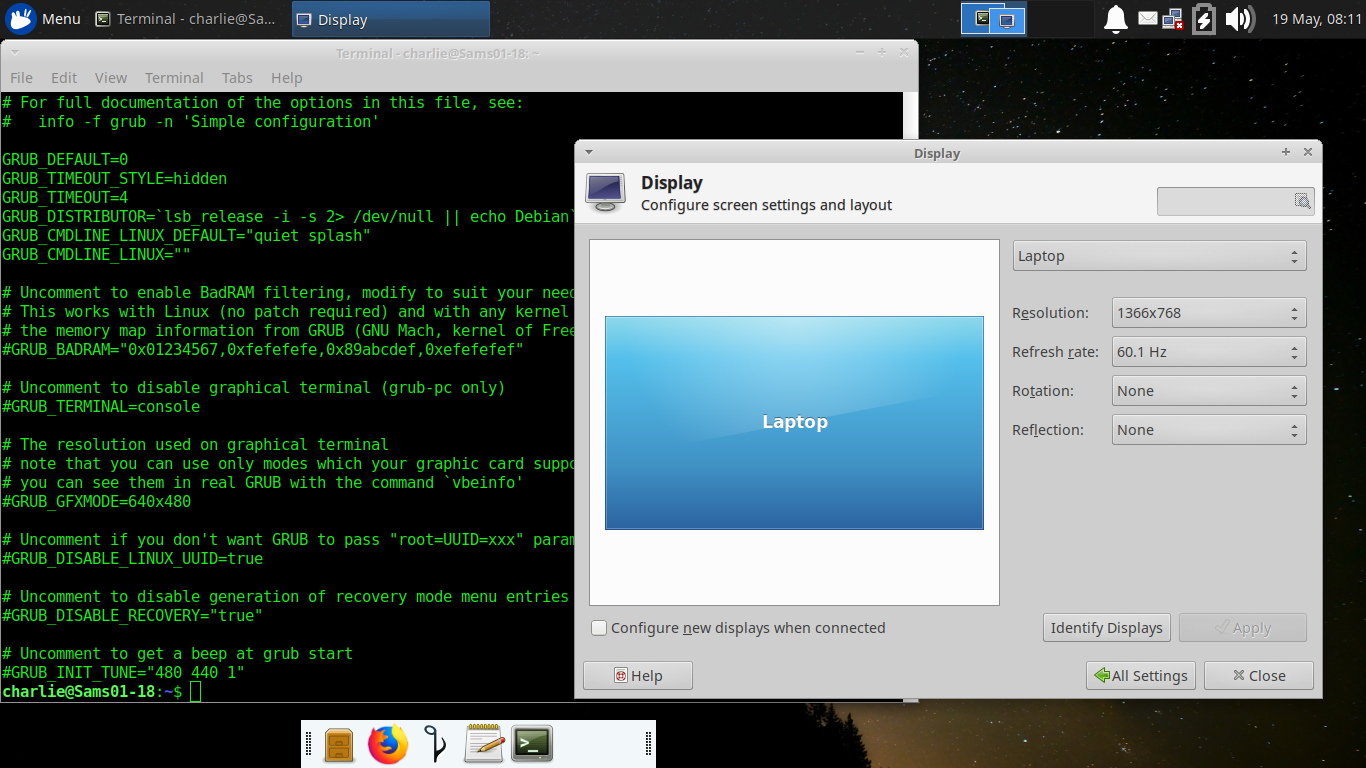
Brian, I think you are over working default/grub, especially on video. I've attached a comparison of my default/grub and Display settings in Xubuntu 18.04. I see that the grub video references 'graphical terminal' and 'VBE' . I suggest you try the default setting for Grub graphics. this might really improve your boot. The bootloader is not a full system and it may not have resources for the massive graphics you are requesting. Have you run 'vbeinfo' in the grub environment? You may be able to do that, though it may not run in grub2 or with EFI. I would review your changes to grub and undo what you have done there to just get the bootloader doing its job. Then you can use Display settings to enhance the GUI on your desktop. Give it a try. Thank you, Ted P. On Sat, May 18, 2019 at 9:13 PM Brian O'Keefe <okeefe@cybermesa.com> wrote:
Hi a,
I finally got around to this and implemented your suggestions. I' including my grub file as it now exists. After implementing the changes my machine shuts down in a reboot but loads only the splash screen and no further. If I boot it as opposes to reboot, I get the newer kernel and the bad graphics. If I choose, manually, the 4.15.0-48 kernel, it boots normally with the proper resolution. Here's my grub file and thanks again!
Brian
# If you change this file, run 'update-grub' afterwards to update # /boot/grub/grub.cfg. # For full documentation of the options in this file, see: # info -f grub -n 'Simple configuration'
#GRUB_DEFAULT="0" GRUB_DEFAULT="Ubuntu, with Linux 4.15.0-48 generic" GRUB_TIMEOUT_STYLE="hidden" GRUB_TIMEOUT="0" GRUB_DISTRIBUTOR="`lsb_release -i -s 2> /dev/null || echo Debian`" GRUB_CMDLINE_LINUX_DEFAULT="quiet splash" GRUB_CMDLINE_LINUX="" GRUB_DISABLE_OS_PROBER=true
# Uncomment to enable BadRAM filtering, modify to suit your needs # This works with Linux (no patch required) and with any kernel that obtains # the memory map information from GRUB (GNU Mach, kernel of FreeBSD ...) #GRUB_BADRAM="0x01234567,0xfefefefe,0x89abcdef,0xefefefef"
# Uncomment to disable graphical terminal (grub-pc only) #GRUB_TERMINAL="console"
# The resolution used on graphical terminal # note that you can use only modes which your graphic card supports via VBE # you can see them in real GRUB with the command `vbeinfo' GRUB_GFXMODE="1366x768"
# Uncomment if you don't want GRUB to pass "root=UUID=xxx" parameter to Linux #GRUB_DISABLE_LINUX_UUID="true"
# Uncomment to disable generation of recovery mode menu entries #GRUB_DISABLE_RECOVERY="true"
# Uncomment to get a beep at grub start GRUB_INIT_TUNE="480 440 1"
On 4/25/19 6:33 PM, Alucard wrote:
Hi Brian,
If you are able to get to a x session (GUI) I would adjust grub with grub-customizer. You can do this from command line, however, it would mean adjusting /etc/grub.d files.
sudo add-apt-repository ppa:danielrichter2007/grub-customizer ; sudo apt update ; sudo apt install grub-customizer ; grub-customizer
https://www.fosslinux.com/4300/how-to-edit-grub-bootloader-and-remove-unwant...
However, I would probably would just tell grub to not display the menu. As long as you're going to manually enter the GRUB_DEFAULT option in /etc/default/grub
I also forgot to tell you to run update-grub after you edit /etc/default/grub
So this is what you should do. sudo cp -p -v /etc/default/grub /etc/default/grub.bak sudo nano /etc/default/grub (Change GRUB_DEFAULT=0 to GRUB_DEFAULT="Ubuntu, with Linux 4.15.0-48 generic" ) (Make sure you include the double quotes, "") (Also add this any where in the same file, just make sure it has it's own line to itself, GRUB_DISABLE_OS_PROBER=true ) (Ctrl + O then Ctrl + X to save and exit) sudo update-grub sudo systemctl reboot
That should force that particular kernel to load on it's own, without a grub menu at boot time.
Jared
On 4/25/19 5:54 PM, Brian O'Keefe wrote:
Many thanks Jared,
I will give this a shot tomorrow. I don't think it will fix the restart issue but perhaps this kernel is magical. I will find out. Any idea why my user name would show up in the Bios boot order? Do you think it's something I could delete safely?
Cheers
Brian On 4/25/19 5:40 PM, Alucard wrote:
Hi Brian,
I think this should work.
sudo cp -p -v /etc/default/grub /etc/default/grub.bak sudo nano /etc/default/grub (Change GRUB_DEFAULT=0 to GRUB_DEFAULT="Ubuntu, with Linux 4.15.0-48 generic" ) (Make sure you include the double quotes, "") (Ctrl + O then Ctrl + X to save and exit) sudo systemctl reboot
See if that will do what you're asking. TBH I'm use to systemd-boot, not grub. It's been a while since I've used grub. If that change broke things, you can move the grub.bak file back to /etc/default/grub
Jared
On 4/25/19 5:18 PM, Brian O'Keefe wrote:
I tried a bunch of fixes but found one that worked! I edited / "etc/default/grub" and manually changed the screen resolution to 1366x768. that may have worked so I shutdown (hard) and booted (after, once again, moving my user name down in the boot order in the Bios) and successfully bringing up the Grub menu. I arbitrarily picked 4.15.0-48 generic and lo and behold Wifi, sound, resolution, xrandr output shows many screen res. options and things seem to be ok, for now. I would like this kernel to be the first choice for booting. I'm sure there is a simple way to do this. can anyone enlighten me? I would really appreciate it but I can also search and I'm sure there is a solution to be found.
Talk about Ghosts in the Shell!!
Thanks for your indulgences! --
_______________________________________________ nmglug mailing listnmglug@lists.nmglug.orghttp://lists.nmglug.org/listinfo.cgi/nmglug-nmglug.org
_______________________________________________ nmglug mailing listnmglug@lists.nmglug.orghttp://lists.nmglug.org/listinfo.cgi/nmglug-nmglug.org
--
_______________________________________________ nmglug mailing listnmglug@lists.nmglug.orghttp://lists.nmglug.org/listinfo.cgi/nmglug-nmglug.org
-- _______________________________________________ nmglug mailing list nmglug@lists.nmglug.org http://lists.nmglug.org/listinfo.cgi/nmglug-nmglug.org
Thanks Ted I made the changes last night Ted, so the default wasn't changed other than the resolution which was a minor increase from the default. If I don't have the display setting as I do and I allow the default settings to boot grub then I end up back where I was; bad resolution, no detecting the display and no option to increase it (in the Displays GUI). There is only one option and it is way too low. Even with the display set as it is in the grub settings, the display is still low and not changeable if I allow the machine to boot with the newest (or any 4.18* kernel). Booting with a 4.15* kernel then allows me to change the resolution with several options, including 1260x768, which is high enough. I added the 1366x768 to see if I could change the res. with a 4.18* kernel and I cannot as the GUI doesn't have any other options for display res. On 5/19/19 8:23 AM, Ted Pomeroy wrote:
Brian, I think you are over working default/grub, especially on video. I've attached a comparison of my default/grub and Display settings in Xubuntu 18.04. I see that the grub video references 'graphical terminal' and 'VBE' . I suggest you try the default setting for Grub graphics. this might really improve your boot. The bootloader is not a full system and it may not have resources for the massive graphics you are requesting. Have you run 'vbeinfo' in the grub environment? You may be able to do that, though it may not run in grub2 or with EFI. I would review your changes to grub and undo what you have done there to just get the bootloader doing its job. Then you can use Display settings to enhance the GUI on your desktop. Give it a try. Thank you, Ted P.
On Sat, May 18, 2019 at 9:13 PM Brian O'Keefe <okeefe@cybermesa.com <mailto:okeefe@cybermesa.com>> wrote:
Hi a,
I finally got around to this and implemented your suggestions. I' including my grub file as it now exists. After implementing the changes my machine shuts down in a reboot but loads only the splash screen and no further. If I boot it as opposes to reboot, I get the newer kernel and the bad graphics. If I choose, manually, the 4.15.0-48 kernel, it boots normally with the proper resolution. Here's my grub file and thanks again!
Brian
# If you change this file, run 'update-grub' afterwards to update # /boot/grub/grub.cfg. # For full documentation of the options in this file, see: # info -f grub -n 'Simple configuration'
#GRUB_DEFAULT="0" GRUB_DEFAULT="Ubuntu, with Linux 4.15.0-48 generic" GRUB_TIMEOUT_STYLE="hidden" GRUB_TIMEOUT="0" GRUB_DISTRIBUTOR="`lsb_release -i -s 2> /dev/null || echo Debian`" GRUB_CMDLINE_LINUX_DEFAULT="quiet splash" GRUB_CMDLINE_LINUX="" GRUB_DISABLE_OS_PROBER=true
# Uncomment to enable BadRAM filtering, modify to suit your needs # This works with Linux (no patch required) and with any kernel that obtains # the memory map information from GRUB (GNU Mach, kernel of FreeBSD ...) #GRUB_BADRAM="0x01234567,0xfefefefe,0x89abcdef,0xefefefef"
# Uncomment to disable graphical terminal (grub-pc only) #GRUB_TERMINAL="console"
# The resolution used on graphical terminal # note that you can use only modes which your graphic card supports via VBE # you can see them in real GRUB with the command `vbeinfo' GRUB_GFXMODE="1366x768"
# Uncomment if you don't want GRUB to pass "root=UUID=xxx" parameter to Linux #GRUB_DISABLE_LINUX_UUID="true"
# Uncomment to disable generation of recovery mode menu entries #GRUB_DISABLE_RECOVERY="true"
# Uncomment to get a beep at grub start GRUB_INIT_TUNE="480 440 1"
On 4/25/19 6:33 PM, Alucard wrote:
Hi Brian,
If you are able to get to a x session (GUI) I would adjust grub with grub-customizer. You can do this from command line, however, it would mean adjusting /etc/grub.d files.
sudo add-apt-repository ppa:danielrichter2007/grub-customizer ; sudo apt update ; sudo apt install grub-customizer ; grub-customizer
https://www.fosslinux.com/4300/how-to-edit-grub-bootloader-and-remove-unwant...
However, I would probably would just tell grub to not display the menu. As long as you're going to manually enter the GRUB_DEFAULT option in /etc/default/grub
I also forgot to tell you to run update-grub after you edit /etc/default/grub
So this is what you should do. sudo cp -p -v /etc/default/grub /etc/default/grub.bak sudo nano /etc/default/grub (Change GRUB_DEFAULT=0 to GRUB_DEFAULT="Ubuntu, with Linux 4.15.0-48 generic" ) (Make sure you include the double quotes, "") (Also add this any where in the same file, just make sure it has it's own line to itself, GRUB_DISABLE_OS_PROBER=true ) (Ctrl + O then Ctrl + X to save and exit) sudo update-grub sudo systemctl reboot
That should force that particular kernel to load on it's own, without a grub menu at boot time.
Jared
On 4/25/19 5:54 PM, Brian O'Keefe wrote:
Many thanks Jared,
I will give this a shot tomorrow. I don't think it will fix the restart issue but perhaps this kernel is magical. I will find out. Any idea why my user name would show up in the Bios boot order? Do you think it's something I could delete safely?
Cheers
Brian
On 4/25/19 5:40 PM, Alucard wrote:
Hi Brian,
I think this should work.
sudo cp -p -v /etc/default/grub /etc/default/grub.bak sudo nano /etc/default/grub (Change GRUB_DEFAULT=0 to GRUB_DEFAULT="Ubuntu, with Linux 4.15.0-48 generic" ) (Make sure you include the double quotes, "") (Ctrl + O then Ctrl + X to save and exit) sudo systemctl reboot
See if that will do what you're asking. TBH I'm use to systemd-boot, not grub. It's been a while since I've used grub. If that change broke things, you can move the grub.bak file back to /etc/default/grub
Jared
On 4/25/19 5:18 PM, Brian O'Keefe wrote:
I tried a bunch of fixes but found one that worked! I edited / "etc/default/grub" and manually changed the screen resolution to 1366x768. that may have worked so I shutdown (hard) and booted (after, once again, moving my user name down in the boot order in the Bios) and successfully bringing up the Grub menu. I arbitrarily picked 4.15.0-48 generic and lo and behold Wifi, sound, resolution, xrandr output shows many screen res. options and things seem to be ok, for now. I would like this kernel to be the first choice for booting. I'm sure there is a simple way to do this. can anyone enlighten me? I would really appreciate it but I can also search and I'm sure there is a solution to be found.
Talk about Ghosts in the Shell!!
Thanks for your indulgences!
--
_______________________________________________ nmglug mailing list nmglug@lists.nmglug.org <mailto:nmglug@lists.nmglug.org> http://lists.nmglug.org/listinfo.cgi/nmglug-nmglug.org
_______________________________________________ nmglug mailing list nmglug@lists.nmglug.org <mailto:nmglug@lists.nmglug.org> http://lists.nmglug.org/listinfo.cgi/nmglug-nmglug.org
--
_______________________________________________ nmglug mailing list nmglug@lists.nmglug.org <mailto:nmglug@lists.nmglug.org> http://lists.nmglug.org/listinfo.cgi/nmglug-nmglug.org
-- _______________________________________________ nmglug mailing list nmglug@lists.nmglug.org <mailto:nmglug@lists.nmglug.org> http://lists.nmglug.org/listinfo.cgi/nmglug-nmglug.org
_______________________________________________ nmglug mailing list nmglug@lists.nmglug.org http://lists.nmglug.org/listinfo.cgi/nmglug-nmglug.org --
Brian, ok, thanks. I think pursuing the graphics firmware and checking out others' experience with that model laptop might help. See you Thursday, it will be good to have broader input on solutions. Thank you, Ted On Mon, May 20, 2019, 8:30 AM Brian O'Keefe <okeefe@cybermesa.com> wrote:
Thanks Ted
I made the changes last night Ted, so the default wasn't changed other than the resolution which was a minor increase from the default. If I don't have the display setting as I do and I allow the default settings to boot grub then I end up back where I was; bad resolution, no detecting the display and no option to increase it (in the Displays GUI). There is only one option and it is way too low. Even with the display set as it is in the grub settings, the display is still low and not changeable if I allow the machine to boot with the newest (or any 4.18* kernel). Booting with a 4.15* kernel then allows me to change the resolution with several options, including 1260x768, which is high enough. I added the 1366x768 to see if I could change the res. with a 4.18* kernel and I cannot as the GUI doesn't have any other options for display res. On 5/19/19 8:23 AM, Ted Pomeroy wrote:
Brian, I think you are over working default/grub, especially on video. I've attached a comparison of my default/grub and Display settings in Xubuntu 18.04. I see that the grub video references 'graphical terminal' and 'VBE' . I suggest you try the default setting for Grub graphics. this might really improve your boot. The bootloader is not a full system and it may not have resources for the massive graphics you are requesting. Have you run 'vbeinfo' in the grub environment? You may be able to do that, though it may not run in grub2 or with EFI. I would review your changes to grub and undo what you have done there to just get the bootloader doing its job. Then you can use Display settings to enhance the GUI on your desktop. Give it a try. Thank you, Ted P.
On Sat, May 18, 2019 at 9:13 PM Brian O'Keefe <okeefe@cybermesa.com> wrote:
Hi a,
I finally got around to this and implemented your suggestions. I' including my grub file as it now exists. After implementing the changes my machine shuts down in a reboot but loads only the splash screen and no further. If I boot it as opposes to reboot, I get the newer kernel and the bad graphics. If I choose, manually, the 4.15.0-48 kernel, it boots normally with the proper resolution. Here's my grub file and thanks again!
Brian
# If you change this file, run 'update-grub' afterwards to update # /boot/grub/grub.cfg. # For full documentation of the options in this file, see: # info -f grub -n 'Simple configuration'
#GRUB_DEFAULT="0" GRUB_DEFAULT="Ubuntu, with Linux 4.15.0-48 generic" GRUB_TIMEOUT_STYLE="hidden" GRUB_TIMEOUT="0" GRUB_DISTRIBUTOR="`lsb_release -i -s 2> /dev/null || echo Debian`" GRUB_CMDLINE_LINUX_DEFAULT="quiet splash" GRUB_CMDLINE_LINUX="" GRUB_DISABLE_OS_PROBER=true
# Uncomment to enable BadRAM filtering, modify to suit your needs # This works with Linux (no patch required) and with any kernel that obtains # the memory map information from GRUB (GNU Mach, kernel of FreeBSD ...) #GRUB_BADRAM="0x01234567,0xfefefefe,0x89abcdef,0xefefefef"
# Uncomment to disable graphical terminal (grub-pc only) #GRUB_TERMINAL="console"
# The resolution used on graphical terminal # note that you can use only modes which your graphic card supports via VBE # you can see them in real GRUB with the command `vbeinfo' GRUB_GFXMODE="1366x768"
# Uncomment if you don't want GRUB to pass "root=UUID=xxx" parameter to Linux #GRUB_DISABLE_LINUX_UUID="true"
# Uncomment to disable generation of recovery mode menu entries #GRUB_DISABLE_RECOVERY="true"
# Uncomment to get a beep at grub start GRUB_INIT_TUNE="480 440 1"
On 4/25/19 6:33 PM, Alucard wrote:
Hi Brian,
If you are able to get to a x session (GUI) I would adjust grub with grub-customizer. You can do this from command line, however, it would mean adjusting /etc/grub.d files.
sudo add-apt-repository ppa:danielrichter2007/grub-customizer ; sudo apt update ; sudo apt install grub-customizer ; grub-customizer
https://www.fosslinux.com/4300/how-to-edit-grub-bootloader-and-remove-unwant...
However, I would probably would just tell grub to not display the menu. As long as you're going to manually enter the GRUB_DEFAULT option in /etc/default/grub
I also forgot to tell you to run update-grub after you edit /etc/default/grub
So this is what you should do. sudo cp -p -v /etc/default/grub /etc/default/grub.bak sudo nano /etc/default/grub (Change GRUB_DEFAULT=0 to GRUB_DEFAULT="Ubuntu, with Linux 4.15.0-48 generic" ) (Make sure you include the double quotes, "") (Also add this any where in the same file, just make sure it has it's own line to itself, GRUB_DISABLE_OS_PROBER=true ) (Ctrl + O then Ctrl + X to save and exit) sudo update-grub sudo systemctl reboot
That should force that particular kernel to load on it's own, without a grub menu at boot time.
Jared
On 4/25/19 5:54 PM, Brian O'Keefe wrote:
Many thanks Jared,
I will give this a shot tomorrow. I don't think it will fix the restart issue but perhaps this kernel is magical. I will find out. Any idea why my user name would show up in the Bios boot order? Do you think it's something I could delete safely?
Cheers
Brian On 4/25/19 5:40 PM, Alucard wrote:
Hi Brian,
I think this should work.
sudo cp -p -v /etc/default/grub /etc/default/grub.bak sudo nano /etc/default/grub (Change GRUB_DEFAULT=0 to GRUB_DEFAULT="Ubuntu, with Linux 4.15.0-48 generic" ) (Make sure you include the double quotes, "") (Ctrl + O then Ctrl + X to save and exit) sudo systemctl reboot
See if that will do what you're asking. TBH I'm use to systemd-boot, not grub. It's been a while since I've used grub. If that change broke things, you can move the grub.bak file back to /etc/default/grub
Jared
On 4/25/19 5:18 PM, Brian O'Keefe wrote:
I tried a bunch of fixes but found one that worked! I edited / "etc/default/grub" and manually changed the screen resolution to 1366x768. that may have worked so I shutdown (hard) and booted (after, once again, moving my user name down in the boot order in the Bios) and successfully bringing up the Grub menu. I arbitrarily picked 4.15.0-48 generic and lo and behold Wifi, sound, resolution, xrandr output shows many screen res. options and things seem to be ok, for now. I would like this kernel to be the first choice for booting. I'm sure there is a simple way to do this. can anyone enlighten me? I would really appreciate it but I can also search and I'm sure there is a solution to be found.
Talk about Ghosts in the Shell!!
Thanks for your indulgences! --
_______________________________________________ nmglug mailing listnmglug@lists.nmglug.orghttp://lists.nmglug.org/listinfo.cgi/nmglug-nmglug.org
_______________________________________________ nmglug mailing listnmglug@lists.nmglug.orghttp://lists.nmglug.org/listinfo.cgi/nmglug-nmglug.org
--
_______________________________________________ nmglug mailing listnmglug@lists.nmglug.orghttp://lists.nmglug.org/listinfo.cgi/nmglug-nmglug.org
-- _______________________________________________ nmglug mailing list nmglug@lists.nmglug.org http://lists.nmglug.org/listinfo.cgi/nmglug-nmglug.org
_______________________________________________ nmglug mailing listnmglug@lists.nmglug.orghttp://lists.nmglug.org/listinfo.cgi/nmglug-nmglug.org
-- _______________________________________________ nmglug mailing list nmglug@lists.nmglug.org http://lists.nmglug.org/listinfo.cgi/nmglug-nmglug.org
I'm including my last email on this Grub problem (I think that's what it is). The problem exists still. I did find a syntax error that I thought might be the issue. I had this in the config file: GRUB_DEFAULT="Ubuntu, with Linux 4.15.0-48 generic" I was searching the how-tos, etc and the correct syntax has a dash and not a space between "48 generic" so "48-generic". I also changed 48 to 55, the last and most current of the 4.15s. Didn't change though it does allow a reboot, just doesn't reboot into anything but the splash screen. Booting on it's own boots a 4.18.x kernel with the improper and not reconfigurable resolution. So really just an update. Paz Brian -------- Forwarded Message -------- Subject: Re: [nmglug] RE weirder Date: Sat, 18 May 2019 21:12:59 -0600 From: Brian O'Keefe <okeefe@cybermesa.com> To: nmglug@lists.nmglug.org Hi a, I finally got around to this and implemented your suggestions. I' including my grub file as it now exists. After implementing the changes my machine shuts down in a reboot but loads only the splash screen and no further. If I boot it as opposes to reboot, I get the newer kernel and the bad graphics. If I choose, manually, the 4.15.0-48 kernel, it boots normally with the proper resolution. Here's my grub file and thanks again! Brian # If you change this file, run 'update-grub' afterwards to update # /boot/grub/grub.cfg. # For full documentation of the options in this file, see: # info -f grub -n 'Simple configuration' #GRUB_DEFAULT="0" GRUB_DEFAULT="Ubuntu, with Linux 4.15.0-48 generic" GRUB_TIMEOUT_STYLE="hidden" GRUB_TIMEOUT="0" GRUB_DISTRIBUTOR="`lsb_release -i -s 2> /dev/null || echo Debian`" GRUB_CMDLINE_LINUX_DEFAULT="quiet splash" GRUB_CMDLINE_LINUX="" GRUB_DISABLE_OS_PROBER=true # Uncomment to enable BadRAM filtering, modify to suit your needs # This works with Linux (no patch required) and with any kernel that obtains # the memory map information from GRUB (GNU Mach, kernel of FreeBSD ...) #GRUB_BADRAM="0x01234567,0xfefefefe,0x89abcdef,0xefefefef" # Uncomment to disable graphical terminal (grub-pc only) #GRUB_TERMINAL="console" # The resolution used on graphical terminal # note that you can use only modes which your graphic card supports via VBE # you can see them in real GRUB with the command `vbeinfo' GRUB_GFXMODE="1366x768" # Uncomment if you don't want GRUB to pass "root=UUID=xxx" parameter to Linux #GRUB_DISABLE_LINUX_UUID="true" # Uncomment to disable generation of recovery mode menu entries #GRUB_DISABLE_RECOVERY="true" # Uncomment to get a beep at grub start GRUB_INIT_TUNE="480 440 1" On 4/25/19 6:33 PM, Alucard wrote:
Hi Brian,
If you are able to get to a x session (GUI) I would adjust grub with grub-customizer. You can do this from command line, however, it would mean adjusting /etc/grub.d files.
sudo add-apt-repository ppa:danielrichter2007/grub-customizer ; sudo apt update ; sudo apt install grub-customizer ; grub-customizer
https://www.fosslinux.com/4300/how-to-edit-grub-bootloader-and-remove-unwant...
However, I would probably would just tell grub to not display the menu. As long as you're going to manually enter the GRUB_DEFAULT option in /etc/default/grub
I also forgot to tell you to run update-grub after you edit /etc/default/grub
So this is what you should do. sudo cp -p -v /etc/default/grub /etc/default/grub.bak sudo nano /etc/default/grub (Change GRUB_DEFAULT=0 to GRUB_DEFAULT="Ubuntu, with Linux 4.15.0-48 generic" ) (Make sure you include the double quotes, "") (Also add this any where in the same file, just make sure it has it's own line to itself, GRUB_DISABLE_OS_PROBER=true ) (Ctrl + O then Ctrl + X to save and exit) sudo update-grub sudo systemctl reboot
That should force that particular kernel to load on it's own, without a grub menu at boot time.
Jared
On 4/25/19 5:54 PM, Brian O'Keefe wrote:
Many thanks Jared,
I will give this a shot tomorrow. I don't think it will fix the restart issue but perhaps this kernel is magical. I will find out. Any idea why my user name would show up in the Bios boot order? Do you think it's something I could delete safely?
Cheers
Brian
On 4/25/19 5:40 PM, Alucard wrote:
Hi Brian,
I think this should work.
sudo cp -p -v /etc/default/grub /etc/default/grub.bak sudo nano /etc/default/grub (Change GRUB_DEFAULT=0 to GRUB_DEFAULT="Ubuntu, with Linux 4.15.0-48 generic" ) (Make sure you include the double quotes, "") (Ctrl + O then Ctrl + X to save and exit) sudo systemctl reboot
See if that will do what you're asking. TBH I'm use to systemd-boot, not grub. It's been a while since I've used grub. If that change broke things, you can move the grub.bak file back to /etc/default/grub
Jared
On 4/25/19 5:18 PM, Brian O'Keefe wrote:
I tried a bunch of fixes but found one that worked! I edited / "etc/default/grub" and manually changed the screen resolution to 1366x768. that may have worked so I shutdown (hard) and booted (after, once again, moving my user name down in the boot order in the Bios) and successfully bringing up the Grub menu. I arbitrarily picked 4.15.0-48 generic and lo and behold Wifi, sound, resolution, xrandr output shows many screen res. options and things seem to be ok, for now. I would like this kernel to be the first choice for booting. I'm sure there is a simple way to do this. can anyone enlighten me? I would really appreciate it but I can also search and I'm sure there is a solution to be found.
Talk about Ghosts in the Shell!!
Thanks for your indulgences!
--
_______________________________________________ nmglug mailing list nmglug@lists.nmglug.org http://lists.nmglug.org/listinfo.cgi/nmglug-nmglug.org
_______________________________________________ nmglug mailing list nmglug@lists.nmglug.org http://lists.nmglug.org/listinfo.cgi/nmglug-nmglug.org --
_______________________________________________ nmglug mailing list nmglug@lists.nmglug.org http://lists.nmglug.org/listinfo.cgi/nmglug-nmglug.org --
participants (3)
-
 Alucard
 -
 Brian O'Keefe
 -
 Ted Pomeroy