
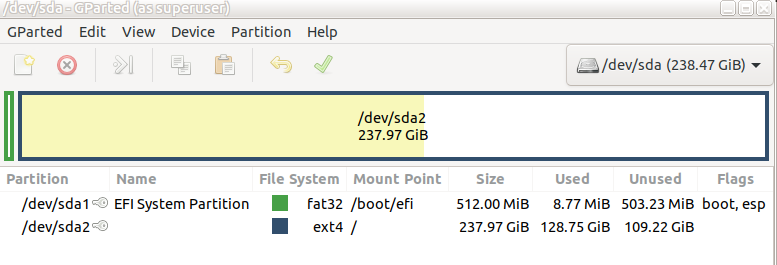
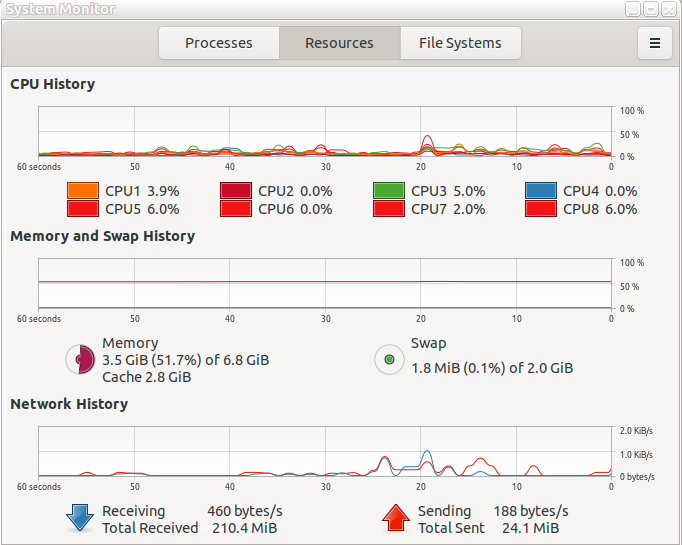
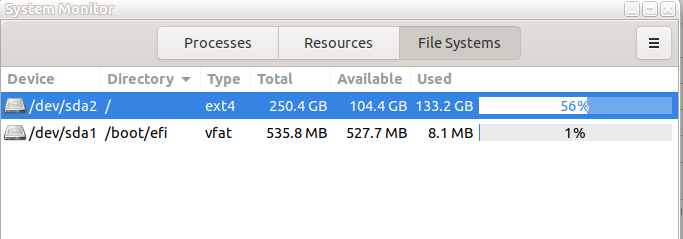
Thanks again Ted, I looked for /boot/efi and there is a directory with many files. Below is how I got there. In the screenshot you can see Swap is using very little memory when I use my machine normally. The second screenshot shows the directory /etc/boot on the disk /de/sda1 and the linux file system on /dev/sda2. gparted has only two partitions (see below from gparted). So the question begs how swap memory is an issue at all? Here's the output of my digging for swap and not finding it in the directory as shown below, /etc/boot. I also found an ubuntu directory and listed the files. Again other than grub the results are Greek to me! :/boot/efi/EFI# ls BOOT ubuntu root@brian-VivoBook-ASUS-Laptop-X505ZA-F505ZA:/boot/efi/EFI# cd ubuntu root@brian-VivoBook-ASUS-Laptop-X505ZA-F505ZA:/boot/efi/EFI/ubuntu# ls BOOTX64.CSV grub.cfg grubx64.efi mmx64.efi shimx64.efi I am loathe to increase the swap memory when it doesn't appear to be a problem according to System Monitor. Anyway, here are my search results to find /etc/boot. /home/brian# cd /boot root@brian:/boot# ls config-5.3.0-55-generic memtest86+.elf config-5.4.0-33-generic memtest86+_multiboot.bin efi System.map-5.3.0-55-generic grub System.map-5.4.0-33-generic initrd.img vmlinuz initrd.img-5.3.0-55-generic vmlinuz-5.3.0-55-generic initrd.img-5.4.0-33-generic vmlinuz-5.4.0-33-generic initrd.img.old vmlinuz.old memtest86+.bin root@brian:/boot# cd efi root@brian:/boot/efi# ls EFI root@brian:/boot/efi# cd EFI root@brian:/boot/efi/EFI# ls BOOT ubuntu root@brian:/boot/efi/EFI# cd BOOT root@brian:/boot/efi/EFI/BOOT# ls BOOTX64.EFI fbx64.efi mmx64.efi root@brian:/boot/efi/EFI/BOOT# cd /boot/efi/EFI root@brian:/boot/efi/EFI# ls BOOT ubuntu root@brian:/boot/efi/EFI# cd ubuntu root@brian:/boot/efi/EFI/ubuntu# ls BOOTX64.CSV grub.cfg grubx64.efi mmx64.efi shimx64.efi Again, many thanks. Brian PS: this is not a serious issue as I can do a hard shutdown and boot up again. Next time I'm hopefully going to be doing nothing important and I can just walk away and see if the machine un-freezes. I'll let you know if I go that route and the results. On 6/7/20 7:55 AM, Ted Pomeroy wrote:
Brian, Right, looks like you did a fresh install of 20.04 and the default in Ubuntu is now a swap file, not a partition. So... you could give a try at the method of increasing swap as described in your first email in this thread. the series of commands basically disconnects swap, then you blank some desire amount of free space, then designate this as the swap directory and enable it. Let us know how it works out. Thank you, Ted P.
On Sat, Jun 6, 2020 at 10:18 PM Brian O'Keefe <okeefe@cybermesa.com <mailto:okeefe@cybermesa.com>> wrote:
One observation that just came to me is the issue again copied below is relating to increasing swap is as a partition in 20.04 but as you can see I do not have a swap partition but I have a 2GB something...file? Also a couple of screenshots from system monitor. It seems that swap has plenty of memory, at least as I run four applications open and hidden process. Maybe they are of some help?
Thanks
Brian
0
yes Ubuntu 20.04 hangs freeze although I have 8 GB of Ram and i7
I could temporary fix this issue in my side, by expanding swap partition from 2 GB to 16 GB
I am not sure but I think there is problem in Ubuntu 20.04 memory management, here in my side it keep consuming memory, then when both memory and swap are full, the computer start to freeze and hang
the solution steps are:
1- check the amount of swap you have
|grep SwapTotal /proc/meminfo |
2-turn off the swap process
|sudo swapoff -a |
3-resize the swap(in my case i expand it to 16 gb)
|sudo dd if=/dev/zero of=/swapfile bs=1G count=16 |
4- attach the swap to partition
|sudo mkswap /swapfile |
5- activate swap(enable it)
|sudo swapon /swapfile |
6- see the new swap size
|grep SwapTotal /proc/meminfo |
done
-- _______________________________________________ nmglug mailing list nmglug@lists.nmglug.org <mailto:nmglug@lists.nmglug.org> http://lists.nmglug.org/listinfo.cgi/nmglug-nmglug.org
_______________________________________________ nmglug mailing list nmglug@lists.nmglug.org <mailto:nmglug@lists.nmglug.org> http://lists.nmglug.org/listinfo.cgi/nmglug-nmglug.org
--
_______________________________________________ nmglug mailing list nmglug@lists.nmglug.org <mailto:nmglug@lists.nmglug.org> http://lists.nmglug.org/listinfo.cgi/nmglug-nmglug.org --
--


Brian O'Keefe writes:
I am loathe to increase the swap memory when it doesn't appear to be a problem according to System Monitor.
This. I've seen a lot of discussion about swap, but if there was any evidence that swap was the problem, I missed it. If adding swap is going to be this hard, maybe put the effort instead into diagnosing why the system is freezing? For instance, do you know if it's X or the kernel that's freezing? It would be interesting to try to ssh in from another machine, to see if maybe the machine is up but X is locked. Diagnosing a freeze isn't all that easy, because of course if the kernel is hung, then the system has no way to note what went wrong. But sometimes you can find out what was happening just before it froze. Here's a Google search that gives some starting points: https://www.google.com/search?client=ubuntu&channel=fs&q=diagnose+why+linux+... ...Akkana
Thanks Akkana Yeah, can't check much when frozen. I've looked at dmesg but too much in there that I don't understand. I'll come running for help if this gets worse. It's usually only every couple of days. I do put the machine to sleep a lot. Maybe I need to shut down daily or some such, Best Brian On 6/7/20 11:07 AM, Akkana Peck wrote:
Brian O'Keefe writes:
I am loathe to increase the swap memory when it doesn't appear to be a problem according to System Monitor.
This. I've seen a lot of discussion about swap, but if there was any evidence that swap was the problem, I missed it. If adding swap is going to be this hard, maybe put the effort instead into diagnosing why the system is freezing?
For instance, do you know if it's X or the kernel that's freezing? It would be interesting to try to ssh in from another machine, to see if maybe the machine is up but X is locked.
Diagnosing a freeze isn't all that easy, because of course if the kernel is hung, then the system has no way to note what went wrong. But sometimes you can find out what was happening just before it froze. Here's a Google search that gives some starting points:
https://www.google.com/search?client=ubuntu&channel=fs&q=diagnose+why+linux+...
...Akkana _______________________________________________ nmglug mailing list nmglug@lists.nmglug.org http://lists.nmglug.org/listinfo.cgi/nmglug-nmglug.org
--


I agree with Akkana.. look for the cause, If your system froze, try running the journalctl command (there's lots of data in that). You can filter the data in many ways so as not to get overwhelmed. For example: To view the kernel logs (which might have clues to a crash or hang) journalctl -rk the (-r) will print the log in reverse order (meaning newest logs show up first) the (-k) will only show logs for the kernel (you can choose many different logs to display with other options) You can scroll down through the logs or type the colon (shift+;) and q to quit the log. Here is a link for helpful journalctl commands: https://www.thegeekdiary.com/6-useful-journalctl-command-examples-in-centos-... I tried it on my ubuntu20.04 and I did not have to use sudo to run the 'journalctl' commands. Usually if a process hung it will be recorded in the kernel logs and that give a path to follow. Also, has this happened multiple times prior to the swap update? or did occur only once? On 6/7/20 11:29 AM, Brian O'Keefe wrote:
Thanks Akkana
Yeah, can't check much when frozen. I've looked at dmesg but too much in there that I don't understand. I'll come running for help if this gets worse. It's usually only every couple of days. I do put the machine to sleep a lot. Maybe I need to shut down daily or some such,
Best
Brian
On 6/7/20 11:07 AM, Akkana Peck wrote:
Brian O'Keefe writes:
I am loathe to increase the swap memory when it doesn't appear to be a problem according to System Monitor.
This. I've seen a lot of discussion about swap, but if there was any evidence that swap was the problem, I missed it. If adding swap is going to be this hard, maybe put the effort instead into diagnosing why the system is freezing?
For instance, do you know if it's X or the kernel that's freezing? It would be interesting to try to ssh in from another machine, to see if maybe the machine is up but X is locked.
Diagnosing a freeze isn't all that easy, because of course if the kernel is hung, then the system has no way to note what went wrong. But sometimes you can find out what was happening just before it froze. Here's a Google search that gives some starting points:
https://www.google.com/search?client=ubuntu&channel=fs&q=diagnose+why+linux+...
...Akkana _______________________________________________ nmglug mailing list nmglug@lists.nmglug.org http://lists.nmglug.org/listinfo.cgi/nmglug-nmglug.org
--
_______________________________________________ nmglug mailing list nmglug@lists.nmglug.org http://lists.nmglug.org/listinfo.cgi/nmglug-nmglug.org

Thanks for the info Leopoldo. I ran the command and there is a lot of info! I didn't update swap but I did notice in the log that swap was increased to the 2+GB so that doesn't seem an issue. I did find many lines errors but they seem ubiquitous as the machine powers up. I only found one line in yesterday's log that was a kill command. Perhaps that's my doing a hard shutdown. Anyway, too much in the logs for me. Perhaps when we can meet physically again I can get some help looking at the logs and figure it out. Fortunately I pretty much stick to simple apps these days (of retirement) and so I don't get in trouble when the machine hangs. Muchas Gracias Brian On 6/7/20 11:49 PM, Leopoldo Macias wrote:
I agree with Akkana.. look for the cause,
If your system froze, try running the journalctl command (there's lots of data in that). You can filter the data in many ways so as not to get overwhelmed. For example:
To view the kernel logs (which might have clues to a crash or hang) journalctl -rk
the (-r) will print the log in reverse order (meaning newest logs show up first)
the (-k) will only show logs for the kernel (you can choose many different logs to display with other options)
You can scroll down through the logs or type the colon (shift+;) and q to quit the log.
Here is a link for helpful journalctl commands:
https://www.thegeekdiary.com/6-useful-journalctl-command-examples-in-centos-...
I tried it on my ubuntu20.04 and I did not have to use sudo to run the 'journalctl' commands.
Usually if a process hung it will be recorded in the kernel logs and that give a path to follow. Also, has this happened multiple times prior to the swap update? or did occur only once?
On 6/7/20 11:29 AM, Brian O'Keefe wrote:
Thanks Akkana
Yeah, can't check much when frozen. I've looked at dmesg but too much in there that I don't understand. I'll come running for help if this gets worse. It's usually only every couple of days. I do put the machine to sleep a lot. Maybe I need to shut down daily or some such,
Best
Brian
On 6/7/20 11:07 AM, Akkana Peck wrote:
Brian O'Keefe writes:
I am loathe to increase the swap memory when it doesn't appear to be a problem according to System Monitor.
This. I've seen a lot of discussion about swap, but if there was any evidence that swap was the problem, I missed it. If adding swap is going to be this hard, maybe put the effort instead into diagnosing why the system is freezing?
For instance, do you know if it's X or the kernel that's freezing? It would be interesting to try to ssh in from another machine, to see if maybe the machine is up but X is locked.
Diagnosing a freeze isn't all that easy, because of course if the kernel is hung, then the system has no way to note what went wrong. But sometimes you can find out what was happening just before it froze. Here's a Google search that gives some starting points:
https://www.google.com/search?client=ubuntu&channel=fs&q=diagnose+why+linux+...
...Akkana _______________________________________________ nmglug mailing list nmglug@lists.nmglug.org http://lists.nmglug.org/listinfo.cgi/nmglug-nmglug.org
--
_______________________________________________ nmglug mailing list nmglug@lists.nmglug.org http://lists.nmglug.org/listinfo.cgi/nmglug-nmglug.org
_______________________________________________ nmglug mailing list nmglug@lists.nmglug.org http://lists.nmglug.org/listinfo.cgi/nmglug-nmglug.org
--

Brian, Sounds like a plan. Until we meet, try to jot down when (and if) you laptop hangs again. It will help in troubleshooting if it turns out to be a chronic issue and if there's a pattern to when the laptop hangs (it could lead us to cron jobs if it's a consistent pattern). If there's not a pattern, then we can look at hardware logs. On 6/10/20 9:37 AM, Brian O'Keefe wrote:
Thanks for the info Leopoldo. I ran the command and there is a lot of info! I didn't update swap but I did notice in the log that swap was increased to the 2+GB so that doesn't seem an issue. I did find many lines errors but they seem ubiquitous as the machine powers up. I only found one line in yesterday's log that was a kill command. Perhaps that's my doing a hard shutdown.
Anyway, too much in the logs for me. Perhaps when we can meet physically again I can get some help looking at the logs and figure it out. Fortunately I pretty much stick to simple apps these days (of retirement) and so I don't get in trouble when the machine hangs.
Muchas Gracias
Brian
On 6/7/20 11:49 PM, Leopoldo Macias wrote:
I agree with Akkana.. look for the cause,
If your system froze, try running the journalctl command (there's lots of data in that). You can filter the data in many ways so as not to get overwhelmed. For example:
To view the kernel logs (which might have clues to a crash or hang) journalctl -rk
the (-r) will print the log in reverse order (meaning newest logs show up first)
the (-k) will only show logs for the kernel (you can choose many different logs to display with other options)
You can scroll down through the logs or type the colon (shift+;) and q to quit the log.
Here is a link for helpful journalctl commands:
https://www.thegeekdiary.com/6-useful-journalctl-command-examples-in-centos-...
I tried it on my ubuntu20.04 and I did not have to use sudo to run the 'journalctl' commands.
Usually if a process hung it will be recorded in the kernel logs and that give a path to follow. Also, has this happened multiple times prior to the swap update? or did occur only once?
On 6/7/20 11:29 AM, Brian O'Keefe wrote:
Thanks Akkana
Yeah, can't check much when frozen. I've looked at dmesg but too much in there that I don't understand. I'll come running for help if this gets worse. It's usually only every couple of days. I do put the machine to sleep a lot. Maybe I need to shut down daily or some such,
Best
Brian
On 6/7/20 11:07 AM, Akkana Peck wrote:
Brian O'Keefe writes:
I am loathe to increase the swap memory when it doesn't appear to be a problem according to System Monitor.
This. I've seen a lot of discussion about swap, but if there was any evidence that swap was the problem, I missed it. If adding swap is going to be this hard, maybe put the effort instead into diagnosing why the system is freezing?
For instance, do you know if it's X or the kernel that's freezing? It would be interesting to try to ssh in from another machine, to see if maybe the machine is up but X is locked.
Diagnosing a freeze isn't all that easy, because of course if the kernel is hung, then the system has no way to note what went wrong. But sometimes you can find out what was happening just before it froze. Here's a Google search that gives some starting points:
https://www.google.com/search?client=ubuntu&channel=fs&q=diagnose+why+linux+...
...Akkana _______________________________________________ nmglug mailing list nmglug@lists.nmglug.org http://lists.nmglug.org/listinfo.cgi/nmglug-nmglug.org
--
_______________________________________________ nmglug mailing list nmglug@lists.nmglug.org http://lists.nmglug.org/listinfo.cgi/nmglug-nmglug.org
_______________________________________________ nmglug mailing list nmglug@lists.nmglug.org http://lists.nmglug.org/listinfo.cgi/nmglug-nmglug.org
--
_______________________________________________ nmglug mailing list nmglug@lists.nmglug.org http://lists.nmglug.org/listinfo.cgi/nmglug-nmglug.org

Thanks Leopoldo. Hope we can gather before too long. I will keep a written journal of any freezes. Brian On 6/10/20 9:53 AM, Leopoldo Macias wrote:
Brian,
Sounds like a plan. Until we meet, try to jot down when (and if) you laptop hangs again. It will help in troubleshooting if it turns out to be a chronic issue and if there's a pattern to when the laptop hangs (it could lead us to cron jobs if it's a consistent pattern). If there's not a pattern, then we can look at hardware logs.
On 6/10/20 9:37 AM, Brian O'Keefe wrote:
Thanks for the info Leopoldo. I ran the command and there is a lot of info! I didn't update swap but I did notice in the log that swap was increased to the 2+GB so that doesn't seem an issue. I did find many lines errors but they seem ubiquitous as the machine powers up. I only found one line in yesterday's log that was a kill command. Perhaps that's my doing a hard shutdown.
Anyway, too much in the logs for me. Perhaps when we can meet physically again I can get some help looking at the logs and figure it out. Fortunately I pretty much stick to simple apps these days (of retirement) and so I don't get in trouble when the machine hangs.
Muchas Gracias
Brian
On 6/7/20 11:49 PM, Leopoldo Macias wrote:
I agree with Akkana.. look for the cause,
If your system froze, try running the journalctl command (there's lots of data in that). You can filter the data in many ways so as not to get overwhelmed. For example:
To view the kernel logs (which might have clues to a crash or hang) journalctl -rk
the (-r) will print the log in reverse order (meaning newest logs show up first)
the (-k) will only show logs for the kernel (you can choose many different logs to display with other options)
You can scroll down through the logs or type the colon (shift+;) and q to quit the log.
Here is a link for helpful journalctl commands:
https://www.thegeekdiary.com/6-useful-journalctl-command-examples-in-centos-...
I tried it on my ubuntu20.04 and I did not have to use sudo to run the 'journalctl' commands.
Usually if a process hung it will be recorded in the kernel logs and that give a path to follow. Also, has this happened multiple times prior to the swap update? or did occur only once?
On 6/7/20 11:29 AM, Brian O'Keefe wrote:
Thanks Akkana
Yeah, can't check much when frozen. I've looked at dmesg but too much in there that I don't understand. I'll come running for help if this gets worse. It's usually only every couple of days. I do put the machine to sleep a lot. Maybe I need to shut down daily or some such,
Best
Brian
On 6/7/20 11:07 AM, Akkana Peck wrote:
Brian O'Keefe writes:
I am loathe to increase the swap memory when it doesn't appear to be a problem according to System Monitor.
This. I've seen a lot of discussion about swap, but if there was any evidence that swap was the problem, I missed it. If adding swap is going to be this hard, maybe put the effort instead into diagnosing why the system is freezing?
For instance, do you know if it's X or the kernel that's freezing? It would be interesting to try to ssh in from another machine, to see if maybe the machine is up but X is locked.
Diagnosing a freeze isn't all that easy, because of course if the kernel is hung, then the system has no way to note what went wrong. But sometimes you can find out what was happening just before it froze. Here's a Google search that gives some starting points:
https://www.google.com/search?client=ubuntu&channel=fs&q=diagnose+why+linux+...
...Akkana _______________________________________________ nmglug mailing list nmglug@lists.nmglug.org http://lists.nmglug.org/listinfo.cgi/nmglug-nmglug.org
--
_______________________________________________ nmglug mailing list nmglug@lists.nmglug.org http://lists.nmglug.org/listinfo.cgi/nmglug-nmglug.org
_______________________________________________ nmglug mailing list nmglug@lists.nmglug.org http://lists.nmglug.org/listinfo.cgi/nmglug-nmglug.org
--
_______________________________________________ nmglug mailing list nmglug@lists.nmglug.org http://lists.nmglug.org/listinfo.cgi/nmglug-nmglug.org
_______________________________________________ nmglug mailing list nmglug@lists.nmglug.org http://lists.nmglug.org/listinfo.cgi/nmglug-nmglug.org
--

participants (3)
-
 Akkana Peck
 -
 Brian O'Keefe
 -
 Leopoldo Macias